
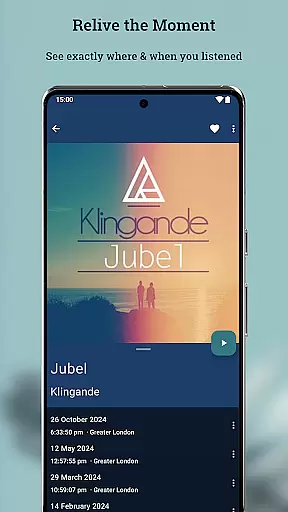
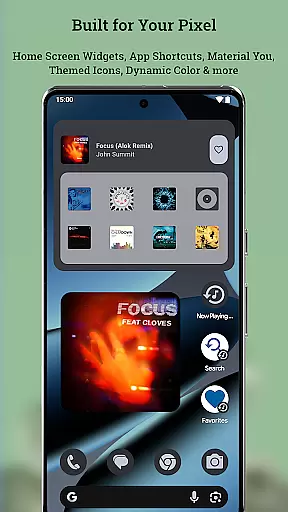
Now Playing History for Pixel is a powerful companion app designed to enhance your Google Pixel's "Now Playing" feature. This innovative application automatically captures and saves every song your phone identifies, creating a permanent and searchable archive of your life's soundtrack. With large detailed album art, the app not only preserves your music memories but also allows you to relive them anytime.
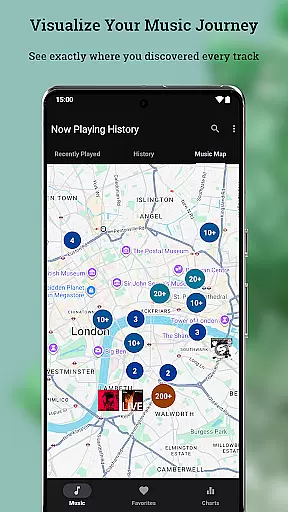
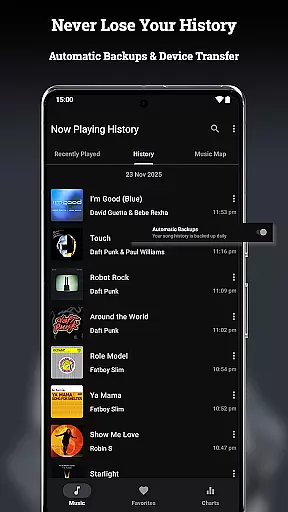
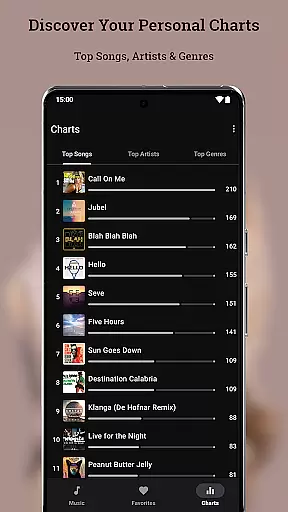
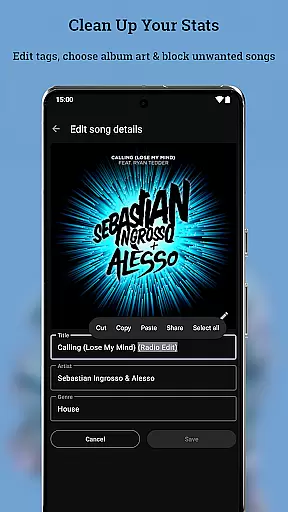
The app offers robust backup and restore functionality, ensuring that your music history is never lost, even when switching devices. It includes unique features like the Music Map, which lets you see where you were when you heard specific songs, and Personal Charts that provide insights into your top artists and songs. The Metadata & Album Art Editor empowers users to correct any misidentified tracks and customize album art selections.
Designed with privacy in mind, Now Playing History ensures that all your data stays on your device unless you choose to share it. The app runs efficiently with minimal battery usage and provides a seamless experience through optimized performance and integration with Pixel features such as Dynamic Theming and Home Screen Widgets.
Now Playing History for Pixel stands out with its comprehensive set of features tailored for music enthusiasts. One of its core functionalities is the automatic capture and storage of every song detected by the "Now Playing" feature, allowing users to build an extensive personal music diary over time.
A key highlight is the ability to visualize your music journey through the Music Map. This feature displays the geographical locations where you discovered different tracks, adding a new dimension to how you interact with your music history. Additionally, the app provides detailed personal charts, giving insights into your listening habits by showcasing top songs, artists, and genres.
For those who value control and accuracy, the Metadata & Album Art Editor allows for easy corrections and customizations. Users can edit song details and select from multiple album art options. The app also supports optional location tracking for enhanced mapping capabilities and offers advanced features like powerful search functions, favorites lists, and duplicate detection to keep your music archive organized and meaningful.
Now Playing History for Pixel offers an extensive music library that captures every song your device detects through Google's 'Now Playing' feature. This creates a personalized and ever-growing archive of your listening history.
The app ensures copyright authenticity by directly logging tracks identified by Google's own music recognition system. This means all entries in your music diary are verified and legitimate, providing peace of mind regarding content legality.
Users benefit from having a detailed record of their musical journey, complete with accurate metadata and high-quality album art. The ability to edit song information further enhances the reliability of the music library.
This application transforms the way users interact with their music history, offering a unique blend of automated tracking and manual curation while maintaining strict adherence to copyright standards.
While Now Playing History doesn't directly affect audio quality, it enhances the listening experience through its comprehensive tracking system. The app maintains detailed records of each detected song, including multiple album art options for visual quality.
Users can enjoy various quality-of-life features such as metadata editing and album art selection. These tools allow for personalization of the music tracking experience without compromising audio integrity.
The application runs efficiently in the background with minimal impact on device performance. Its optimized design ensures less than 1% battery usage while maintaining fast response times and instant loading of music history.
By focusing on accuracy and efficiency, Now Playing History provides a reliable solution for music enthusiasts who want to maintain high standards in their personal music archives without affecting actual audio playback quality.
User-friendly interface
Comprehensive music tracking
Robust backup system
Privacy-focused design
Seamless Pixel integration
Limited to Pixel devices
No pre-existing history import
Dependent on "Now Playing"
Optional features need permissions
Not optimized for tablets

Time Guru will strengthen your internal sense of musical time via random muting.
 4.30
4.30
DJ Music Mixer - DJ Remix: remix songs, make beat music & record mix of DJ.
4.40
Walkout Song DJ is the most intuitive app to manage your sports music.
4.70
Guzheng Master supports many playing techniques as an acoustic Guzheng
4.50
The best music and audio player, with beautiful UI, music search and equalizer.
4.60
Record, Mix & Master with all n-Track effects, 64-bit audio and Stem Separation.
4.70
Smart piano keyboard, Classical to Pop, Real-time multiplayer connection!
4.20
Offline Music Player&MP3 Player with themes, equalizer, lyrics, music play mode
4.60
PowerAudio is a powerful offline music player.
4.20
24,000 free audio books and no ads!
4.90
Taal player that lets you sing any Indian & Western song with Tabla & Tanpura
4.60
Fun & Easy Voice Changer – Record, Edit & Add Hilarious Effects!
4.50
Save hundreds of dollars for a physical strobe tuner and instead use this app.
4.50
Help you quickly get started with Shokz headphones
4.40
Play KORG’s revolutionary touch-based instrument on a variety of devices.
4.40
Powerful 10-Band equalizer pro with sound booster improves Android audio quality
4.30
Offline Tunes, Unlimited Vibes
3.90
Learn to play the piano using falling notes!
3.80
Make music anywhere. Turn your device into an instrument.
4.0


User Reviews