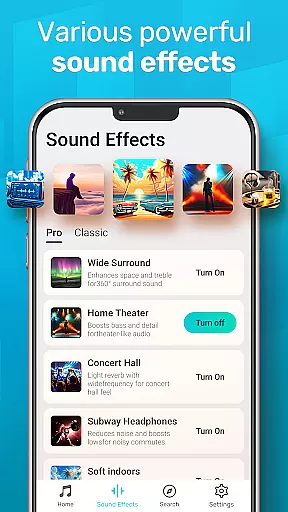
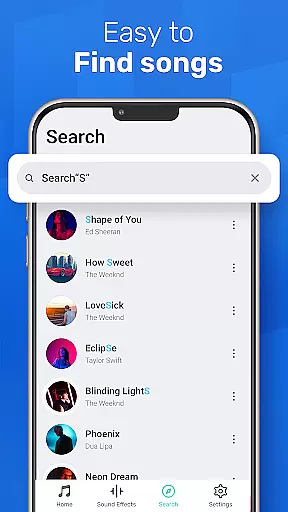
MusicGo is a versatile offline music player app that supports all major audio formats, making it an essential tool for music enthusiasts. With over 20 built-in equalizer presets and advanced audio technology, the app delivers outstanding sound quality tailored to individual preferences.
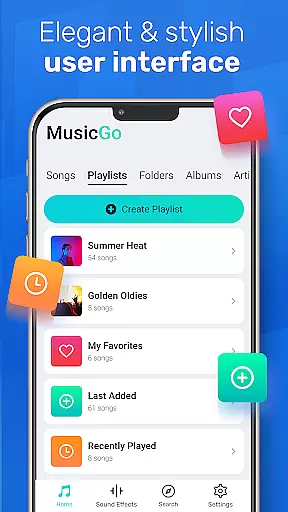
The user-friendly interface allows easy management of music files directly on your device. You can organize your library by playlists, albums, or artists, and enjoy smart auto playlists like Featured, Most Played, and Recently Played. Its elegant design includes customizable themes, ensuring a personalized and visually pleasing experience.
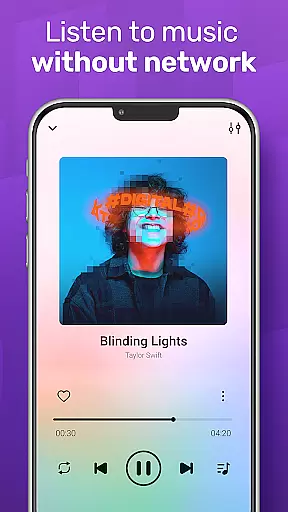
Whether commuting or relaxing at home, MusicGo lets you enjoy high-quality music anytime, anywhere. The app's compatibility with both Bluetooth and wired headphones, along with background playback support, makes it a reliable choice for uninterrupted music enjoyment.
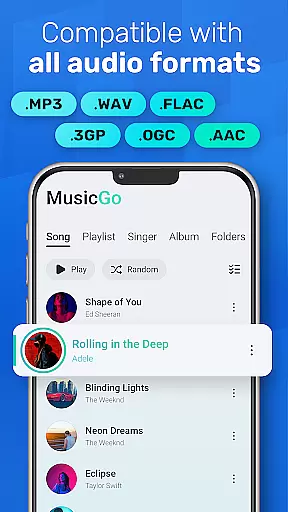
MusicGo stands out with its comprehensive format support, covering popular audio types like MP3, FLAC, WAV, MIDI, AAC, and APE. This ensures every track plays in optimal quality regardless of its original format.
The app's powerful equalizer offers over 20 presets, including options for bass boost and reverb effects. These features allow users to fine-tune their listening experience according to different genres such as classical, rock, or dance music.
Additional functionalities include deep scanning for automatic library updates, multiple playback modes (shuffle, loop, repeat), and smart organization tools. Background playback and headphone compatibility further enhance convenience, while the stylish UI provides a modern touch to your daily music routine.
MusicGo offers an extensive music library that supports all major audio formats including MP3 FLAC WAV MIDI AAC and APE ensuring optimal quality playback for every song. This comprehensive format compatibility provides users with a truly limitless music experience allowing them to enjoy their personal collections without limitations.
The app's deep scanning feature automatically refreshes the music library making it easy for users to manage their files. With support for a wide range of formats MusicGo ensures that users can access their entire music collection in the best possible quality thus enhancing the overall listening experience.
While MusicGo focuses on format support and library management it also respects copyright authenticity by enabling users to play only legally acquired music files. This approach guarantees that users can enjoy their favorite tunes with peace of mind knowing they are complying with legal standards.
With over 20 built-in equalizer presets MusicGo delivers outstanding sound quality tailored to various music genres such as classical dance folk and rock. These equalizer settings allow users to enhance their music with bass boosts and reverb effects elevating the listening experience to new heights.
The equalizer feature is designed for customization letting users adjust audio settings to fit their personal taste. Whether you prefer a bass-heavy sound or a more balanced audio profile MusicGo provides the tools necessary to fine-tune your listening experience with just a single tap.
In addition to its powerful equalizer MusicGo supports high-quality audio formats ensuring that every note is delivered with precision. This combination of advanced equalization and format support makes MusicGo a top choice for audiophiles who demand the best sound quality from their mobile music player.
Supports all audio formats
20+ equalizer presets
Intuitive user interface
Smart playlists
Background playback
Limited online streaming
No lyrics display
Ads in free version
Occasional bugs
Heavy on storage

SqueezePlayer turns your Android phone or tablet into a SqueezeBox on its own!
 4.60
4.60
A synth that really lets you shape your sounds!
4.50
Brian Eno and Peter Chilvers’ acclaimed music app Bloom, radically reinvented.
4.80
Listen radio AM / FM Stations. Live AM / FM Radio App Station. Radio Com.
4.70
Music, News & Sports Radio Tuner App. Tune in Live FM & AM Radio Stations.
4.80
The official Sonos app
4.10
A complete sound package for the sound engineer or enthusiast
4.60
Turn Every Moment into Music
3.60
Listen to offline music and sounds from all categories
4.70
Make songs with AI! Any genre, custom lyric, song generator for music creation!
4.80
Listen to live FM radio stations, sports, music and news on global radios online
4.70
The best music and audio player, with beautiful UI, music search and equalizer.
4.60
Network/Cloud Streaming, Visualization, Graphic Equalizer and Sound Effects.
4.20
A sleek, no-frills player designed for true music lovers.
4.20
PowerAudio is a powerful offline music player.
4.20
Offline and always ad-free - stream in the highest quality available.
4.10
VB-AUDIO Software / VBAN-Receptor allows listening to any VBAN Streams
4.10
Slow music down without changing pitch.
3.70
Music Streaming suite for Ampache, Nextcloud Music and compatible backends.
4.4


User Reviews