
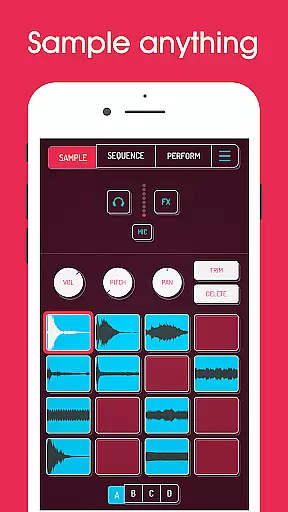
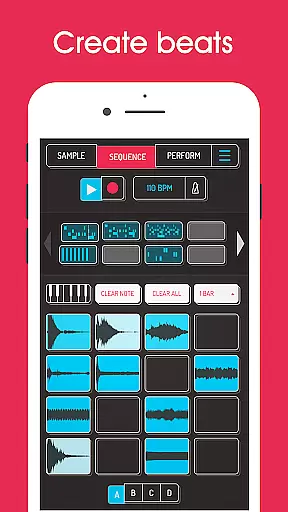
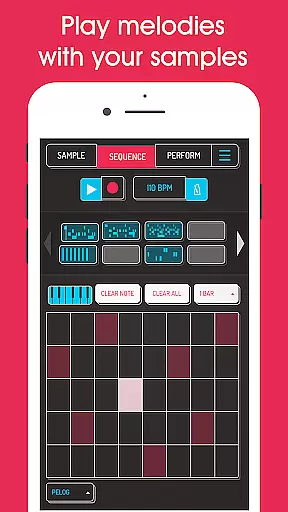
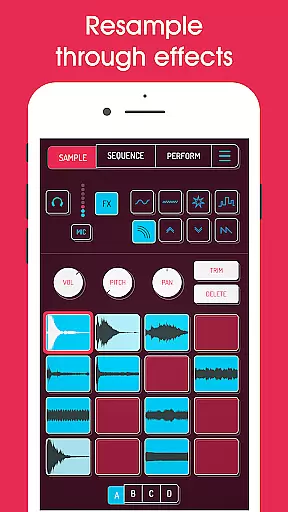
Koala Sampler is a pocket-sized music production tool that allows users to record sounds via their phone's microphone or import custom samples. The app focuses on instant music creation, offering an intuitive interface with minimal parameters for seamless workflow.
With 16 built-in effects and advanced features like AI-powered sample separation, MIDI control, and high-resolution sequencing, Koala Sampler caters to both beginners and experienced producers. Whether creating beats, applying effects, or exporting professional-quality WAV files, this app ensures a fun and efficient creative process.
Ideal for musicians on the go, Koala Sampler transforms any environment into a studio, enabling endless sonic experimentation while maintaining a smooth user experience.
Koala Sampler offers a robust set of features designed for music creators. Users can record up to 64 unique samples and apply one of 16 built-in effects such as reverb, fuzz, and synthesizer. Advanced tools like AI-driven sample separation allow isolation of drums, bass, and vocals from imported tracks.
The app includes a high-resolution sequencer, quantization, swing adjustment, and multiple playback modes (normal, one-shot, loop, reverse). Each sample can be fine-tuned with attack, release, and tone controls, while global effects like tempo delay and compressor enhance the overall mix.
Additional functionalities include MIDI compatibility, resampling capabilities, and export options for loops or full tracks in professional WAV format. These features make Koala Sampler a versatile tool for producing polished tracks anytime, anywhere.
Koala Sampler offers an extensive music library that allows users to record up to 64 different samples using their phone's microphone. This vast capability ensures a rich diversity of sounds, providing musicians with the resources needed for creative expression.
In addition to recording original content, Koala supports importing your own samples, enhancing the library's size and variety. The app also employs AI technology to separate samples into individual instruments, such as drums, bass, vocals, and others, which enriches the music creation process.
Regarding copyright authenticity, Koala provides features that ensure all audio creations remain the intellectual property of the user. By allowing personal recordings and sample imports, it guarantees that creators maintain ownership and control over their work.
With professional-quality WAV file exports, users can trust in the legitimacy and integrity of their musical output when using Koala Sampler. This feature is crucial for artists who wish to distribute or monetize their tracks while respecting copyright laws.
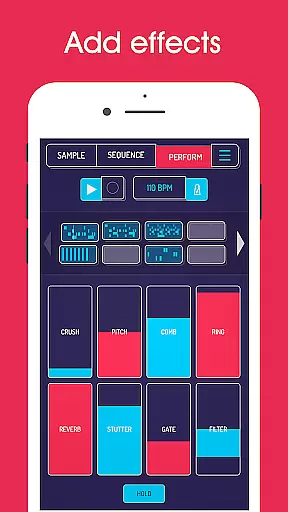
The hallmark of Koala Sampler is its commitment to high audio quality options, offering 16 superb built-in effects for transforming any sound or voice. These include essential modifications like More Bass, More Treble, Fuzz, Robot, Reverb, and specialized effects such as Octave up/down and Synthesizer.
For DJ mix production, Koala boasts an additional suite of 16 sophisticated FX tailored for mixing performances. Users can manipulate their tracks with tools like Bit-crusher, Pitch-shift, Comb filter, Ring modulator, Stutter, Gate, Resonant Filters among others - ensuring every piece has a unique auditory signature.
Advanced parameters on each sample such as attack, release, and tone adjustments provide detailed control over the sonic character. Mute/Solo controls along with note repeat options further refine playback precision according to the artistu2019s vision.
Moreover, MIDI controllability enables integration with external keyboards for live playability. With these comprehensive audio manipulation capabilities at hand within Koala Sampler, creators are empowered to produce tracks that meet exacting standards of modern music production.
Intuitive interface
Powerful built-in FX
AI sample separation
MIDI compatibility
Professional export
Limited free version
No video tutorials
Paid upgrades
Occasional bugs
Complex for beginners

 4.70
4.70
Listen to live FM radio stations, sports, music and news on global radios online
4.70
A High-Precision Audio Spectrum Analysis App
4.20
Visualize the guitar fretboard, master scales & play through changes like a pro!
4.50
Ultimate Sonos Controller
4.70
Smart piano keyboard, Classical to Pop, Real-time multiplayer connection!
4.20
Simple mp3 and mp4 player with advanced features.
3.40
Travel To The Music Universe
3.40
Listen to offline music and sounds from all categories
4.70
Voice recorder - Audio recorder. Best recorder for recording
4.90
Your song collections with lyrics and chords on Android smartphones and tablets.
4.80
Responsive piano with great sounds, graphics, and songs
4.80
SqueezePlayer turns your Android phone or tablet into a SqueezeBox on its own!
4.60
Over 100 million tracks available for high quality streaming and download
4.60
Play KORG’s revolutionary touch-based instrument on a variety of devices.
4.40
The Music Journey in Your Hands
4.30
Network/Cloud Streaming, Visualization, Graphic Equalizer and Sound Effects.
4.20
The official Sonos app
4.10
Music Streaming suite for Ampache, Nextcloud Music and compatible backends.
4.0


User Reviews