
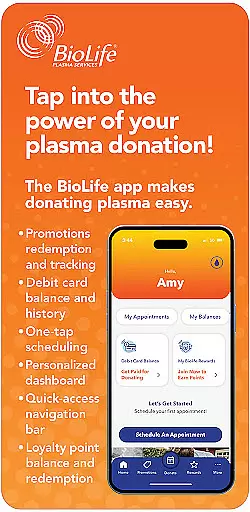
BioLife Plasma Services, developed by Takeda TKPHF (OTCMKTS), is a specialized medical application designed to assist users in managing plasma donations efficiently. The app serves as a comprehensive tool for scheduling appointments, checking reward payments, and accessing promotional offers. With its user-friendly interface, donors can conveniently book appointments with a single click, monitor their reward balances, and receive notifications about exclusive promotions. This app is particularly valuable for regular plasma donors who seek to streamline their donation process while staying informed about incentives and rewards.
The application stands out in the Medical category by addressing the specific needs of plasma donors. It not only simplifies appointment management but also enhances user engagement through features like refer-a-friend programs and progress tracking towards promotional rewards. Whether you are a first-time donor or a regular contributor, BioLife Plasma Services provides essential functionalities that make the donation journey more rewarding and efficient.
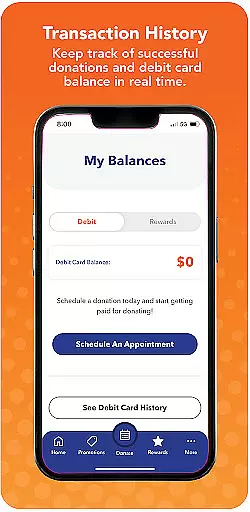
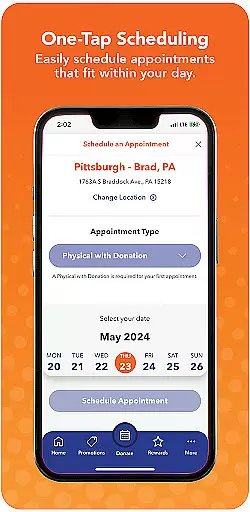
BioLife Plasma Services offers an array of distinctive features tailored to enhance the plasma donation experience. One of the standout capabilities is the one-click scheduling function, which allows users to book appointments effortlessly from their mobile devices. This feature is complemented by easy access to reward payment balances directly on the home screen, ensuring donors can quickly check their earnings and review payment histories without navigating through multiple menus.
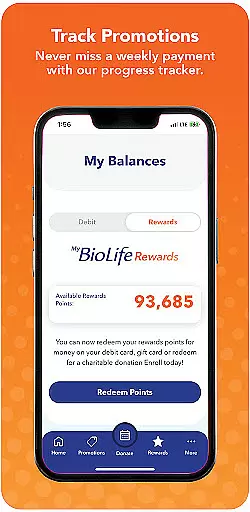
In addition to these core functionalities, the app provides promotional offer notifications, keeping users informed about exclusive deals and incentives. Donors can track their progress toward earning promotional rewards and utilize the refer-a-friend feature to share opportunities via text, email, or social media platforms. This not only helps in expanding the donor community but also qualifies users for additional bonuses like the Buddy Bonus. By integrating these comprehensive tools, BioLife Plasma Services ensures a seamless and engaging experience for all plasma donors.
In the medical field, content credibility is paramount for ensuring users receive accurate and reliable information. BioLife Plasma Services, part of Takeda TKPHF, a leading global biotechnology company, focuses on serving individuals affected by rare diseases and specialized conditions. The app provides verified information about plasma donation, which is crucial for patients relying on these donations for treatment.
The app's content undergoes expert review to maintain high standards of accuracy. This includes detailed descriptions of the donation process, eligibility criteria, and safety measures, all of which are essential for educating donors and ensuring their peace of mind. By offering this level of transparency, BioLife Plasma Services establishes trust with its users.
Users benefit from having access to expert-reviewed content that helps them make informed decisions about plasma donation. The app not only educates but also reassures donors about the importance and safety of their contributions, enhancing their overall experience and commitment to the cause.
Teleconsultation has become an integral part of modern healthcare, allowing patients to consult with healthcare professionals remotely. BioLife Plasma Services incorporates teleconsultation features to enhance donor engagement and support. Through the app, users can easily schedule appointments and receive personalized guidance from medical experts, ensuring a seamless and efficient consultation process.
The quality of teleconsultations within the app is maintained through user-friendly interfaces and reliable communication channels. Donors can expect timely responses and clear instructions regarding their appointments and any preparatory steps needed. This ensures that users feel supported throughout their donation journey, improving their overall satisfaction and willingness to participate.
By integrating high-quality teleconsultation services, BioLife Plasma Services not only facilitates convenient scheduling and consultations but also fosters a supportive environment for donors. This approach enhances user engagement and contributes to the success of plasma donation programs, ultimately benefiting patients in need.
User-friendly interface
Efficient appointment scheduling
Comprehensive reward tracking
Exclusive promotional offers
Refer-a-friend bonus program
Limited to plasma donors
Requires constant updates
Occasional technical glitches
Payment delays reported
Geographical restrictions apply

Perform pure-tone audiometry and a speech intelligibility test on your phone.
 4.50
4.50
ECG modules improve rhythm ID. ACLS is a simulator for cardiac arrest scenarios.
4.3
Master AEMT with 1,400+ study items, TEIs, practice tests, and scoring.
4.10
Enjoy 200%+ volume booster with bass booster, equalizer and headphone supported.
4.60
700 questions, 2 full exams, Predictive Scoring—your key to NREMT success!
3.90
Download OctaApp for easy access to your plasma donation info
4.40
Secure video appointments
4.50
Continuous Glucose Monitoring
3.40
Get Rx fast at the pharmacy, schedule health care, and shop ExtraCare savings.
3.30
Boost reading, writing, speaking and listening with a scientifically proven app.
4.70
Easy telehealth appointments + urgent care
4.70
This app is simply 1 book (also large app) and 17 other apps combined into 1
4.70
3rd trimester? Counting Kicks is what moms should do-It’s important & easy too!
4.30
Use the phone microphone or headset mic as sound amplifier for louder hearing.
4.30
Assess and treat left neglect more effectively in stroke and brain injury rehab.
4.30
Update medical records, view upcoming appointments, message your provider & more
3.80
Easy access to benefits and rewards
3.70
MySafeRide simplifies booking and managing rides for health plan members.
3.50
X-Vein: Advanced vein detection for medical practice
3.10


User Reviews