
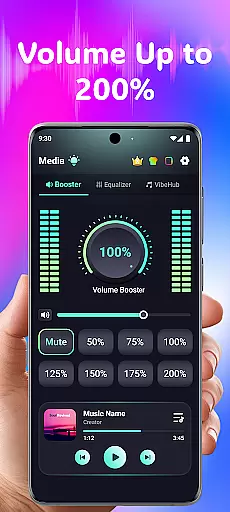
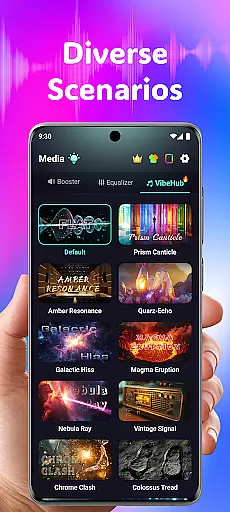
Volume Booster Bass Booster EQ is a powerful audio enhancement application designed to elevate your sound experience across various scenarios. The app's core functionality lies in its ability to amplify media volume up to 200%, making it an ideal solution for outdoor parties, movie watching, and gaming sessions where audio clarity is crucial. With features like the Advanced Equalizer and Real-Time Noise Reduction, users can enjoy rich bass, clear dialogue, and immersive sound quality tailored to their preferences.
Beyond basic volume control, the app offers specialized tools such as Independent Left & Right Ear Control and Advanced Frequency Amplification, catering to users with specific hearing needs. Whether you're looking to boost your phone’s speaker output or fine-tune audio frequencies for clearer conversations, this app provides a comprehensive suite of tools to optimize sound for headphones, Bluetooth devices, and speakers alike.
This makes Volume Booster Bass Booster EQ not just a utility app but also an essential tool for those seeking enhanced auditory experiences in both recreational and assistive contexts.
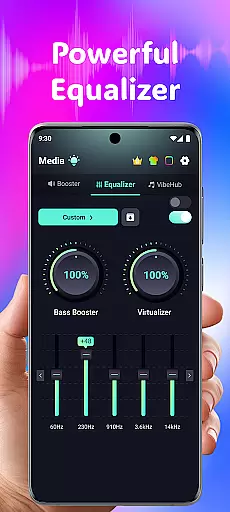
One of the standout aspects of Volume Booster Bass Booster EQ is its cutting-edge feature set that addresses multiple audio needs. At its heart is the Powerful Volume Boost function, which allows users to amplify their device's volume by up to 200%. This feature is complemented by an Advanced Equalizer with five bands (60Hz, 230Hz, 910Hz, 3.6kHz, 14kHz), enabling detailed customization of bass, treble, and midrange frequencies for different types of content—be it music, movies, or games.
In addition to these core capabilities, the app includes AI-powered Real-Time Noise Reduction, which filters out unwanted background sounds such as wind or crowd chatter, ensuring crystal-clear audio playback. Another innovative feature is the Independent Left & Right Ear Control, allowing asymmetrical hearing support through individualized volume adjustments for each ear. These functionalities are further enhanced by Live Sound Recorder & Playback, giving users the ability to capture important moments without losing audio fidelity.
Each feature has been thoughtfully designed to provide tangible value, whether it’s improving entertainment experiences or assisting users with hearing challenges. The combination of high-powered amplification, precise equalization, and intelligent noise management sets this app apart from other audio tools on the market.
In the realm of medical applications, content credibility is paramount for user trust and safety. Volume Booster Bass Booster EQ addresses this by providing a suite of features that are designed with audio health in mind. The app includes advanced frequency amplification which allows users to fine-tune six distinct sound ranges, ensuring that all auditory inputs are clear and comprehensible without distortion.
The app's commitment to expert-reviewed content is evident through its AI-powered real-time noise reduction capabilities. This feature intelligently filters out unwanted background noises such as wind or crowd chatter, delivering an enhanced listening experience while safeguarding against unnecessary auditory strain. By prioritizing clarity and precision, the application ensures that every sound enhancement is both effective and safe.
Furthermore, Volume Booster Bass Booster EQ offers independent left and right ear control, allowing personalized adjustments tailored to individual hearing needs. With sync mode and visual feedback, it supports asymmetrical hearing profiles under expert guidance principles. These functionalities not only improve user engagement but also reinforce the reliability of the appu2019s medical-grade audio solutions.
Teleconsultation has become a vital component of modern healthcare delivery, especially within apps focused on auditory well-being like Volume Booster Bass Booster EQ. The application excels in offering high-quality teleconsultation features that ensure users can address their audio concerns effectively from anywhere. Its live sound recorder and playback functionality enables individuals to capture important moments or conversations with ease, facilitating better communication during virtual consultations.
With intuitive controls and one-tap recording options, the app simplifies the process of gathering relevant auditory data for healthcare professionals. This seamless interaction empowers doctors to provide accurate assessments remotely, enhancing the overall quality of care received by patients. Such thoughtful design elements underscore the appu2019s dedication to supporting robust telehealth experiences.
Additionally, the inclusion of advanced equalizer settings ensures that any shared media during these sessions retains optimal sound fidelity. Users benefit from crystal-clear exchanges whether they're discussing music preferences or troubleshooting specific hearing issuesu2014all contributing to superior teleconsultation outcomes supported by professional-grade technology embedded within Volume Booster Bass Booster EQ.
Powerful amplification
Advanced equalizer
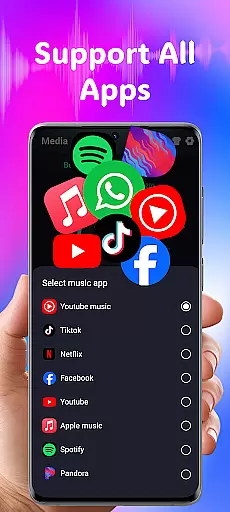
Wide app compatibility
User-friendly interface
Real-time noise reduction
Potential speaker damage
No physical controls
Limited free features
High battery usage
Complex for beginners

A fantastic 3d reference that includes over 300 structures and a quiz function.
 3.00
3.00
Modivcare members can book and manage trips.
4.50
Molina Members: My Molina. Manage your health anytime, anywhere!
4.30
One app to unlock your health
4.30
Crush your paramedic exam with NREMT-style tests, ECGs, and top-tier prep!
3.90
A rapid reference for prehospital providers caring for pediatric patients.
4.0
OKN Strips, OptoDrum, OKN
4.1
PPP provides quick offline access to over 350 field treatment protocols.
4.60
Manage your health care in one easy place
4.40
CPR Timer for High Performance AHA BLS / ACLS
5.00
A comprehensive medical disease app.
5.00
Live vet support by text/video
4.80
Pelvic Floor Muscle Exercises
4.80
The NightOwl Companion app allows you to interact with the NightOwl sensor.
4.70
This app is simply 1 book (also large app) and 17 other apps combined into 1
4.70
The doctor will see you now
4.70
Beat alcohol and drug addiction with a revolutionary treatment program in an app
4.50
Secure video visits with your VA care team from anywhere
4.50
Master AEMT with 1,400+ study items, TEIs, practice tests, and scoring.
4.10


User Reviews