
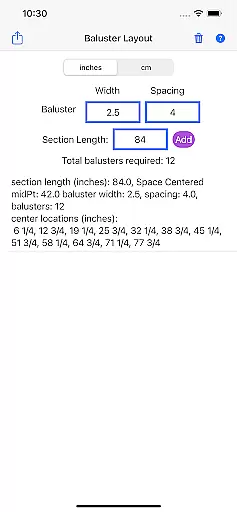
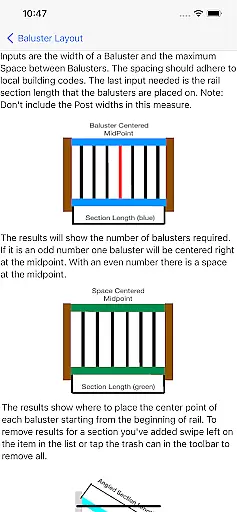
Baluster Layout is a specialized application designed for deck and stair builders, aiding in the precise calculation of baluster spacing to meet building code requirements. The app's core functionality lies in its ability to determine the exact number of balusters needed and their placement by simply inputting the railing length, baluster width, and desired spacing.
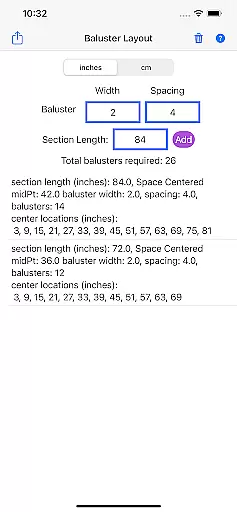
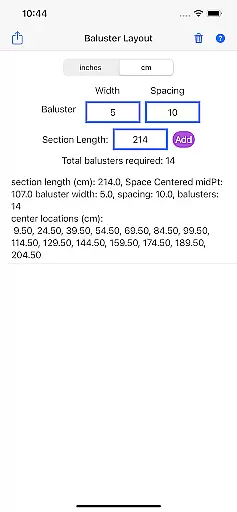
One of the standout features of Baluster Layout is its support for projects with multiple railing sections, each having unique dimensions. This flexibility ensures that even the most complex installations can be planned accurately. Additionally, users can choose between inches or centimeters, catering to various project specifications worldwide.
The app proves invaluable when ensuring safety and compliance in construction projects. Its detailed results provide a comprehensive breakdown of baluster needs and placements, making it an essential tool for both professionals and DIY enthusiasts looking to create visually appealing and code-compliant structures efficiently.
Baluster Layout offers a robust set of features tailored to simplify and enhance the process of baluster installation. One of the primary functionalities is the precision spacing calculator, which ensures optimal spacing for balusters, thereby complying with stringent building codes automatically.
In addition to handling simple installations, the app excels in managing complex projects involving multiple rail sections. Each section can have its own unique dimensions, and the app calculates the baluster requirements for each independently. This feature is particularly beneficial for large-scale projects needing meticulous planning and execution.
Unit flexibility is another significant advantage, allowing users to operate in either imperial or metric units. Detailed result outputs provide clear guidance on the number of balusters required per section and their exact placement, thus eliminating manual calculations and potential errors. This comprehensive approach not only saves time but also enhances project accuracy and compliance.
In the realm of home improvement and construction, having reliable information is crucial. Baluster Layout provides accurate calculations for baluster spacing, ensuring that all data you receive is authentic and complies with building codes. This precision helps both professionals and DIY enthusiasts to avoid common pitfalls associated with incorrect measurements.
The app's ability to handle multiple rail sections with unique dimensions means that each project detail is processed with meticulous attention. By entering specific parameters such as railing length and baluster width, users can trust that the app will deliver precise results tailored to their needs. This level of detail guarantees that every property modification or construction project maintains high standards of safety and compliance.
Furthermore, the detailed breakdown of baluster requirements per section ensures transparency in planning and execution. Users are equipped with comprehensive data, which not only aids in meeting regulatory demands but also enhances the overall aesthetic appeal of their structures. With Baluster Layout, authenticity in project listings is assured, empowering builders to create secure and visually pleasing environments.
Beyond just providing precise baluster spacing, Baluster Layout incorporates essential home management features that streamline the entire process. The app allows users to input various units of measurement, including inches or centimeters, catering to different project specifications seamlessly. This flexibility makes it an indispensable tool for managing diverse home projects efficiently.
One standout feature is its capacity to save time and reduce errors by automating complex calculations. Instead of manual computations, which are prone to mistakes, users can rely on the appu2019s algorithms to generate accurate placements swiftly. This efficiency not only expedites project timelines but also minimizes material wastage, leading to cost savings.
Additionally, Baluster Layout supports the creation of visually appealing and code-compliant structures through its detailed results. These outputs guide users in executing flawless installations, thereby enhancing both functionality and design aesthetics. By integrating these advanced home management capabilities, Baluster Layout stands out as a vital resource for anyone involved in deck or stair building projects.
Time-saving
Code compliant
Accurate calculations
User-friendly interface
Versatile unit options
Limited to balusters
No 3D visualization
Basic UI design
Requires manual input
Single function app

Map-based search app for apartments and homes for rent.
 4.60
4.60
Draw your floor plan smartly. Make house design blueprint with home planner app
3.60
AI-powered home design, interior design, home decor, and room design solutions
4.50
Convert your Phone to HiSense Smart TV Remote Control
4.70
SmartRent - Opening Doors To A Smarter World
4.40
Plan your remodel AI home renovation easily using planner 5D and home decor AI.
4.40
Search for Homes, Rentals, Agents & Schools
4.70
3D House Design and AI Room Planner - from floor plans to full interior design.
4.40
A Smarter Home in Seconds
4.70
Turn old phones into security cameras, baby monitors, pet cams, and more.
4.70
Plants, Beauty, Collectibles
4.60
Fire & Power Safety
4.50
Set up your devices, customize settings, and monitor your home—from anywhere
4.40
Fully control your Philips TV with this all-in-one remote control app.
4.20
Book your local plumber 24/7, track your service order & get exclusive coupons
4.00
Technology powering many in-home services for residents across the United States
3.80
This Fire TV Remote control's your Fire TV Device and Insignia Fire TV Remote
3.70
Draw house plans, floor plans 3d & house design with house plan drawing 3d app
3.60
Unlock AI-based barcode scanning and support the development of Grocy Android
4.5


User Reviews