
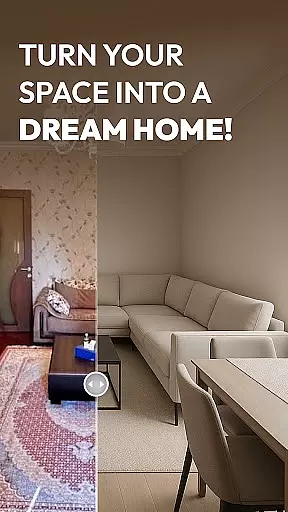
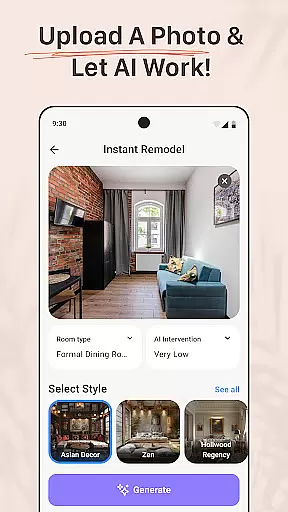
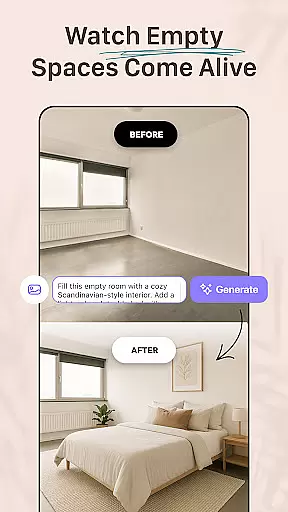
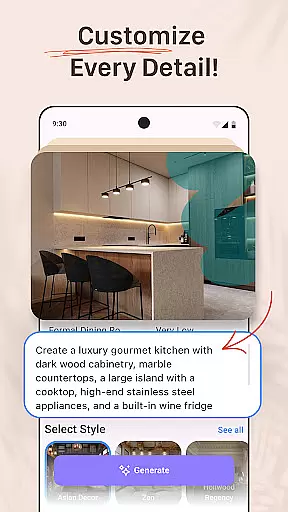


AI Remodel is a revolutionary home design application that empowers users to create their dream spaces with ease. This app combines cutting-edge AI technology with intuitive design tools, enabling both beginners and professionals to plan and visualize complete home renovations. Users can generate accurate floor plans, experiment with various layouts, and produce stunning 3D renderings without any prior design experience.
The app's powerful features include smart room planning, material suggestions, and seamless integration with popular design platforms like Planner 5D. Whether remodeling a single room or redesigning an entire house, AI Remodel provides all the necessary tools for successful project completion. Its advanced AI algorithms help users make informed decisions by previewing changes before implementation, making it an invaluable tool for homeowners, renters, and professional designers alike.
AI Remodel distinguishes itself through its comprehensive suite of design features. The app's core functionality revolves around its advanced AI-powered design capabilities, which allow users to upload photos or start from scratch while receiving intelligent suggestions for layouts, color schemes, and furniture arrangements. The built-in Room Planner 3D tool enables users to manipulate elements in a fully responsive three-dimensional environment, providing unprecedented creative control over every aspect of their projects.
One of the app's standout features is its seamless integration with Planner 5D, which ensures precise measurements and high-resolution outputs. Users can draw custom floor plans, adjust wall positions, experiment with lighting options, and test different materials within a single interface. The app also offers curated style suggestions and material combinations, allowing users to explore various design aesthetics from minimalism to mid-century modern. These sophisticated tools are presented through an intuitive user interface that requires no specialized training to master.
Property listing authenticity is a crucial feature for any home design and renovation app like AI Remodel. This ensures that all the design elements, floor plans, and 3D renderings accurately represent the potential of your space. With advanced AI-driven tools, AI Remodel verifies each design aspect to ensure it aligns with real-world possibilities and constraints.
The app employs cutting-edge technology to analyze uploaded photos or newly created designs, cross-referencing them with actual spatial data. This meticulous process guarantees that every virtual renovation or redecoration you perform can be realistically translated into your physical space. Users can confidently experiment with layouts, color schemes, and furniture arrangements knowing that these changes can be implemented in reality.
For homeowners, renters, and professional designers alike, this commitment to authenticity means that the time and creativity invested in designing through AI Remodel will yield practical, actionable results. Whether planning minor touch-ups or major overhauls, users are assured that their digital designs will match their real-world expectations, providing peace of mind and saving both time and resources.
AI Remodel offers comprehensive home management features that extend beyond basic design functionalities. These features allow users to not only visualize but also manage and track various aspects of their renovation projects efficiently. From creating detailed floor plans to managing material choices and budget allocations, the app provides an all-in-one solution for home improvement projects.
One standout capability is its seamless integration with Planner 5D, which enhances project organization and precision control. Users can scale designs accurately, measure spaces in real-time, and export high-resolution plans ready for implementation. This level of detail ensures that whether you're sketching initial concepts or finalizing complete layouts, your plans remain reliable and professional-grade.
Additionally, AI Remodel supports ongoing project management by enabling users to update progress, adjust timelines, and document changes throughout the renovation process. This functionality proves invaluable for coordinating tasks, especially when working with contractors or managing complex renovations involving multiple stakeholders. By consolidating these essential tools within a single platform, AI Remodel empowers users to maintain oversight and achieve successful outcomes in their home remodeling endeavors.
User-friendly interface
Advanced AI suggestions
3D visualization tools
Planner 5D integration
Comprehensive design options
Requires learning curve
Premium features locked
Occasional glitches
Limited free resources
Device compatibility issues

B-hyve Pro App for landscape irrigation professionals
 4.70
4.70
This Fire TV Remote control's your Fire TV Device and Insignia Fire TV Remote
3.70
Download today to join the community to help bring lost pets home faster.
4.70
Convert your Phone to HiSense Smart TV Remote Control
4.70
AI floor creator to design your dream house, plan rooms & style your home
4.00
Smart AI plant care schedules, Real plant experts, support & Thriving community!
4.20
Schlage Lock Company LLC
4.00
Find the perfect paint color with advanced tools to explore and visualize color.
3.80
Turn old phones into security cameras, baby monitors, pet cams, and more.
4.70
Search for Homes, Rentals, Agents & Schools
4.70
MLS-powered real estate app to find homes for sale & apartments for rent
4.70
The Merkury Smart app makes it easy to control your smart devices.
4.50
Make Renting Easy
4.40
Wobble Fix Tool
4.40
Security App with HD Video, 2-way Audio, and event detection for Home monitoring
4.40
3D House Design and AI Room Planner - from floor plans to full interior design.
4.40
Set up your devices, customize settings, and monitor your home—from anywhere
4.40
USHUD.com helps you find the best homes for sale in your area
4.00
Technology powering many in-home services for residents across the United States
3.80


User Reviews