
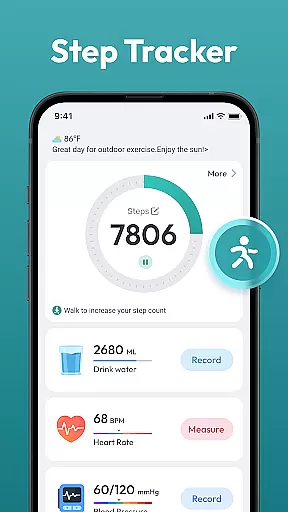
Step Counter - Pedometer App is a comprehensive health and fitness tool designed to help users track their daily physical activities. This app automatically counts steps, measures walking or running distance, and supports setting personal goals such as reaching 10,000 steps per day.
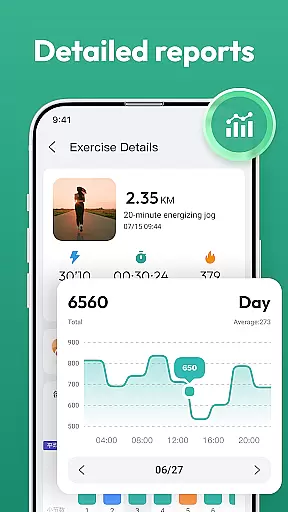
In addition to basic step counting, the app provides detailed activity reports through daily, weekly, and monthly charts. It caters to users of all ages and requires no additional wearable devices, making it an accessible solution for anyone looking to improve their health and maintain an active lifestyle.
The Step Counter - Pedometer App offers a variety of features that enhance user experience and promote a healthier lifestyle. One of its key functionalities is automatic step counting, which works seamlessly with most Android devices without the need for external wearables.
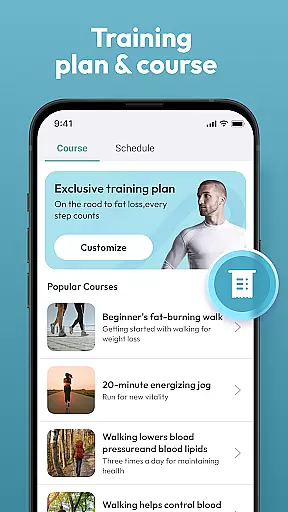
Beyond tracking steps, the app records various health data and provides training courses and plans tailored to individual needs. The user-friendly interface ensures that users can easily navigate through different features, view their progress, and adjust settings according to their preferences.
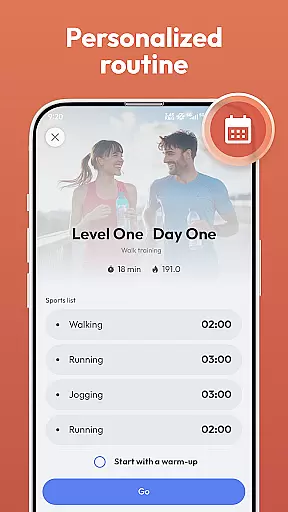
Personalized planning in a fitness app refers to the ability to tailor workout programs according to individual needs and goals. Step Counter - Pedometer App offers this feature by allowing users to choose from various training courses and plans that suit their fitness levels.
The app's automatic step counting and health data tracking enable it to provide customized feedback and suggestions. By analyzing daily, weekly, and monthly activity charts, users can adjust their routines to optimize results.
With personalized planning, users benefit from a more engaging and effective fitness journey. The app adapts to different lifestyles, whether the aim is weight loss, general health maintenance, or reaching a daily goal of 10,000 steps.
This tailored approach ensures that each user's experience is unique and aligned with their personal objectives, making Step Counter - Pedometer App a versatile tool for all ages seeking to improve their wellbeing.
Progress visualization is a crucial aspect of any fitness application, providing users with tangible evidence of their achievements. Step Counter - Pedometer App excels in this area by offering detailed charts that display daily, weekly, and monthly progress.
These visual representations include step counts, distance covered, and other tracked health data, giving users a comprehensive overview of their activities. Such features not only inform but also motivate users by highlighting improvements over time.
By integrating progress visualization, the app fosters a sense of accomplishment and encourages consistent use. Users can easily monitor their milestones and stay motivated to reach new fitness goals.
Ultimately, the ability to visually track achievements enhances user engagement and retention, making Step Counter - Pedometer App an invaluable companion on the journey to better health.
Automatic step tracking
User-friendly interface
No external device needed
Detailed activity reports
Customizable goals
Limited to Android
Requires constant phone carry
Battery consumption
Occasional inaccuracies
No live coaching

Text notifications, button control, heart monitor & more for your Amazfit.
 2.40
2.40
Weight loss app: home workout for women to lose weight & burn calories.
4.80
a fun app full of surprises :)
4.70
Pack of 66 calming lullabies for smooth fall asleep and relaxation
4.10
Using Recognise™ has been shown to reduce pain and improve performance.
4.2
A simple way to calculate peptide doses and also to convert different units.
4.3
Using Recognise™ has been shown to reduce pain, and improve performance.
4.3
Walk. Earn: Get rewarded for every step! Walk, move, and earn real rewards.
4.70
Pedometer that gives you sweatcoins for steps. It pays to walk!
4.10
Easy reconstitution calc for mixing peptides and creating protocols
4.70
Binaural Beats - Fully Customizable Waves - Pure Sound - No Loops
4.50
Relax. Sleep Better. Feel Better.
4.50
See what's really going on inside your head! Real time EEG graphs from your Muse
4.40
Your portable blood pressure tracker. Record, monitor, and analyze BP anytime.
4.30
This is an application that serves as a companion app for smart watch.
4.20
Monitor, analyze, track, and convert blood sugar & help you control diabetes.
4.10
Looking to take control of your health? Our psychology-based programs can help.
4.10
beat yesterday.
4.00
Sync your activities of the most popular sports tracking services
2.70


User Reviews