
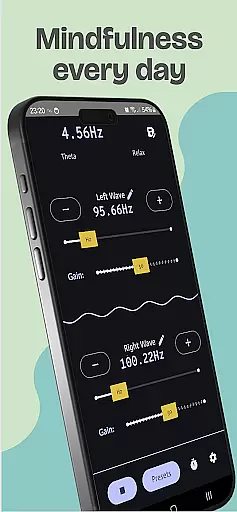
Brain Waves Pro Binaural Beats is a specialized audio application designed to help users generate pure sound waves that stimulate concentration, meditation, and relaxation. The app leverages binaural beats technology, producing real-time audio through two independent oscillators that can be finely adjusted via horizontal sliders or direct input. This allows users to create precise frequencies tailored to their needs, such as enhancing focus, promoting sleep, or reducing stress.
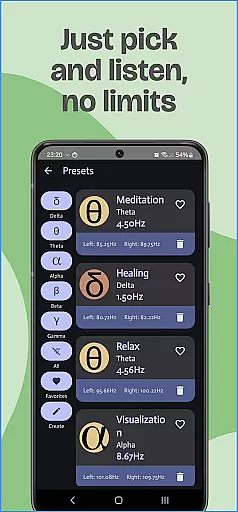
The app offers various wave types, including Theta for meditation and memory, Delta for deep sleep, Alpha for relaxation, and Gamma for higher learning and focus. With its ability to run in the background and an integrated timer feature, users can seamlessly integrate these soundscapes into their daily routines. For optimal results, headphones are recommended to fully experience the pulsating effects of binaural beats.
This tool is particularly beneficial for individuals seeking mental clarity, stress relief, or improved sleep quality. By customizing frequencies and saving presets, users can personalize their auditory experience and enjoy uninterrupted sound sessions that cater to their specific wellness goals.
Brain Waves Pro Binaural Beats stands out with its advanced features that cater to both casual listeners and those deeply invested in sound therapy. One of its core functionalities is the ability to generate real-time binaural beats using two independent oscillators. These oscillators can be controlled either by adjusting horizontal bars or by directly inputting frequency values, allowing for precision tuning down to two decimal points. This level of customization ensures that users can create unique soundscapes tailored to their individual preferences.
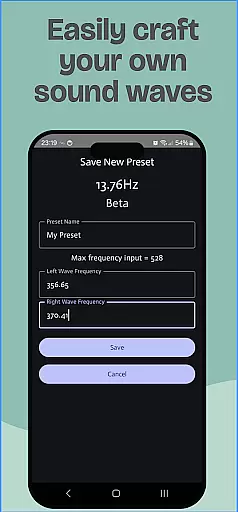
In addition to its customizable sound generation, the app includes several practical features. Users can save and manage their favorite frequency combinations as presets, making it easy to return to preferred settings. The app also supports background playback, enabling users to multitask without interrupting their audio experience. A built-in timer function automatically stops playback after a set duration, which is ideal for bedtime use. Furthermore, the app provides detailed descriptions of different wave types (Theta, Delta, Alpha, Gamma, Beta) and their associated benefits, helping users make informed choices about which sounds to use.
These features collectively enhance the user experience by providing both flexibility and control. Whether you're looking to improve concentration while studying, find relaxation during stressful times, or aid in falling asleep, Brain Waves Pro Binaural Beats offers a comprehensive solution that adapts to various needs.
Personalized planning in Brain Waves Pro Binaural Beats allows users to create tailored soundscapes that cater to their specific mental state needs. This feature is crucial for achieving desired psychological outcomes such as relaxation, focus, or sleep enhancement.
The app provides multiple wave types including Theta for meditation and memory, Delta for healing and deep sleep, Alpha for relaxation and creativity, and Gamma for inspiration and higher learning. Users can adjust frequencies with two independent oscillators, fine-tuning the experience to their exact requirements.
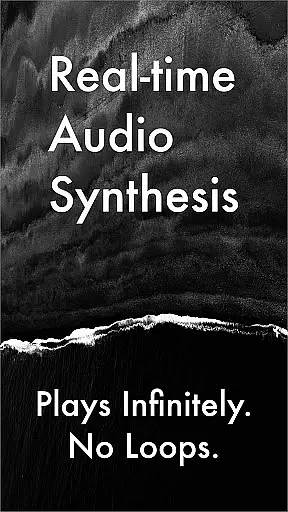
With real-time audio synthesis, users can generate and save their own frequencies, ensuring a unique and personalized auditory environment. The ability to input precise values up to two decimal points empowers users to experiment and find the perfect settings for their personal goals.
This level of customization not only enhances user engagement but also increases the effectiveness of the binaural beats, providing a powerful tool for personalized mental wellness and cognitive enhancement.
Progress visualization in Brain Waves Pro Binaural Beats refers to the app's ability to provide users with tangible feedback on their usage and improvements over time. While the app doesn't include traditional progress charts, it offers features that help users track their mental state journey effectively.
Through saved presets, users can monitor their preferred frequency combinations and observe how their choices evolve. This feature serves as a form of progress tracking, allowing users to refine their personalized soundscapes based on previous successful sessions.
The timer function adds another layer of progress management, enabling users to set specific durations for their sessions. As users advance in their practice, they can gradually increase session lengths, creating a measurable way to visualize their progress in meditation or concentration exercises.
Additionally, the app's capability to run in the background while users engage in other activities provides an uninterrupted flow of binaural beats, contributing to consistent progress without the need for constant interaction with the app interface.
Real-time audio synthesis
Highly customizable frequencies
Background playback support
Integrated timer functionality
Comprehensive wave type options
Requires careful volume management
Headphone dependency for full effect
Potential CPU usage issues on newer Android versions
No pre-recorded sound library
Complex for beginners

Relax to calm sounds, white noise, music, guided meditation and bedtime stories
 4.40
4.40
Power-lifting, weightlifting and Wendler 531 app to track your workout program.
4.90
a fun app full of surprises :)
4.70
Show your support for the development of FitNotes - Gym Workout Log
4.90
3D Body Measurement System
3.60
You deserve easy access to important insurance information. Download for FREE.
4.70
Dexcom G7 Continuous Glucose Monitoring
3.70
Fast Body building & Weight Loss. Home Workouts with Daily Coach, No Equipment.
4.30
Control your blood pressure, heart rate and blood sugar in a fast way.
4.00
Easy access to health benefits
4.70
Easy reconstitution calc for mixing peptides and creating protocols
4.70
Measure your Pupil Distance for Eyeglasses and VR headsets in 3 quick steps.
4.70
Your AI pet BFF. Talk, play, and beat anxiety in this calming game.
4.60
Get alert about getting out of desired heart rate zone.
4.10
Pedometer that gives you sweatcoins for steps. It pays to walk!
4.10
Understand your body’s most meaningful messages and transform your health.
3.90
Make sense of your health data.
3.80
Insanity blocks of intense physical activity, short breaks of 30 seconds.
4.1
Using Recognise™ has been shown to reduce pain and improve performance
4.5


User Reviews