
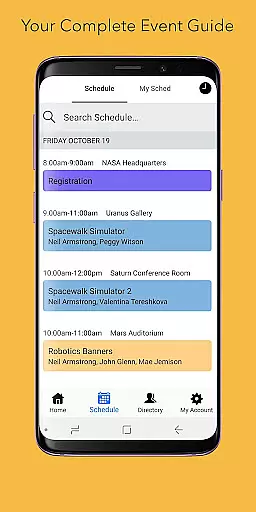
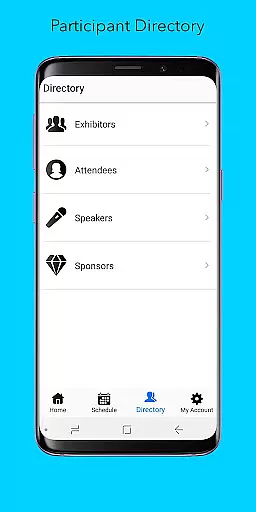
Sched is a leading platform for session registration and attendance management, designed to streamline the organization of complex multitrack events. This app allows event organizers and attendees to manage all event details in one place, offering a comprehensive schedule, personalized user experiences, and an extensive directory of speakers and exhibitors.
With features like offline caching, users can access their schedules anytime, even without an internet connection. Sched's vision is to create a world where events are not just endured but truly experienced, making it an essential tool for enhancing event participation and engagement.
Sched offers a robust set of features tailored for efficient event management. Users can browse the full schedule conveniently, eliminating the need for physical event guides. The app supports personalization, enabling attendees to log in and modify their schedules on-the-go, or sign up for public events by creating an attendee account.
Additionally, Sched provides a detailed directory of professional profiles for speakers and exhibitors, ensuring users have all necessary information at their fingertips. Its offline caching functionality guarantees that users always have access to their schedules, regardless of connectivity issues, thus enhancing reliability and user satisfaction.
Task creation and detail customization are essential features for event management applications like Sched. This functionality allows event organizers to create detailed sessions, workshops, or presentations with specific information such as time, location, speaker details, and session descriptions.
Sched offers an intuitive interface where users can easily input and adjust session specifics. Organizers can categorize events into tracks, add tags for easy navigation, and include rich media content such as images and videos. The platform also supports setting prerequisites or recommended attendee backgrounds, ensuring that participants are well-prepared.
The benefits of this feature are manifold. Attendees receive comprehensive information about each session, helping them make informed decisions on which events to attend. For organizers, the ability to customize details means they can tailor the event experience to meet both attendee expectations and educational objectives.
Ultimately, task creation and customization empower users to design a structured yet flexible event program. This not only enhances the overall attendee experience but also streamlines the management process for complex multitrack events.
Reminder settings in event applications play a crucial role in ensuring attendees do not miss important sessions. By allowing users to set reminders for upcoming events, apps like Sched help maintain engagement and punctuality throughout the conference or festival.
Sched provides versatile reminder options. Users can choose from various alert timingsu2014such as 10 minutes, one hour, or one day before the session starts. Additionally, these reminders can be synchronized with the device's native calendar, ensuring seamless integration into the useru2019s daily routine.
This feature significantly enhances user convenience. Attendees receive timely notifications, reducing the likelihood of missing key sessions due to oversight or scheduling conflicts. Moreover, it aids in better time management by providing clear cues on when and where to be, thus optimizing the overall event experience.
In summary, reminder settings contribute to a more organized and engaging event experience. By leveraging customizable alerts, Sched ensures that participants stay informed and punctual, ultimately leading to higher satisfaction and more effective event participation.
User-friendly interface
Comprehensive scheduling
Offline access
Personalized experience
Extensive directory
Limited free features
Requires account creation
Occasional sync issues
Premium cost
Complex setup

The calendar app in this 2026 year see all dates.
 4.20
4.20
PheedLoop Go! is the mobile event app for events powered by PheedLoop.
4.40
Audio guide companion APP for SEE's Michelangelo's Sistine Chapel
3.50
It is an Event Planning Application.
4.4
Here you can choose tickets for films, performances, concerts and other events
4.60
Create invitation cards for birthdays, weddings, Christmas and more.
4.80
Digital Income Wallet of the Final Libertadores 2025
4.4
Beautiful invitation cards + easy RSVP tracking for any event. Design Invites.
4.80
Microsoft Ignite is an event that showcases latest advancements in technology
4.00
Invitation card maker for birthday party & Wedding. Digital greeting card editor
4.90
Plan your wedding for free on the go: vendors, budget, website and checklists!
4.80
Save money on concert, sport, and theater tickets, and discover upcoming events.
4.80
Buy and Sell Tickets for Concerts, Sports, and Theater.
4.70
Everything you need for the Best Thursday Ever.
4.40
Invitation Card Maker, Design & share wedding, birthday & party invites fast
4.40
Microsoft Build is an annual developer conference hosted by Microsoft
4.20
Buy tickets for any event!
3.90
Instant photo sharing for every occasion
3.80
TV.Garden is a video player to play your own TV streams from around the world!
3.40


User Reviews