
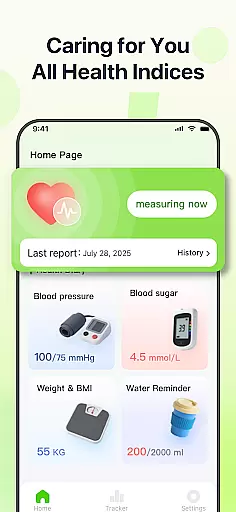
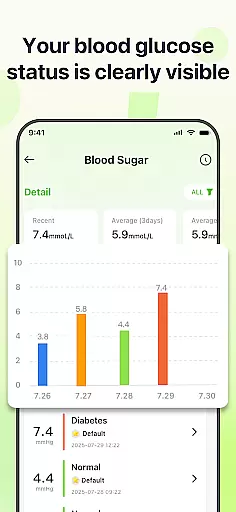
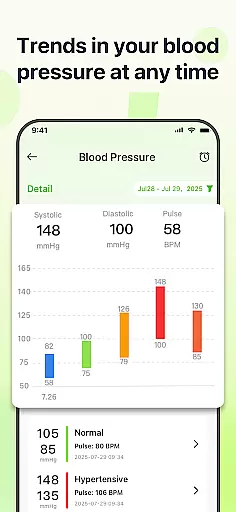
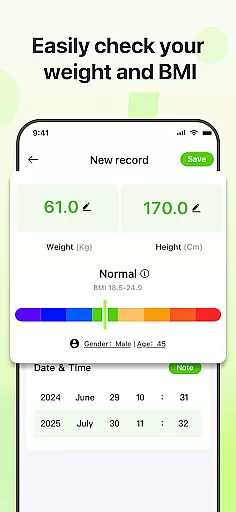
PulseSense is a comprehensive health tracking application designed to simplify wellness management. The app allows users to effortlessly log key metrics such as blood pressure, glucose levels, and heart rate while providing intelligent reports tailored to individual data. Its sleek trend visualizations span days to years, helping users uncover patterns and track progress over time.
With privacy at its core, PulseSense ensures all data stays encrypted on the device without requiring cloud storage or accounts. It is ideal for individuals managing chronic conditions like hypertension or diabetes, seniors seeking straightforward health tools, or anyone prioritizing secure health tracking. By consolidating metrics into one platform, PulseSense empowers users with actionable insights rather than just raw numbers.
PulseSense stands out with its effortless logging system, enabling users to input critical health metrics like blood pressure, glucose levels, and heart rate with ease. The app's intelligent reporting feature generates personalized lifestyle recommendations based on logged data, ensuring users receive tailored advice to improve their wellness journey.
Another highlight is its sleek visualization tools, which display trends across days, weeks, months, and years. These intuitive graphs help users identify patterns and measure progress over time. Additionally, PulseSense offers customizable reminders to reinforce healthy habits and allows users to attach personal notes and tags to entries for added context.
Privacy remains a cornerstone of PulseSense’s design. Unlike many health apps, it operates without cloud storage or third-party data sharing, ensuring end-to-end encryption directly on the user's device. This makes it an excellent choice for those who prioritize security alongside functionality.
Personalized planning in health applications refers to the ability to tailor wellness strategies based on individual user data. PulseSense excels in this area by offering intelligent health reports and personalized lifestyle recommendations.
The app analyzes logged metrics such as blood pressure, glucose levels, and heart rate to generate insights unique to each user's health journey. This ensures that users receive relevant advice that aligns with their specific wellness goals.
By attaching personal notes and custom tags to health entries, users can provide additional context for more accurate and meaningful recommendations. This level of personalization empowers users to make informed decisions about their health.
Ultimately, PulseSense's personalized planning feature helps individuals manage chronic conditions more effectively and maintain healthier lifestyles through actionable insights derived from their own data.
Progress visualization is a crucial component of any fitness or health app, allowing users to track their improvements over time. PulseSense offers sleek trend visuals that span days, weeks, months, and years, providing a comprehensive view of oneu2019s health journey.
These visualizations are not just simple graphs; they are designed to uncover patterns and highlight progress, making it easier for users to understand their health metrics at a glance. By consolidating all health metrics in one place, PulseSense eliminates the need to switch between different tools.
Users can set reminders within the app to reinforce healthy habits and ensure consistency in their tracking routine. This regular monitoring fosters a deeper connection with oneu2019s health objectives.
In summary, PulseSense's robust progress visualization capabilities enable users to stay informed and consistent, driving long-term engagement and better health outcomes.
User-friendly interface
Advanced trend analysis
Personalized health insights
Strong privacy protection
Customizable reminders
No direct measurement tools
Limited integration options
Premium features locked behind paywall
Requires manual data entry
Not a medical diagnostic tool

Easy access to health benefits
 4.70
4.70
Control your sleep in real-time wearing Garmin device
3.60
a fun app full of surprises :)
4.70
HRV4Training helps you optimize goals and improve performance. No sensors needed
3.30
Histamine intolerance, low FODMAP diet and irritable bowel syndrome (IBS)
4.00
A brain game that moves you
4.70
Your AI pet BFF. Talk, play, and beat anxiety in this calming game.
4.60
FODMAP, Gluten, Allergy, Vegan
4.50
Pedometer that gives you sweatcoins for steps. It pays to walk!
4.10
Beauty Care, Makeup & Skin Care Scanner | Pregnancy App For A Mom | Healthy Baby
5.00
Protect your healthy sleep
4.80
Easy to use step counter, calorie counter helps lose weight, count steps offline
4.80
Easy reconstitution calc for mixing peptides and creating protocols
4.70
Get lasting results with Chair Yoga, Wall Pilates, and Walking workouts!
4.60
Chair Workout: Women's Edition for safe, flexible, and personalized fitness.
4.40
Enjoy the Gluten Free living with the best app. SCAN the barcodes & SEARCH.
3.60
GloryFit is a companion app for the smart bracelet.
3.60
The app helps you address digestive symptoms based on the Fast Tract Diet.
3.50
Transform your body and soul with DBFFitness, with a 40-day fitness journey.
4.0


User Reviews