

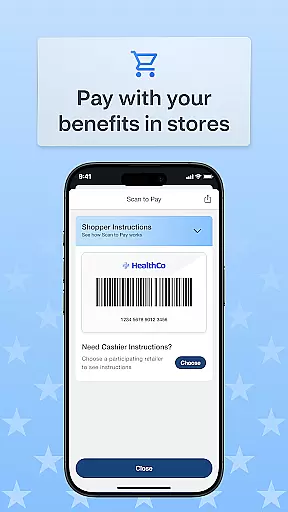
OTC Health Solutions is a comprehensive mobile application designed to help users easily access and manage their Over-the-Counter (OTC) health benefits from anywhere. The app provides secure and straightforward access to both health and OTC benefits, which can be utilized at nearby CVS stores or through online shopping. With real-time updates on fund balances and activity, users can take full control of their benefits.
The app also allows users to view detailed transaction histories, track the status of their orders, and locate nearby CVS stores where they can use their benefits in-store. Additionally, it offers flexible shopping options including CVS in-store purchases, online shopping, and home delivery services. This makes it convenient for users to shop according to their preferences while ensuring they maximize their health benefits effectively.
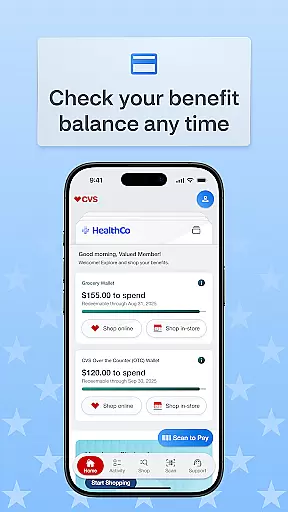
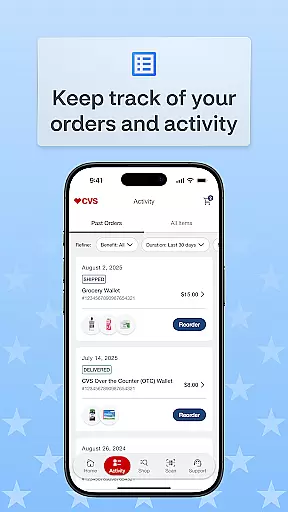
One of the standout features of OTC Health Solutions is its ability to provide real-time balance updates on funds and activities. This ensures that users are always aware of their available benefits and can plan their purchases accordingly. The app also includes a transaction history feature, allowing users to review past transactions and track the status of current orders seamlessly.
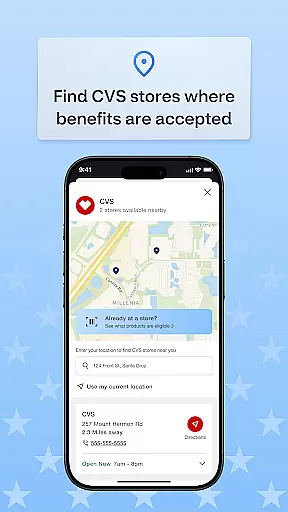
Another significant feature is the store locator tool, which helps users find nearby CVS stores where they can use their benefits in-store. For those who prefer online shopping, the app supports CVS online purchases and even offers home delivery options. These features collectively ensure that users have a versatile and convenient shopping experience, whether they choose to shop in-store or online.
Personalized planning in the OTC Health Solutions app empowers users to tailor their health and over-the-counter benefits according to individual needs. This feature ensures that each user can access relevant information and resources, enhancing their healthcare experience.
The app provides real-time balance updates on funds and activity, allowing users to manage their benefits effectively. By tracking transaction history and order status, users gain insights into their usage patterns and can adjust their plans accordingly for optimal benefit utilization.
With personalized planning, users can shop on their own terms using convenient CVS in-store, online, and home delivery options. This flexibility supports a seamless integration of health management into daily life, promoting better adherence to personal wellness goals.
Progress visualization within the OTC Health Solutions app offers users a clear and intuitive way to monitor their health and over-the-counter benefits. This feature transforms complex data into easy-to-understand visuals, helping users stay informed about their benefit usage and remaining balances.
Users can view detailed transaction histories for benefits used, which are presented through graphical representations. These visual aids make it simpler to track spending trends and understand how funds are allocated across different purchases or services.
By integrating progress visualization with real-time updates, the app ensures that users always have an accurate picture of their current status. This transparency not only builds trust but also encourages proactive management of one's healthcare resources.
User-friendly interface
Real-time updates
Secure access
Flexible shopping
Comprehensive support
Limited to CVS
Occasional bugs
Requires internet
No offline mode
Few customization options

Text notifications, button control, heart monitor & more for your Amazfit.
 2.40
2.40
The simplest way to track your 21 Day Program containers, exercises, and water.
4.50
sobriety counter app to help and motivate people to stop drinking alcohol.
4.90
Build Healthy Habits!
4.60
Optimization for TRT & Enhanced Athletes
4.4
Find Paid Clinical Trials In Your Area
3.70
Eat smarter with Eato, your personal calorie counter and nutrition tracker!
4.40
GloryFit is a companion app for the smart bracelet.
3.60
Drink water reminder app. Track water intake. Smart simple hydration tracker.
4.70
Beauty Care, Makeup & Skin Care Scanner | Pregnancy App For A Mom | Healthy Baby
5.00
Power-lifting, weightlifting and Wendler 531 app to track your workout program.
4.90
Weight loss app: home workout for women to lose weight & burn calories.
4.80
Measure your Pupil Distance for Eyeglasses and VR headsets in 3 quick steps.
4.70
Binaural Beats - Fully Customizable Waves - Pure Sound - No Loops
4.50
For Absolute Novices to Strength Training. Simple. Effective.
4.40
“Overcoming pain based on EMDR” helps you to alleviate chronic pain and stress.
4.10
Create powerful subliminal audio with custom affirmations and background music.
4.00
Enjoy the Gluten Free living with the best app. SCAN the barcodes & SEARCH.
3.60
HRV4Training helps you optimize goals and improve performance. No sensors needed
3.30


User Reviews