
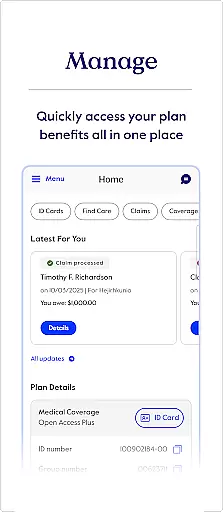
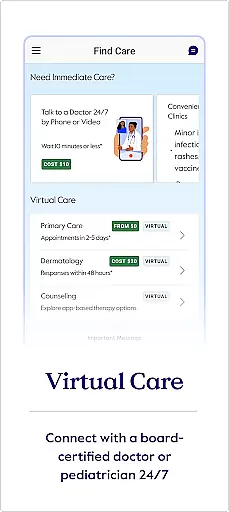
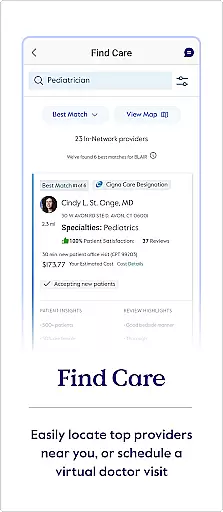
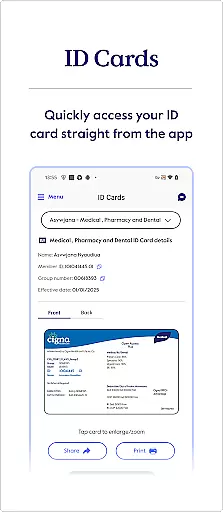
myCigna is a comprehensive health management app designed for Cigna customers. The app provides easy access to essential health information, allowing users to manage their healthcare needs efficiently. With features like ID card access, care finder, claims review, and prescription management, myCigna ensures that users have all their critical health data at their fingertips.
The app supports functionalities such as viewing and sharing ID cards, finding healthcare providers, checking claims, managing pharmacy needs, and reviewing coverage details. Additionally, it offers wellness tracking and supports multiple languages including English and Spanish. This makes myCigna an indispensable tool for anyone looking to streamline their healthcare management process.
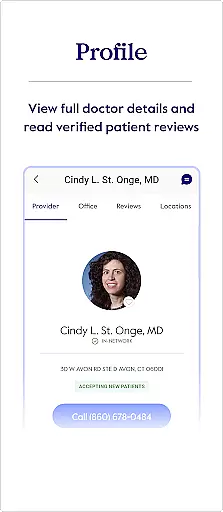
myCigna boasts a variety of features tailored to enhance user experience in managing health information. Users can quickly view and share their ID cards via email or print them directly from the app. The Find Care feature allows users to search for doctors, dentists, pharmacies, and healthcare facilities within Cigna's network, providing quality-of-care ratings and cost comparisons.
Claims management is simplified with options to view and search both recent and past claims. Users can also access their health fund balances and manage their pharmacy needs by refilling prescriptions and updating preferences. Furthermore, the app provides detailed coverage insights, wellness activity tracking, and supports multiple languages, ensuring accessibility and convenience for a diverse user base.
Personalized planning in the myCigna app provides users with tailored health and wellness strategies based on their specific coverage and health goals. This feature leverages data from your Cigna health plan to offer customized recommendations.
The app enables you to view goal activity and awards, ensuring that your health objectives are aligned with your current plan benefits. By analyzing your usage patterns and health information, it suggests activities that can enhance your well-being while maximizing your insurance benefits.
Users benefit from a more engaged healthcare experience as they receive personalized insights into what actions they can take to improve their health. These plans evolve with continuous feedback, adapting to changes in your health journey and coverage details.
This personalized approach not only helps individuals manage their health better but also optimizes the use of their insurance plans by highlighting relevant services and preventive care opportunities available under their policy.
Progress visualization within the myCigna app allows users to track their health milestones and achievements through intuitive graphical representations. This feature is crucial for maintaining motivation and understanding one's health trajectory over time.
With access to visual charts and graphs, users can monitor claims history, account balances, and wellness activities. The app presents this data in an easily digestible format, making it simple to comprehend complex information at a glance.
By offering clear visuals of your progress, such as completed goals or reductions in deductible amounts, the app empowers you to make informed decisions about your healthcare. Visual cues help identify trends and areas needing attention, enhancing proactive health management.
Ultimately, progress visualization transforms raw data into actionable insights, fostering a deeper connection between users and their health outcomes while encouraging ongoing engagement with their health plans.
User-friendly interface
Comprehensive health management
Multi-language support
Efficient claims processing
Integrated pharmacy services
Limited to Cigna customers
Feature availability varies by coverage
No offline functionality
Occasional bugs reported
Requires internet connection

Easy access to health benefits
 4.70
4.70
Chair Workout: Women's Edition for safe, flexible, and personalized fitness.
4.40
App to stop smoking slowly or now with a motivational badges and helpful tips
4.80
Period Tracker, the easiest way to track your periods!
4.50
See what's really going on inside your head! Real time EEG graphs from your Muse
4.40
When the night comes, we prepare your eyes for deep, sweet dreams
4.70
Track sleep cycle, relax with white noise, sleep sounds & smart alarm clock
3.80
Fast Body building & Weight Loss. Home Workouts with Daily Coach, No Equipment.
4.30
Scan food & cosmetic products and evaluate their impact on your health
4.80
Easy to use step counter, calorie counter helps lose weight, count steps offline
4.80
A brain game that moves you
4.70
You deserve easy access to important insurance information. Download for FREE.
4.70
Mind on steroids - relaxation, productivity, meditation and sleep!
4.60
For Absolute Novices to Strength Training. Simple. Effective.
4.40
Download MadMuscles to start your positive body transformation!
4.30
This is an application that serves as a companion app for smart watch.
4.20
FitCloudPro takes care of your health every minute.
3.70
Control your sleep in real-time wearing Garmin device
3.60
The app helps you address digestive symptoms based on the Fast Tract Diet.
3.50


User Reviews