

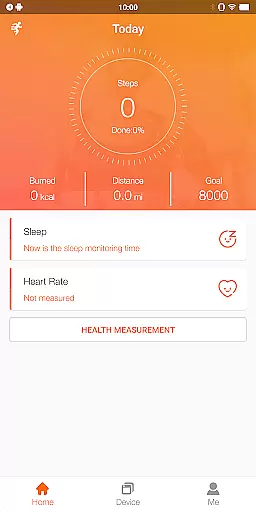
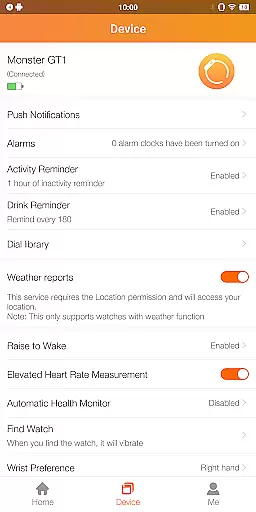
FitCloudPro is a comprehensive health and fitness application designed to seamlessly connect your smartwatch with your mobile device. This app not only manages your Kumi smartwatch but also enhances its functionality, providing users with greater control over their wearable technology. With support for models like the KUMI GT6 Pro, GW16T Pro, KU3 Max, and KU3 Meta, FitCloudPro ensures that you can monitor and record essential health metrics such as steps, calories burned, sleep patterns, heart rate, and blood oxygen levels.
In addition to health tracking, FitCloudPro offers rich message reminders for calls, SMS, and social media notifications, allowing users to stay connected without constantly checking their phones. The app also features various customizable watch faces, sedentary and hydration reminders, and settings for brightness, vibration, and do-not-disturb modes. These functions collectively contribute to a holistic approach to personal wellness and productivity, making FitCloudPro an indispensable tool for anyone looking to optimize their smartwatch experience.
FitCloudPro stands out with its diverse range of features tailored to enhance the smartwatch user experience. One of its core functionalities is the ability to monitor and record detailed health data, including steps taken, calories burned, sleep quality, heart rate, and blood oxygen levels. This allows users to gain valuable insights into their daily health patterns and make informed lifestyle adjustments. Furthermore, the app provides rich message reminders for calls, SMS, and popular social media platforms like Facebook and Twitter, ensuring that users never miss important communications.
Another notable feature is the selection of various watch faces, which enables users to personalize their smartwatch display to match their style and mood. FitCloudPro also includes practical tools such as sedentary reminders, hydration alerts, and customizable settings for brightness and vibration. These thoughtful additions help promote a healthier lifestyle while offering convenience and personalization. By integrating essential permissions like location, Bluetooth, and notification access, FitCloudPro delivers timely updates and synchronized health data, ensuring an optimal and uninterrupted user experience.
FitCloudPro offers personalized health and fitness planning tailored to individual needs. The app collects data such as steps, calories burned, sleep patterns, heart rate, and blood oxygen levels to create a comprehensive health profile for each user.
Through advanced algorithms, FitCloudPro analyzes your daily activities and provides customized recommendations to improve your overall well-being. This includes setting achievable goals based on your current fitness level and tracking progress over time.
Users benefit from an adaptive system that evolves with their lifestyle changes, ensuring that the advice and plans remain relevant and effective. This personal approach helps maintain motivation and encourages a healthier lifestyle.
The true value of personalized planning in FitCloudPro lies in empowering users to take control of their health journey with actionable insights and tailored guidance, making it an essential tool for anyone looking to enhance their fitness regimen.
Visualizing progress is a key feature of FitCloudPro, designed to keep users engaged and motivated on their fitness journey. By presenting health metrics such as steps taken, calories burned, and sleep quality in easy-to-understand graphs and charts, users can easily track their achievements.
The app's interface highlights milestones and trends over time, providing a clear picture of improvement areas and successes. Users can customize their dashboards to focus on the metrics most important to them, ensuring a personalized experience.
This visualization not only makes it simpler to understand complex health data but also serves as a motivational tool. Seeing tangible results encourages continued effort and adherence to fitness goals.
With FitCloudProu2019s progress visualization, users gain valuable insights into their health trends, enabling informed decisions about their fitness routines and lifestyle choices, ultimately leading to sustained health benefits.
User-friendly interface
Comprehensive health tracking
Customizable watch faces
Rich message notifications
Practical wellness reminders
Limited device compatibility
Battery consumption concerns
Occasional syncing issues
Premium features require subscription
Not suitable for medical use

SportWerks - Workout Tracker for Wear OS Watches
 3.90
3.90
Text notifications, button control, heart monitor & more for your Amazfit.
2.40
Chair Workout: Women's Edition for safe, flexible, and personalized fitness.
4.40
The app helps you address digestive symptoms based on the Fast Tract Diet.
3.50
See what's really going on inside your head! Real time EEG graphs from your Muse
4.40
Load the bar with this barbell & plate calculator. It's leg day, not brain day!
4.70
The OFFICIAL Couch to 5K® running training app! A 9 week walk-run workout plan.
4.50
Memory, mind & logic exercises. Puzzle games, IQ & brain test for kids & adults
4.50
Lazy home workouts with your virtual fitness coach for weight loss.
4.30
Build Healthy Habits!
4.60
Effortlessly and naturally release anxiety by harnessing the power of your brain
4.60
Relax. Sleep Better. Feel Better.
4.50
Point, scan, and unlock truth in every bite.
4.50
Relax to calm sounds, white noise, music, guided meditation and bedtime stories
4.40
This is an application that serves as a companion app for smart watch.
4.20
Monitor, analyze, track, and convert blood sugar & help you control diabetes.
4.10
Track sleep cycle, relax with white noise, sleep sounds & smart alarm clock
3.80
Measure real-time wrist & ambient temperature with your Galaxy Watch (Wear OS)
3.20
Sync your activities of the most popular sports tracking services
2.70


User Reviews