
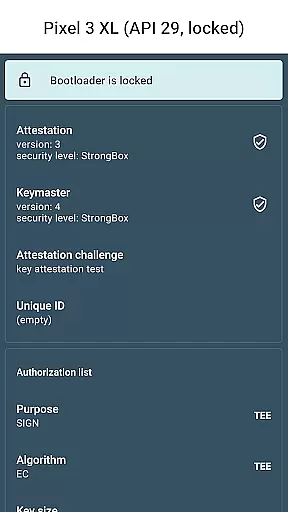
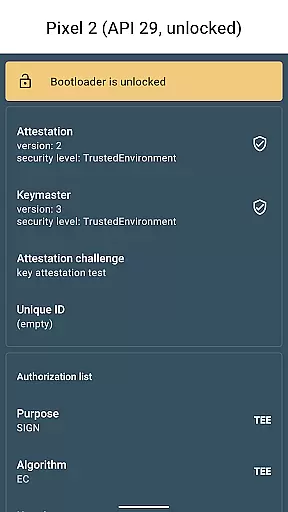
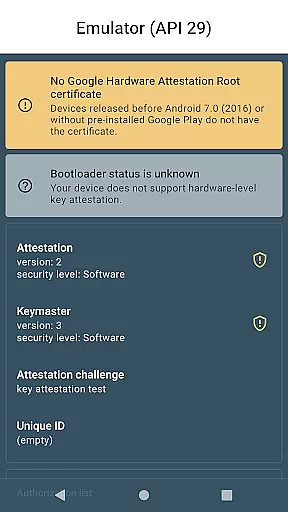
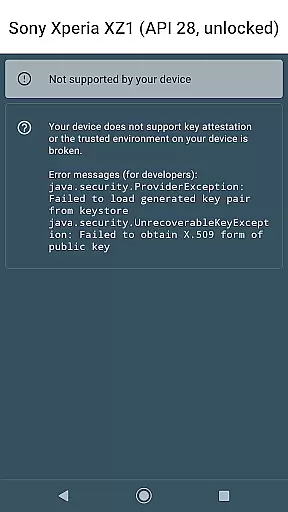
Key Attestation Demo is a specialized application designed for developers and power users who require advanced security features. This app allows users to verify the authenticity of cryptographic keys on Android devices, ensuring secure transactions and communications.
The core functionality revolves around implementing and testing key attestation processes as outlined in official Android documentation. It serves as an essential tool for those working with Android's Keystore system, providing practical demonstrations and validations of security protocols.
By using this app, developers can ensure their applications maintain robust security standards, making it particularly valuable for creating secure enterprise solutions or developing privacy-focused applications.
This application offers several distinct features that cater specifically to the needs of security-focused developers. First, it provides a practical implementation of the key attestation process, allowing users to verify the integrity of security keys directly on their devices.
Another notable feature is its open-source nature, with source code available on GitHub. This transparency enables developers to review, modify, and improve the app's functionality while serving as a valuable learning resource for implementing similar security measures in other projects.
Additionally, the app includes links to official Android documentation, making it a comprehensive resource for understanding and implementing key attestation in various development scenarios.
Functionality completeness in a library or demo app refers to how thoroughly it implements its intended features. For Key Attestation Demo, this means providing all necessary tools and APIs to demonstrate and test key attestation processes on Android devices.
The app includes comprehensive documentation links and source code access, ensuring developers have everything needed to understand and utilize key attestation mechanisms effectively.
By covering various aspects of the attestation process, from certificate chain verification to detailed device information extraction, the app offers a complete toolkit for developers working with hardware-backed security features.
This completeness allows power users and developers to verify the authenticity of hardware-backed keys, which is crucial for implementing secure systems on Android devices.
Usability focuses on how easily developers can integrate and use the library or demo in their projects. The Key Attestation Demo excels in usability by providing clear documentation references directly within its description.
Operational smoothness is demonstrated through seamless integration with Android's security features. Users can smoothly navigate and utilize the app's functionalities without facing technical hindrances.
With accessible source code hosted on GitHub, the app ensures that developers can easily review, modify, and implement its features in their own projects, enhancing overall usability.
This approach not only simplifies the development process but also encourages community contributions, leading to continuous improvement and smoother operation over time.
Developer-focused tool
Open-source availability
Comprehensive security features
Official documentation included
Practical implementation example
Limited general user appeal
Requires technical expertise
No beginner-friendly interface
Specialized use cases only
Minimal visual design

Wireless reverse charging using phone now is possible
 4.30
4.30
Identify securely online
3.10
An essential GFX utility developed for specific FPS mobile games
4.50
Collection of Maps and Mods for Dmod
3.30
Enjoy hours of entertainment with our Roblox mobile games app
4.3
An impressive collection of tools, characters, weapons, skins and more!
4.30
Simulator of real black light
3.50
Phone Software Update Quick Checker helps you to keep your phone apps up to date
4.50
Unlock the hidden menus of your phone with our mobile secret codes app.
4.20
Study Bible King James Version: the correct way to learn the Bible with audio
4.80
Block, disable and secure phone camera from secretly taking photos by spyware.
4.50
Game Booster GFX for smoother gaming experience. Enjoy 120 FPS and 4x Game Space
4.20
View your cameras anywhere and anytime
4.20
Test DPC is a sample device policy controller for use with Android Enterprise.
4.20
Do you want to drive easy ? do you wanna full mirror link Mobile with your car
4.10
The best PS2 games from your childhood come to life in their mobile version!
4.00
Connect and find your Smart Tag 2 devices through our app.
3.60
Experience virtual reality on your smartphone with Cardboard.
3.50
Record with Double Camera Video Recording using Dual Camera Front and Back Video
3.00


User Reviews