
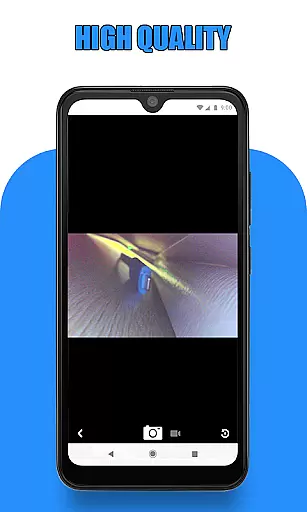
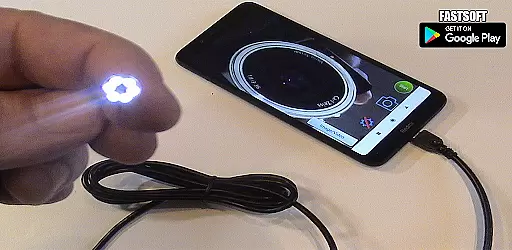
Endoscope Camera Connector is a specialized app designed to connect Android devices with external cameras such as endoscopes, USB cameras, or Borescope cameras. This versatile tool allows users to view live feeds from these devices directly on their smartphones, making it ideal for various inspection tasks.
The app functions similarly to an OTG viewer, enabling users to open and interact with external Borescopes via USB OTG or Type-C connections. It supports video recording with sound and provides access to a gallery where users can manage captured images and videos. Before using the app, users should ensure their device supports USB OTG technology and that their camera is UVC-compatible.
This app is particularly useful in scenarios like sewer inspections or plumbing repairs, where visual assessments are crucial. By eliminating the need for traditional drain cameras or plumbing cams, Endoscope Camera Connector offers a portable and efficient solution for professionals and DIY enthusiasts alike.
Endoscope Camera Connector boasts several key features that enhance its functionality and user experience. Firstly, the app includes an OTG checker within its settings, allowing users to verify if their device supports USB OTG technology before proceeding. This ensures compatibility and prevents potential connection issues.
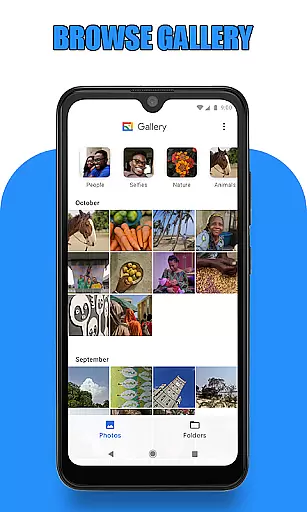
Once connected, users can easily capture photos and record videos directly through the app's intuitive interface. The integrated gallery system lets users organize, view, and delete media files effortlessly. By swiping left in the gallery, users can switch between images and videos, providing seamless navigation through their captured content.
A notable advantage of this app is its versatility across different use cases. Whether inspecting blocked drains, conducting sewer line assessments, or working with external webcams, the app adapts to various professional needs. Its ability to transform smartphones into powerful inspection tools makes it an invaluable asset for technicians and hobbyists requiring detailed visual analysis.
Endoscope Camera Connector offers a comprehensive solution for connecting your mobile device with various external cameras, including endoscopes, USB cameras, and Borescope cameras. The app's functionality is designed to support a wide range of devices, making it versatile for both personal and professional use.
The app works by utilizing OTG (On-The-Go) technology, allowing users to connect their external cameras directly to their Android devices via USB or Type-C connectors. Once connected, the app facilitates the viewing, recording, and capturing of videos and images from the external camera. This broad compatibility ensures that whether you're using a Depstech, sewer inspection camera, or any UVC-compatible device, Endoscope Camera Connector can seamlessly integrate and provide a reliable performance.
Before using the app, users are guided to check if their device supports USB OTG technology through an integrated checker. This preliminary step ensures that all technical requirements are met, thus enhancing the user experience by preventing potential connectivity issues. Additionally, the app provides clear instructions on how to use the camera functionalities effectively, ensuring users can make the most out of their devices.
By supporting essential features such as video recording with sound, photo capturing, and access to a gallery for media management, Endoscope Camera Connector delivers a complete package. Users can easily view, manage, and delete their captured media within the app, streamlining workflows in fields like plumbing inspections, blocked drain diagnostics, and other scenarios where external cameras are indispensable.
Usability is a critical aspect of the Endoscope Camera Connector, ensuring that users can efficiently operate the app without encountering significant hurdles. The app is engineered to offer a smooth operational experience, focusing on ease of use and accessibility for individuals across different expertise levels.
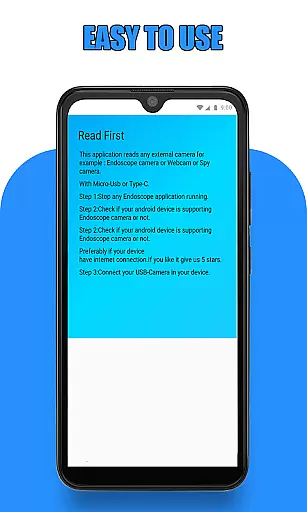
Upon launching the app, users are greeted with a straightforward interface that guides them through the necessary steps to connect their external cameras. By simply plugging in the USB of the endoscope camera and following the on-screen prompts, users can quickly start viewing live footage. This intuitive process eliminates unnecessary complications, making it accessible even for those who may not be tech-savvy.
Moreover, the app includes a built-in gallery feature that allows users to manage their captured photos and videos effortlessly. With simple navigation gestures, such as sliding to switch between media types and long-pressing to delete unwanted files, the app ensures that managing media is hassle-free. These features collectively contribute to a fluid user experience, reducing the learning curve typically associated with specialized applications.
Overall, Endoscope Camera Connector excels in delivering operational smoothness by combining essential functionalities with an easy-to-navigate interface. Whether used for professional inspections or personal projects, the app's design prioritizes user engagement and satisfaction, ensuring that tasks are completed efficiently and effectively.
User-friendly interface
Wide device compatibility
Efficient media management
Versatile application uses
Real-time camera feed
Limited iOS support
Requires OTG adapter
Dependent on UVC compatibility
No advanced editing tools
Occasional connection issues

Demo for Key Attestation feature of the Android system.
 4.80
4.80
Connect and find your Smarttag devices through our app.
4.00
An essential GFX utility developed for specific FPS mobile games
4.50
Zlink Carplay Android a mirror link app with a Carplay interface style
4.0
Mobile Connect To TV - HDMI USB & WiFi Screen Mirroring
3.70
Ps2 plugins for 64 bit artitechture
3.70
Simulator of real black light
3.50
Mirror phone to TV effortlessly! Stream, share & connect with Airplay ease.
3.60
Unlock the hidden menus of your phone with our mobile secret codes app.
4.20
Study Bible King James Version: the correct way to learn the Bible with audio
4.80
Tune your game graphics with our GFX optimizer for optimal gaming experience
4.50
Game booster GFX may reduce interruptions and improve gaming experience.
4.50
Phone Software Update Quick Checker helps you to keep your phone apps up to date
4.50
Demo version of the mcpro24fps manual video camera. Try and buy a full version!
4.00
Mirror link car connector to share your screen with car dashboard
3.80
Connect your phone to any endoscope camera, USB camera, or borescope with ease.
3.70
A great tool help you to format Micro SD memory Card
3.10
If you are looking for melon playground mod that fun you deffinitely try our app
2.70
Collection of high-quality, trendy skins and outfits!
4.0


User Reviews