
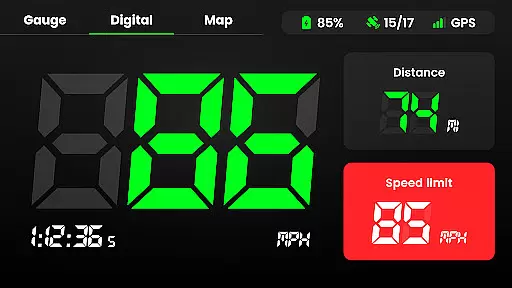
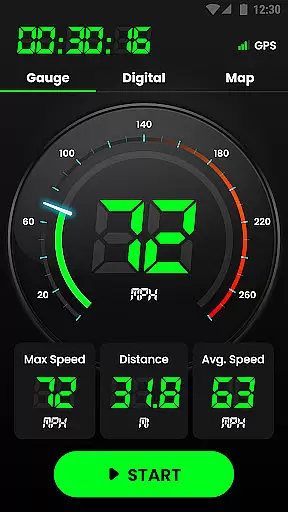
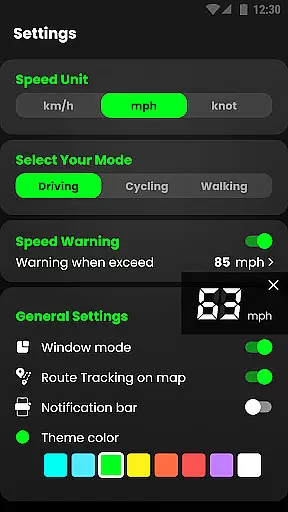
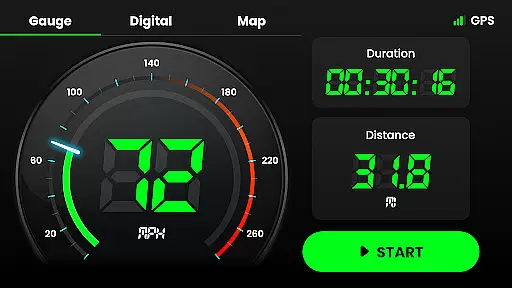
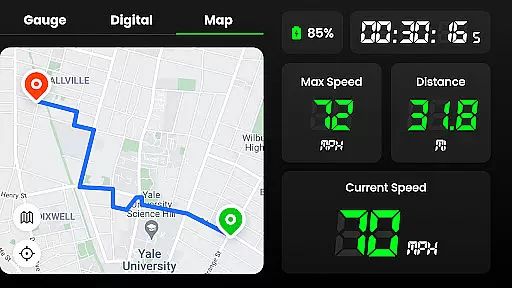
Speedometer is a highly accurate GPS-based speed tracking application designed to measure the velocity of various modes of transportation. Whether you're driving, cycling, or even walking, this app provides real-time speed updates and distance tracking through an intuitive interface. The app supports both digital and analog displays, allowing users to view their current speed in different formats such as km/h, mph, or knots.
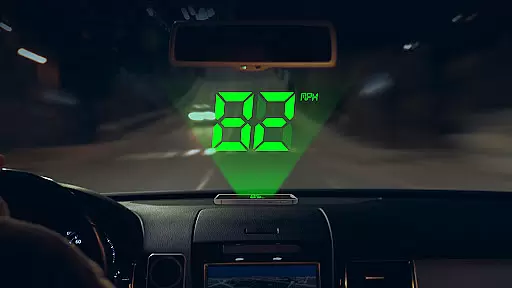
One of the standout features of Speedometer is its ability to function offline, ensuring that users can track their speed even without an internet connection. Additionally, it offers advanced functionalities like speed limit alerts, which notify users via vibration or voice alerts when they exceed predefined limits. With its Head-Up Display (HUD) mode, users can project their speed readings onto their car windshield for easy viewing while driving. This makes it not only a versatile tool for everyday commuters but also a reliable solution for those who need precise speed measurements in professional settings.
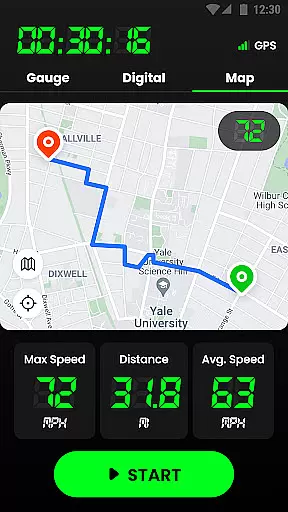
The app's GPS navigation capabilities allow users to monitor their location and journey routes on a map, making it ideal for tracking trips and analyzing travel history. Its small size and battery-friendly design ensure minimal impact on device performance, while customizable themes and multiple display modes enhance user experience. Whether you're looking to replace a faulty vehicle speedometer or simply want to track your fitness activities, Speedometer delivers comprehensive tools to meet all your speed measurement needs.
Speedometer stands out with its rich set of features tailored to provide an exceptional user experience. One of its key highlights is the dual-mode display option, offering both digital and analog interfaces. Users can switch between these modes depending on their preference, with the digital mode mimicking a traditional car dashboard for ease of use. Furthermore, the app allows seamless switching between different units of speed measurement—kilometers per hour (km/h), miles per hour (mph), and knots—making it adaptable for global usage across various regions and vehicles.
Another remarkable feature is the offline functionality, which ensures uninterrupted service regardless of network availability. This is particularly useful for travelers venturing into areas with poor connectivity. The built-in HUD (Head-Up Display) mode projects essential data directly onto the windshield, enhancing safety by reducing the need to look away from the road. For those concerned about exceeding legal speed limits, the app includes customizable speed alerts that trigger warnings via vibrations or audible notifications when thresholds are breached.
Additionally, Speedometer excels in route tracking and history management. It records detailed trip information, including starting and ending points, total distance covered, average speed, and maximum speed achieved during each journey. These logs are accessible anytime, providing valuable insights for personal or professional analysis. With support for widgets and notification bar displays, users can conveniently monitor their stats without opening the app. Overall, these robust features make Speedometer a top choice for anyone seeking precision and convenience in speed tracking.
Map accuracy is crucial for any navigation or tracking application, and Speedometer excels in this area. The app utilizes advanced GPS technology to provide real-time location data with impressive precision. Whether you're driving, cycling, or walking, users can trust that their current position displayed on the map is both accurate and reliable.
The integration of GPS navigation allows Speedometer to not only show your location but also track every journey route intuitively on the map. This feature ensures that users have a clear understanding of their travel path, making it easier to navigate unfamiliar areas or review past trips. With high-frequency updates, the app maintains its accuracy even when you're moving at high speeds.
Speedometer's offline functionality further enhances its map accuracy. Users can continue to receive precise location data without an internet connection, which is particularly beneficial in areas with poor network coverage. This reliability ensures that whether you are in a remote area or simply without cellular service, your speed and location information remains consistent and trustworthy.
Route planning is an essential feature for anyone looking to optimize their travel experience, and Speedometer offers robust tools to assist with this task. By leveraging detailed mapping data, the app provides users with multiple route options, allowing them to choose the most efficient path based on real-time traffic conditions and estimated travel times. This flexibility helps drivers avoid congestion and reach their destinations faster.
In addition to offering alternative routes, Speedometer continuously monitors traffic patterns and adjusts its recommendations accordingly. If there's a sudden change in traffic flow or an unexpected roadblock, the app quickly recalculates the best possible route, ensuring minimal disruption to your journey. These dynamic updates keep users informed about potential delays and help them make timely decisions regarding their travel plans.
For those who prefer customization, Speedometer includes various settings to tailor the route planning experience. Users can set preferences such as avoiding toll roads or highways, prioritize scenic routes, or select specific points of interest along the way. Such personalization options ensure that each trip aligns with individual needs and preferences, enhancing overall satisfaction with the navigation process.
User-friendly interface
Accurate GPS tracking
Offline functionality
Customizable speed alerts
Lightweight design
Limited free features
Occasional GPS inaccuracies
No social sharing
Premium subscription required
Battery consumption

Offline maps for phone and smart watch: topographic maps, satellite images...
 3.30
3.30
Find shortest way and save energy . Distance and area calculator.
4.70
Voice GPS with driving directions, offline maps navigation GPS for safe travel
4.50
Navigate confidently with our precise Digital Compass app & Direction Compass!
4.70
Get route map navigation with 3D satellite view, and live earth camera streaming
3.70
Live Satellite view app for find GPS navigation Direction and live location map
3.70
Off-Roading Navigation App With Trails, Public Lands, & Private Property Info
3.30
Get matched with a nearby driver — you’ll be on your way in minutes.
4.30
Rideshare, taxi cabs, and more for your airport travels and everyday trips.
4.50
Bolt is a ride-hailing app for requesting fast, safe, and affordable transport
4.80
GPX Viewer PRO shows tracks, routes and waypoints from gpx and kml files.
4.60
America’s largest public fast charging network, with over 500 charging stations.
4.50
Plan routes, share locations, and set custom alert zones
4.40
Simple & easy to use a compass app. Get accurate directions.
4.20
Find radar, speed camera, flight tracker. Use hud, location tracker, speedometer
4.20
Find routes fast with GPS Maps, GPS Navigation & driving directions.
4.10
Explore Live Earth Map with 3D World Map & locate cites, mountains real time.
3.80
Explore the world with Live Satellite View, 3D Maps, GPS Navigation & Earth Map.
2.90
All of NHSA's trail information at your fingertips for the 2025-2026 season
4.1


User Reviews