

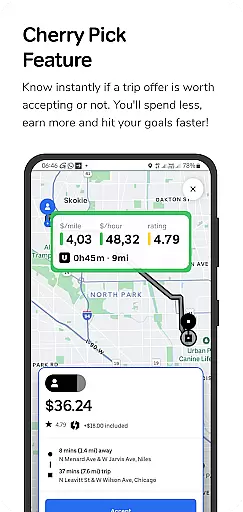
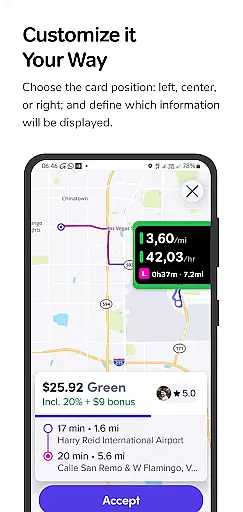
GigU is the leading smart assistant designed specifically for rideshare drivers in the US, helping them maximize earnings on platforms like Uber and Lyft. The app's standout feature is its Cherry Pick functionality, which instantly evaluates trip offers to determine their profitability. This empowers drivers to make smarter decisions, ensuring they spend less time on unprofitable trips while reaching their income goals faster.
The app provides essential tools such as live smart indicators that display key metrics like earnings per mile or hour, a color-coded grading system for quick decision-making, and voice notifications for hands-free operation. With additional features like safety shortcuts to Google Maps and a detailed trip history log, GigU combines profitability with driver convenience and security.
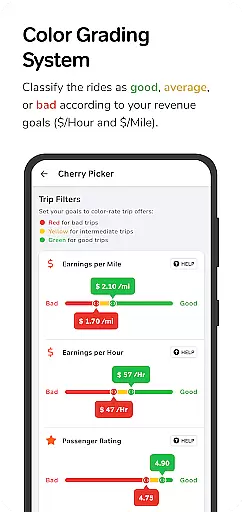
GigU stands out with its comprehensive suite of features tailored for rideshare drivers. The Cherry Pick feature uses advanced algorithms to analyze trip details in real-time, providing instant feedback on whether a ride is worth accepting based on user-defined criteria. The app employs a unique colored grading system that visually categorizes trips by profitability, making it easy to identify the best opportunities at a glance.
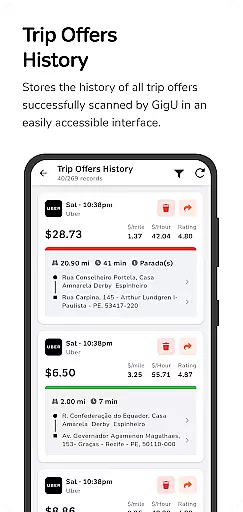
Additional functionalities include live smart indicators showing critical metrics such as earnings per minute or mile, voice notifications that allow drivers to keep their eyes on the road, and quick access to Google Maps for verifying pickup and drop-off locations. The app also maintains a complete history of all scanned trip offers, giving users valuable insights into market trends and their driving patterns.
All these features are powered by Android's Accessibility Services API, which GigU leverages responsibly to detect trip offers without compromising user privacy or security.
In the ridesharing industry, having access to detailed vehicle and trip information is crucial for drivers seeking to maximize their earnings. GigU revolutionizes this aspect by providing live smart indicators that display essential metrics such as earnings per mile, per hour, and per minute. This feature ensures drivers can make informed decisions about which trips to accept.
The app employs a colored grading system that rates trips based on user-defined settings. This intuitive color-coding allows drivers to instantly assess the potential profitability of a ride offer, ensuring speed and simplicity in decision-making. With this system, users can avoid less profitable trips and optimize their working hours.
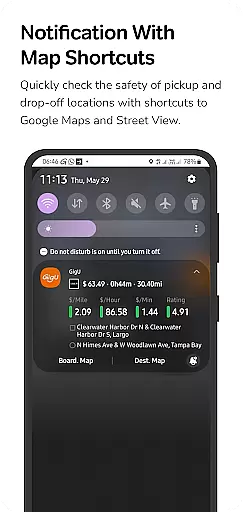
GigU also offers quick maps shortcut notifications, enabling drivers to swiftly evaluate the safety of pickup and drop-off locations. By integrating with Google Maps and Street View, these shortcuts provide valuable context that helps drivers ensure their personal security while on the job.
Price transparency is vital in the ridesharing ecosystem, and GigU excels in providing drivers with clear insights into the financial aspects of each ride offer. The app's Cherry Pick feature evaluates trip offers in real-time, allowing drivers to know immediately whether a particular ride is worth accepting based on potential earnings.
With the ability to view the history of all received ride offers scanned by GigU, drivers gain a transparent overview of their opportunities and decisions over time. This historical data empowers users to refine their strategies and improve their overall earnings.
Additionally, GigU enhances user experience through voice notifications that convey critical information without requiring drivers to look at their phones. This hands-free approach not only promotes safer driving conditions but also ensures that drivers remain fully informed about the profitability of ride offers while focusing on the road.
Instant trip evaluation
User-friendly interface
Enhanced earning potential
Voice notification support
Comprehensive trip history
Limited to rideshare drivers
Requires accessibility permissions
Premium features may cost extra
Dependent on third-party apps
Occasional performance issues

OBD diagnostics, Live Data, DPF regeneration for BMW
 4.00
4.00
App Mirroring for Tesla Car's Browser
2.80
Listings of Tesla's with FSD - Included package
4.60
Play what you want through Android Auto
4.90
Buy and sell your boat
4.70
myAudi offers users services and Audi connect services for Audi drivers
4.10
Car Values, Research and More
4.80
Secure mobile payments & fuel savings at Phillips 66®, Conoco® and 76® stations
4.40
MySubaru: Download. Connect. Love.
4.70
Marathon ARCO Rewards members earn rewards & apply the rewards for fuel savings!
4.80
DMV practice test 2025: Driver License permit test & written test for all states
4.70
DMV Test Pro offers all the updated FREE DMV tests online.
4.60
Get price alerts, vehicle history details and more for cars near you!
4.50
Launcher for use in the car
4.40
Autotrader is your online solution for buying and selling new and used cars.
4.40
Realtime Charts is a plugin for the Torque Pro App (OBD 2 & Car)
4.20
Get your personalized financing options and shop for used cars today!
4.20
Earn and save with Fuel Rewards®
3.20
Theme for Car Launcher
4.3


User Reviews