
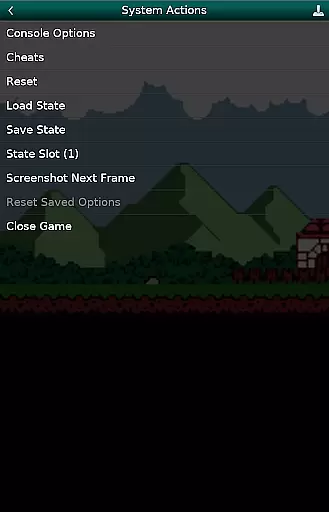
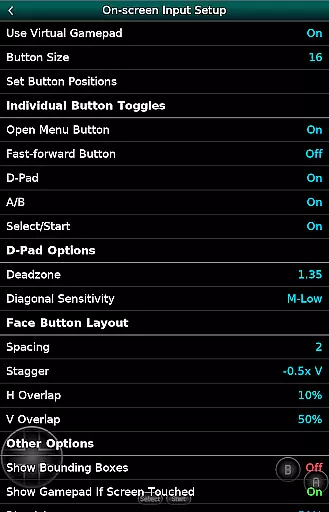
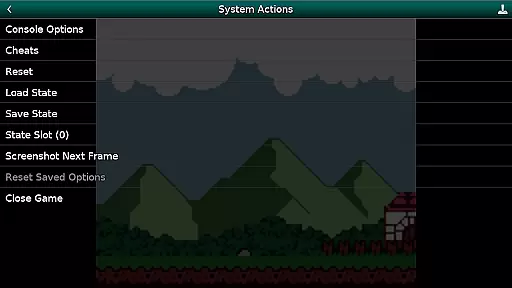
GBC.emu is an advanced open-source Gameboy emulator that offers a minimalist UI with a focus on low audio and video latency. It supports a wide range of devices, from the original Xperia Play to modern devices like the Nvidia Shield and Pixel phones. The app provides multiple color palettes for original GB games, cheat code support in Game Genie and Gameshark formats, and compatibility with .gb and .gbc file formats. Users can enjoy configurable on-screen controls and Bluetooth/USB gamepad support.
This emulator is perfect for gamers who want to relive classic Gameboy experiences on their Android devices. With its robust feature set and compatibility with various controllers, GBC.emu ensures an authentic and responsive gaming experience. Note that no ROMs are included, and users must supply their own legally obtained ROM files.
GBC.emu stands out with its advanced emulation capabilities based on Gambatte, ensuring accurate and efficient performance. The app includes multiple color palettes for original GB games, enhancing visual experiences. Cheat codes in Game Genie and Gameshark formats allow users to customize their gameplay. Supporting .gb and .gbc file formats, optionally compressed with ZIP, RAR, or 7Z, adds flexibility in managing game files.
Configurable on-screen controls provide a personalized touch, while Bluetooth and USB gamepad support ensure compatibility with a variety of HID devices recognized by the OS, such as Xbox and PS controllers. This makes GBC.emu versatile and user-friendly, catering to both casual and hardcore gamers looking for a seamless experience on their Android devices.
Arcade authenticity and nostalgia are crucial elements for any gaming emulator, ensuring that the experience remains true to the original while evoking fond memories of classic gameplay. GBC.emu (Gameboy Emulator) excels in this area by offering an advanced emulation based on Gambatte, a highly accurate Game Boy and Game Boy Color core.
This emulator supports a wide variety of devices, from legacy models like the original Xperia Play to modern devices such as the Nvidia Shield and Pixel phones. By including multiple color palettes for original GB games, it enhances the nostalgic feel while maintaining authenticity. The minimalist UI further complements this by focusing on low audio/video latency, which is essential for recreating the responsive experience of arcade machines.
Users benefit from features like cheat codes in Game Genie and Gameshark formats, adding another layer of nostalgia. These features not only bring back memories but also provide practical benefits such as easier gameplay and enhanced enjoyment. With support for .gb and .gbc file formats, optionally compressed with ZIP, RAR, or 7Z, users can relive their favorite moments without compromise.
Control responsiveness is vital for an immersive and enjoyable gaming experience, particularly in arcade-style games where precision and timing are key. GBC.emu (Gameboy Emulator) addresses this need by providing highly configurable on-screen controls that adapt to various play styles and preferences.
The emulator supports Bluetooth and USB gamepads, as well as keyboards, making it compatible with any HID device recognized by the OS, such as Xbox and PS controllers. This extensive compatibility ensures that users can choose their preferred method of control, enhancing both comfort and performance during extended gaming sessions.
By focusing on low audio/video latency, GBC.emu ensures that every button press translates immediately into in-game actions, providing a seamless and responsive experience. This attention to detail makes gameplay more engaging and satisfying, allowing players to fully immerse themselves in the nostalgic world of Game Boy and Game Boy Color titles.
Low audio/video latency
Wide device compatibility
Multiple color palettes
Cheat code support
Configurable controls
No ROMs included
Requires manual setup
Limited to GB/GBC
Complex for beginners
Dependent on external files

*Try for free.* Survive alone in a Roguelike Reverse Bullet Hell.
 4.80
4.80
Use superpower in your magic hands. Defeat the enemies in a fun elemental game.
4.50
Playing venom RPG alien games? Set spider alien isolation base, with no survivor
4.30
Local offline 2 3 4 player multiplayer minigames - race, tanks, football
4.60
Eat & evolve your shark in the ultimate shark survival game!
4.50
Cool car builder & racing simulator: make a car to win the obstacle course race!
4.60
Venture into the galaxy to fight against the invasion of space invaders.
4.60
Millions of crafters have smashed billions of blocks! Now you can join the fun!
4.40
Original Space Adventure Experience
4.60
Jump and fly your way through danger in this rythm-based action platformer!
4.70
Motorcycle racing games! Prove your paperboy can win in the bike race 3D!
4.50
Nostalgia.GBC is a high quality GBC emulator.
4.50
PC Engine/TurboGrafx-16 Emulator
4.50
Epic offline war strategy game - build your city, train your army, conquer
4.20
Enter Double Dragon Trilogy, a compilation of the beloved arcade series
4.10
Dig yourself a way to gold, diamonds and success with this addictive mining game
3.90
Neogeo MVS/AES Emulator
3.30
Turn-based pixel game where jumping is the only weapon!
4.0
Play retro games with ease – NES, SNES, PSX, PSP & more supported
4.0


User Reviews