
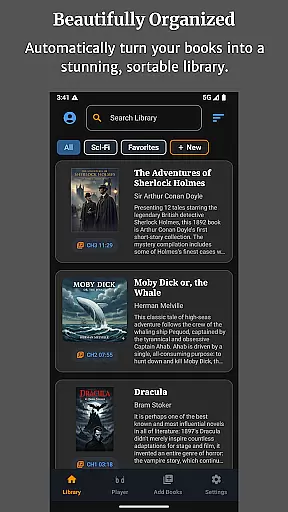
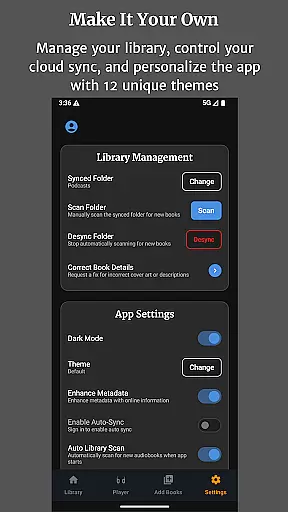
Audiobook Buddy is a comprehensive audiobook management app that transforms scattered audio files into an organized, visually appealing library. It supports syncing from local folders and popular cloud services like Google Drive, OneDrive, and Dropbox, creating a unified library with smart organization features.
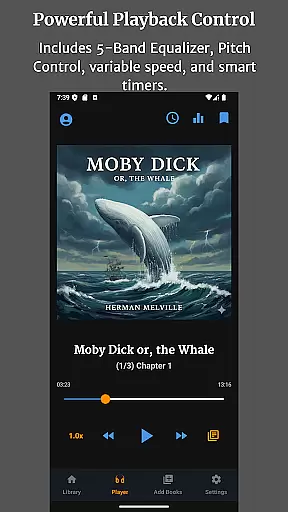
The app offers advanced playback controls including a 5-band Equalizer, Pitch Control, per-book speed settings, and a sleep timer. Users can enjoy background playback, full lock-screen controls, and a mini player for seamless listening. With support for 11 customizable themes and multiple languages, Audiobook Buddy provides a personalized and accessible experience.
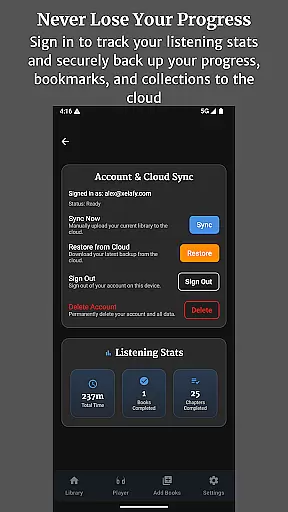
Ideal for audiobook enthusiasts, this app allows users to track listening time, sync progress across devices, and access a vast collection of public domain books while supporting various audio formats.
Audiobook Buddy stands out with its robust feature set tailored for audiobook management. The app's smart library organization system automatically groups audiobooks from different sources into a single, cohesive library. Its Collection feature lets users create custom playlists for series or genres, enhancing discoverability and organization.
Playback capabilities are exceptional, offering a 5-band Equalizer, Pitch Control, and adjustable speed settings for individual books. The inclusion of a sleep timer, background playback, and full lock-screen controls ensures a smooth listening experience. Audiobook Buddy also provides comprehensive file support, handling various audio formats and metadata types while reading embedded cover art.
Additional features include cloud-based bookmark syncing, multi-language support, and customizable themes, making it a versatile tool for both casual listeners and dedicated audiobook collectors.
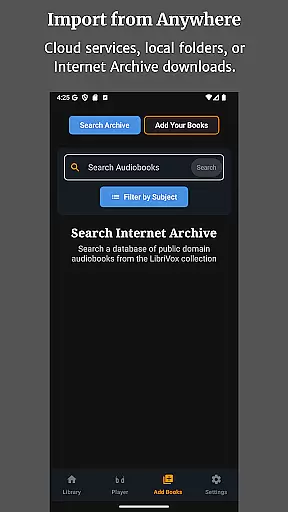
Audiobook Buddy offers an extensive library of public domain audiobooks sourced from LibriVox, providing users with a vast selection of titles to choose from. Beyond the public domain offerings, the app allows users to import their own files and ZIP archives, effectively building a personalized library that can include copyrighted materials legally owned by the user.
The app supports a wide range of audio formats including MP3, M4A, M4B, AAC, OGG, FLAC, WAV, and WMA, ensuring compatibility with various sources. Metadata formats such as CUE, NFO, and TXT are also supported, allowing for rich data about each audiobook to be displayed and organized properly within the library.
Users can trust the authenticity of the content they access through Audiobook Buddy, as it provides clear information on the source of public domain books and enables personal imports, thus respecting copyright laws while offering flexibility in library expansion.
One of Audiobook Buddy's standout features is its comprehensive format compatibility, which ensures that users can enjoy their audiobooks regardless of file type. The app supports popular audio formats like MP3, M4A, M4B, AAC, OGG, FLAC, WAV, and WMA, making it versatile for different user needs and preferences.
In addition to audio formats, Audiobook Buddy reads embedded cover art and accepts JPEG, PNG, and WebP image files, enhancing the visual experience of browsing one's library. This attention to detail extends to metadata support, where CUE, NFO, and TXT files provide additional context and organization for audiobooks.
It's important to note that while DRM-protected audiobooks aren't supported, Audiobook Buddy directs users to resources like Open Library and the Internet Archive for non-DRM titles, promoting legal and unrestricted listening experiences.
User-friendly interface
Extensive format support
Smart library organization
Customizable themes
Cloud sync functionality
No DRM support
Limited language options
Advanced features may overwhelm beginners
Occasional sync issues reported
Some features require sign-in

"Five Dr. Seuss titles in one omBook!"
 4.60
4.60
Cute bedtime story for kids
4.30
Offline dictionary for learning Cantonese as a second language
4.90
7 Languages, Google, Wiki, Vocabulary.com, Cambridge & Urban Dictionary!
4.50
WebNovel - Read Solo Leveling novel and comic
4.10
Scan. Price. Grade.
4.60
F9 Cookbook Mobile App
4.60
Unlock more features in Lithium and show your support. Expand for details.
4.00
World's most comprehensive dictionary app: 13 languages, all online or offline!
4.80
Liturgy of the Hours totally off-line
4.80
Bible Study App with Audio Book, Verse of the Day, and Devotionals.
4.80
Read books PDF, EPUB, WORD, KINDLE, MOBI! Your ebook reader among reading apps.
4.80
Discover Stars and Planets: Live Map Shows Current Constellations in Full Detail
4.70
Translate into 100+ languages with the world’s most accurate AI translator.
4.70
"Do you like green eggs and ham?"
4.70
Read unlimited novels, audiobooks, stories & Unlock ebooks, fanfiction and more!
4.70
Read aloud texts, audiobooks, PDFs or any eBook with text to speech AI audio
4.60
Pretty Moon information App with Complications and Tile
4.30
CleverBook Pro makes the popular guide for the game even better!
4.00


User Reviews