
Lithium Pro is an advanced upgrade package designed specifically for users of the free Lithium app, which falls under the Books & Reference category. This Pro version unlocks a suite of premium features that enhance your reading and data management experience. By integrating with your Google Drive account, it offers seamless synchronization across multiple devices, ensuring your important data is always backed up and accessible wherever you go.
In addition to synchronization, Lithium Pro provides extensive customization options. Users can personalize their reading environment by adjusting page background colors, text colors, and link colors. The ability to create, edit, and delete custom themes allows for a tailored reading experience that suits individual preferences. With more highlight colors and additional features on the horizon, Lithium Pro delivers both functionality and personalization to avid readers.
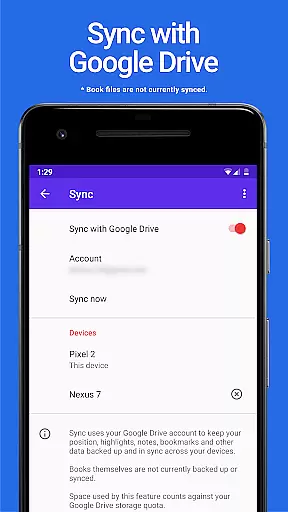
The standout feature of Lithium Pro is its robust Sync functionality. Leveraging Google Drive, this feature ensures all your critical data is consistently backed up and synchronized across various devices. Although book files themselves are not included in the sync process, the convenience of accessing your settings and other essential information from any device significantly enhances user flexibility and reliability.
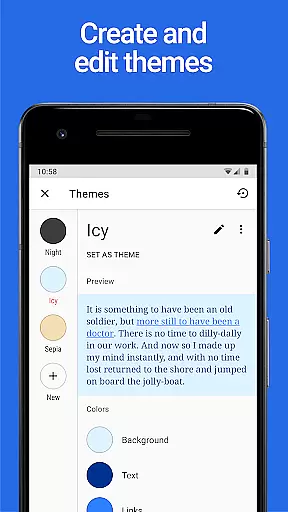
Another remarkable aspect is the custom themes capability. After upgrading, users gain access to an expanded set of theme options through the display settings. Here, they can modify background and text colors as well as hyperlink hues. This level of customization empowers users to craft a visually comfortable and personalized reading space. Moreover, the promise of additional features such as extra highlight colors indicates a commitment to ongoing improvement and user satisfaction.
When it comes to digital reading, the size and authenticity of an e-book library are crucial factors for avid readers. Lithium Pro understands this need and offers a seamless solution through its advanced Sync feature. While the app itself does not store books directly, it ensures that your entire e-book collection is safely backed up and synchronized across all your devices via Google Drive.
This synchronization capability guarantees that users can access their complete library regardless of the device they are using. Although book files themselves aren't currently included in the backup process, the comprehensive data sync maintains all user preferences, reading progress, and library organization. This approach provides peace of mind while ensuring maximum flexibility in managing one's digital book collection.
The application works in tandem with the free version of Lithium, activating premium features that enhance the overall reading experience. By leveraging Google Drive's secure infrastructure, Lithium Pro establishes a reliable ecosystem for managing and accessing e-books, making it an excellent choice for readers who value both quantity and quality in their digital libraries.
Format compatibility is a vital aspect of any robust reading application, determining how well it can handle various document types. Lithium Pro excels in this area by supporting multiple formats and offering extensive customization options. The app's Custom Themes feature allows users to personalize their reading experience like never before, giving them control over page background color, text color, and link colors.
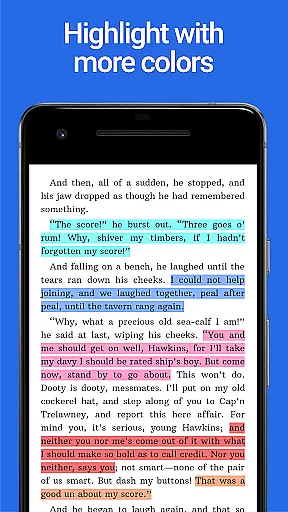
After upgrading to the Pro version, users gain access to enhanced formatting capabilities through the display settings menu. Here, they can create, delete, and modify custom themes to suit their preferences perfectly. Additionally, the app provides more highlight colors than the standard version, enabling more precise note-taking and reference marking throughout different document formats.
While working in conjunction with the free Lithium app, these premium features significantly expand the application's format handling abilities. The combination of advanced customization options and improved highlighting tools makes Lithium Pro a versatile solution for readers who work with various document types and require maximum flexibility in their reading materials.
Seamless data sync
Extensive theme options
Enhanced highlight colors
Google Drive integration
Ongoing feature updates
Requires free app
No book backup
Premium cost
Limited without base app
Feature rollout delay

Contains the 365 daily readings and everything other thing needed for catholics
 4.70
4.70
“I am the Lorax. I speak for the trees.”
4.80
Offline dictionary for learning Cantonese as a second language
4.90
The favorite Christmas story comes to life!
4.80
Offline translator from english to spanish, and from spanish to english.
4.50
Shop over 13 million new and used books at up to 80% off list price
4.20
Learn Thai with 195,000+ entries, crisp Thai sounds, big text; works offline.
4.80
F9 Cookbook Mobile App
4.60
Read unlimited novels, audiobooks, stories & Unlock ebooks, fanfiction and more!
4.70
"When tweetle beetles fight, it's called a tweetle beetle battle."
4.90
Read aloud texts, audiobooks, PDFs or any eBook with text to speech AI audio
4.60
Unlock unlimited access to bestselling ebooks, novels, stories, and audiobooks
4.60
Master AKC Rally signs with in-depth hints, diagrams, and expert guidance.
4.50
Bilingual dictionary with English translations of Modern Standard Arabic words.
4.30
Prime novels await! Fantasy & Romance on JoyRead. Immersive reads!
4.20
“There was one last piece of cake. My little sister said ‘Me too!’”
4.00
Read Trending Romance Stories
4.00
Novels, audiobooks, ebooks & fanfiction. Read anytime, anywhere!
3.40
Fast loot guide for ARC Raiders. Simple tips, stats, maps, and item details.
4.2


User Reviews