
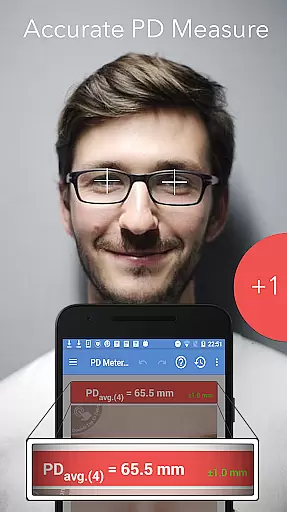
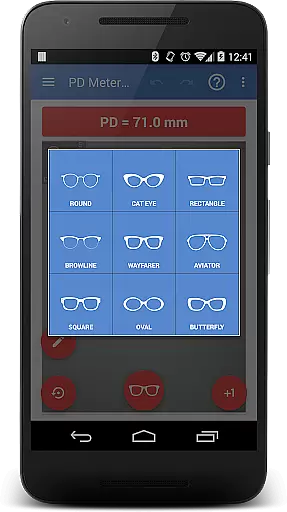
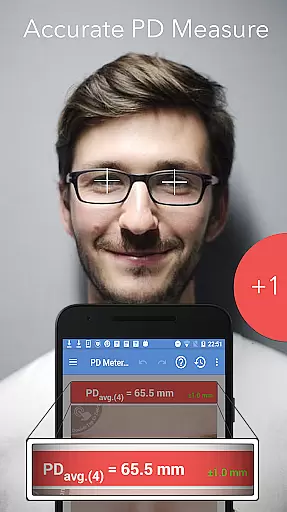
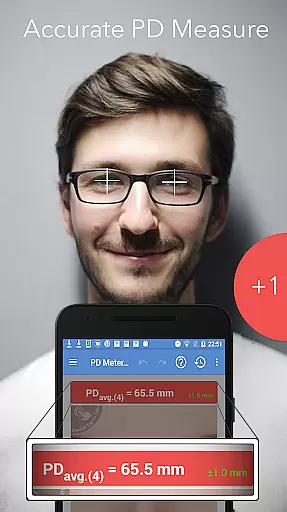
Pupil Distance PD Meter Pro is a specialized mobile application designed for accurate pupillary distance (PD) measurement using your smartphone's camera. This Health & Fitness tool provides users with a reliable way to measure their interpupillary distance (IPD), which is crucial when purchasing eyeglasses, sunglasses, or VR headsets. The app stands out by offering a bonus feature that allows users to virtually try on basic eyeglass frames, enhancing the online shopping experience.
With its user-friendly interface and precise measurement capabilities, this app ensures you get the right fit for your eyewear needs. Whether you're an optician or simply someone who wants to buy glasses online, Pupil Distance PD Meter Pro delivers professional-grade measurements in the palm of your hand. The app also offers responsive customer support and a satisfaction guarantee, making it a trustworthy choice for all your PD measurement requirements.
Pupil Distance PD Meter Pro boasts several distinctive features that set it apart in the Health & Fitness category. First and foremost, the app utilizes advanced camera technology to provide accurate PD measurements. Users can easily measure their own PD or help others do so with simple on-screen instructions. The inclusion of a virtual try-on feature for basic eyeglass frames adds significant value, allowing users to preview how different frames might look on them.
Another notable feature is the app's commitment to authenticity and transparency. Unlike many competitors, Pupil Distance PD Meter Pro does not engage in buying fake reviews to boost ratings. All positive feedback is organic and comes from genuine users. Additionally, the app offers robust customer support, ensuring any issues are promptly addressed. With options for refunds and dedicated assistance via email, users can trust they are getting a reliable and ethical product.
In the realm of Health & Fitness, personalized planning is crucial for tailoring individual health solutions. Pupil Distance PD Meter Pro excels in this area by offering customized measurements for interpupillary distance (IPD).
This application utilizes your device's camera to accurately measure and assess pupillary distance, ensuring that users can obtain precise data essential for purchasing eyewear or VR headsets.
By providing a personal and reliable measurement option, the app empowers users to make informed decisions regarding their eyewear purchases without the need for professional measurement services.
The personalized approach not only enhances user experience but also promotes independence in managing one's eye health needs effectively.
Progress visualization plays a significant role in maintaining user engagement and motivation within health applications. For Pupil Distance PD Meter Pro, although its primary function focuses on measurement rather than progress tracking, it still offers valuable visual feedback.
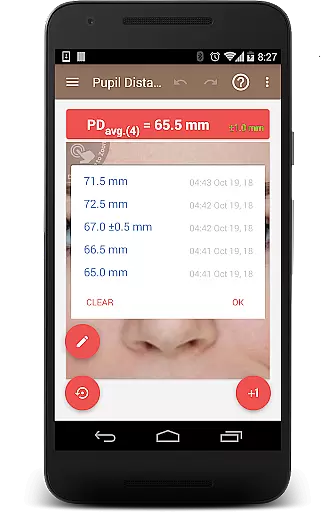
After measuring your interpupillary distance, the app presents the data in an easily understandable format, allowing you to visualize your unique ocular measurements.
While the app may not track changes over time like traditional fitness apps, its clear presentation of measurement results serves as a form of static progress visualization, aiding comprehension and record-keeping.
This feature ensures that users are well-informed about their eye measurements, contributing to better management of their optical health.
User-friendly interface
Accurate PD measurements
Virtual try-on feature
Responsive customer support
Authentic user reviews
Limited frame styles
Requires good lighting
Occasional measurement errors
No live chat support
Premium version costs

Transform your body and soul with DBFFitness, with a 40-day fitness journey.
 4.5
4.5
Power-lifting, weightlifting and Wendler 531 app to track your workout program.
4.90
Meditation app, head space app provides calm music to help you meditate & sleep
5.00
When the night comes, we prepare your eyes for deep, sweet dreams
4.70
Show your support for the development of FitNotes - Gym Workout Log
4.90
3D Body Measurement System
3.60
Drink water reminder app. Track water intake. Smart simple hydration tracker.
4.70
Focus on BP & Health
3.80
Workouts for everyone
4.70
Beauty Care, Makeup & Skin Care Scanner | Pregnancy App For A Mom | Healthy Baby
5.00
Your AI pet BFF. Talk, play, and beat anxiety in this calming game.
4.60
The simplest way to track your 21 Day Program containers, exercises, and water.
4.50
Pilates, Calisthenics, Yoga
4.50
Personal step counter for you, private and accurate
4.50
For Absolute Novices to Strength Training. Simple. Effective.
4.40
Your portable blood pressure tracker. Record, monitor, and analyze BP anytime.
4.30
Turn your steps into cash, gift cards & rewards with our step counting pedometer
3.80
Optimization for TRT & Enhanced Athletes
4.1
Using Recognise™ has been shown to reduce pain, and improve performance.
4.3


User Reviews