
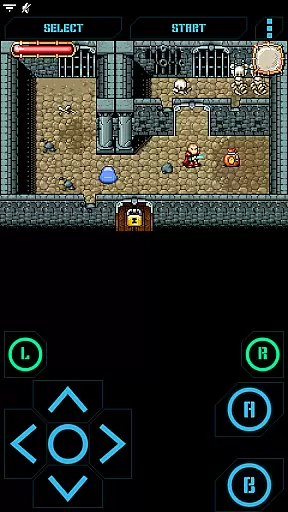
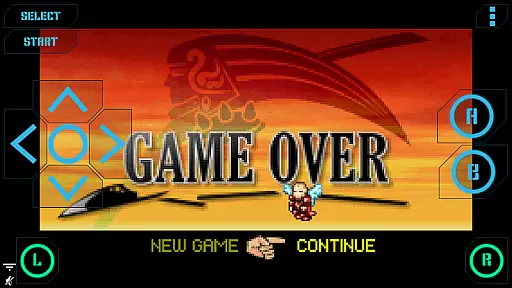
Nostalgia.GBA Pro is a premium Game Boy Advance emulator that brings classic gaming to modern devices. Built on the robust mGBA core, this arcade app offers an authentic emulation experience with advanced features for game enthusiasts. The interface combines sleek design with user-friendly controls, making it accessible for both casual players and retro gaming purists.
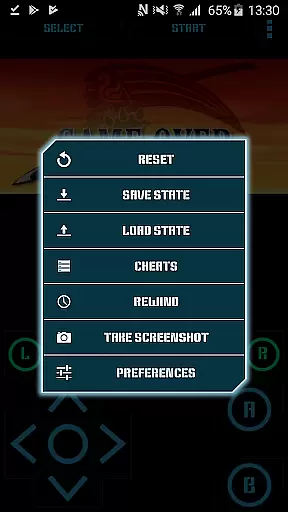
Key functionalities include save state management, rewind capabilities, and customizable controls. These features allow users to seamlessly transition between devices while maintaining their game progress. With support for hardware acceleration and high-quality audio, Nostalgia.GBA delivers smooth performance and accurate sound reproduction. The app's compatibility with various controllers and cheat code functionality enhances the overall gaming experience.
Ideal for retro gaming communities and collectors of classic games, this emulator provides a comprehensive solution for playing GBA titles on contemporary devices. Its ability to handle ZIP files and maintain game states across multiple devices makes it particularly valuable for dedicated gamers who want to preserve their gaming history while enjoying modern convenience.
The Nostalgia.GBA Pro emulator distinguishes itself through its sophisticated feature set designed for optimal gaming experiences. The application's virtual controller system stands out with its unprecedented customization options - users can precisely adjust button sizes and positions to create their perfect control layout. This level of personalization ensures comfortable extended play sessions.
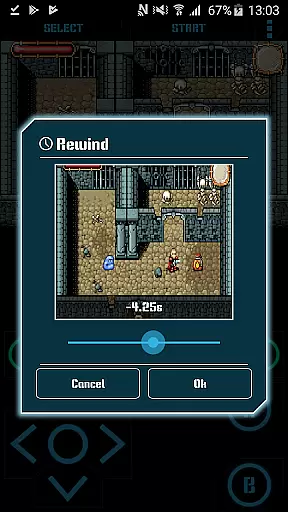
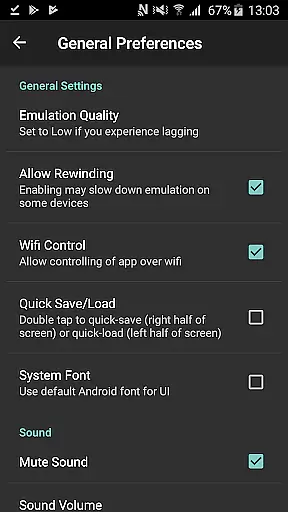
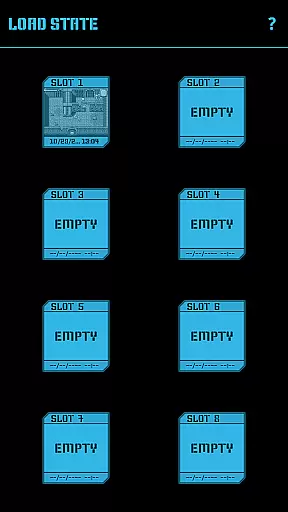
Advanced save state management represents another crucial feature, offering eight manual slots with visual previews plus an autosave function. The innovative rewind capability allows players to reverse time by several seconds, effectively eliminating frustration from challenging sections. The emulator supports wireless connectivity through Wi-Fi controller mode and maintains 44100 Hz stereo sound quality.
Additional professional-grade features include OpenGL ES hardware acceleration for smooth graphics rendering, comprehensive HID bluetooth gamepad support, and integrated screenshot functionality. The inclusion of cheat code support adds another layer of flexibility for users. These combined capabilities position Nostalgia.GBA Pro as a top-tier solution in the arcade emulation category.
Arcade authenticity and nostalgia are crucial elements for any gaming emulator, as they ensure the original experience is faithfully recreated. Nostalgia.GBA Pro excels in this area by offering a high-quality emulation of Game Boy Advance (GBA) games based on the mGBA project. This foundation guarantees that classic GBA titles run as they were originally intended, preserving the nostalgic value cherished by gamers.
The emulator goes beyond mere game compatibility by incorporating modern features that enhance gameplay without compromising authenticity. With support for save states, users can capture their progress at any point and even share these save files across devices. This feature not only adds convenience but also opens up new possibilities for collaborative or continued gameplay experiences while staying true to the arcade essence.
Additionally, Nostalgia.GBA Pro offers customizable controls, allowing players to adjust button sizes and positions to mimic the feel of traditional arcade setups or create a personalized layout. The inclusion of turbo buttons and rewind functionality further enriches the experience, blending nostalgia with contemporary gaming enhancements. These thoughtful additions demonstrate the app's commitment to honoring the past while embracing the present.
Control responsiveness is a vital aspect of any gaming experience, particularly for an emulator like Nostalgia.GBA Pro, where precision and timing can significantly impact gameplay. This emulator ensures that every action, from pressing a button to executing complex combinations, is registered instantly and accurately, providing users with a seamless and immersive gaming session.
The app supports various input methods, including touch controls, hardware keyboards, and Bluetooth gamepads such as MOGA and 8bitdo. This versatility allows gamers to choose their preferred method of interaction, ensuring optimal responsiveness regardless of the device used. Whether you're using a touchscreen or a physical controller, Nostalgia.GBA Pro delivers consistent performance that meets the demands of fast-paced arcade games.
Furthermore, the emulator leverages hardware acceleration through OpenGL ES to deliver smooth graphics rendering alongside responsive controls. This combination results in a visually appealing and highly reactive gaming environment that captures the essence of arcade gaming. By prioritizing control responsiveness, Nostalgia.GBA Pro ensures that players can fully immerse themselves in their favorite GBA titles without missing a beat.
High-quality emulation
Customizable controls
Save state sharing
Rewind feature
Ad-free experience
No games included
Paid version only
Requires ROMs
Complex setup
Device limitations

Turn-based pixel game where jumping is the only weapon!
 4.0
4.0
Mine & Craft Block Mini World! Survival Crafting and Building & Creative Online.
4.30
Stack the blocks as high as you can!
4.30
Jump and fly your way through danger in this rythm-based action platformer!
4.50
John GBA is GBA emulator. This emulator is easy to use.
3.10
Premium version. Save the galaxy from alien shooter in this classic game
4.50
Play all your favorite Playstation games in your android device!!
4.50
You control the ball! Dribble, shoot and score against eleven soccer players!
4.60
Draw your legs to win the race!
4.20
Join the breathtaking chase!
4.80
Flip and flail a rag doll through endless levels and plunge into outlandish fun!
4.60
Flip the bottle! Do tricks and don't let the bottle fall!
4.50
Play, Craft and Share your Endless Runner Levels on Kooply Run: Subway Craft
4.50
PC Engine/TurboGrafx-16 Emulator
4.50
Epic offline war strategy game - build your city, train your army, conquer
4.20
Dad doesn’t let you go out, can you outwit your parents and escape?
4.00
A fast, full-featured GB/GBC emulator with link cable emulation.
3.80
Neogeo MVS/AES Emulator
3.30
BallStack is a vibrant match-3 game where you stack and match colorful balls!
4.2


User Reviews