
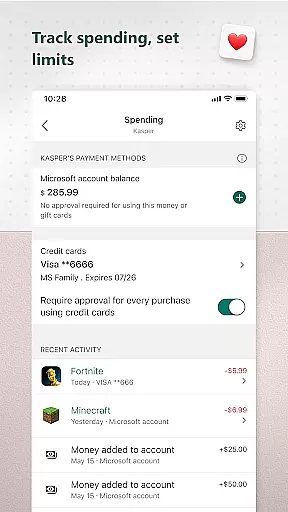
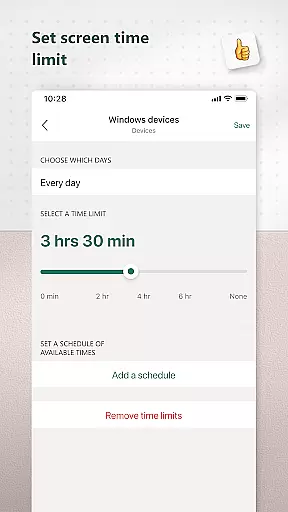
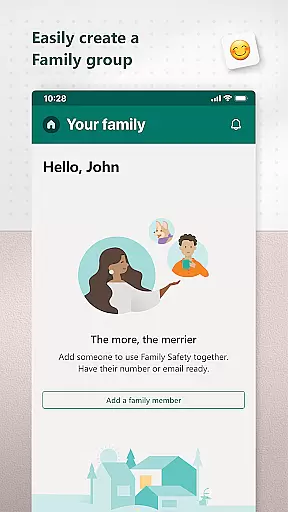
Microsoft Family Safety is a comprehensive parenting app designed to help families develop healthy digital habits while ensuring children's safety online. The app offers parental controls that allow parents to filter inappropriate content, set screen time limits across devices, and monitor activity reports.
With features like web filtering for kid-friendly browsing on Microsoft Edge, app blocking capabilities, and detailed activity reporting, the app provides parents with tools to guide their children's digital experiences. It also supports device management for Xbox, Windows, and Android platforms, making it versatile for modern family needs.
This app serves as a bridge between parental oversight and children's digital independence, promoting safer exploration of the online world while maintaining open communication through weekly email summaries.
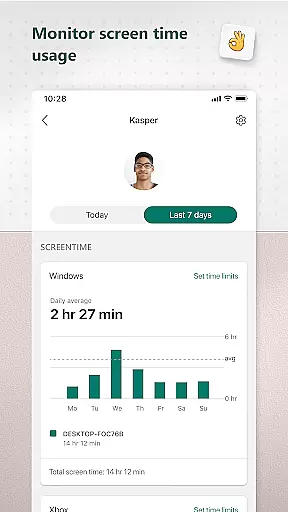
Microsoft Family Safety stands out with its robust feature set tailored for both parents and children. The app's activity reporting system provides detailed insights into screen time usage and online activity patterns, delivered through weekly summary emails.
Parents can utilize advanced screen time management tools, including specific app/game time limits across multiple platforms. The content filtering system works seamlessly with Microsoft Edge to ensure safe browsing experiences and blocks inappropriate applications.
The app's permission management system is particularly noteworthy, operating with clear privacy guidelines. Unlike other parenting apps, Microsoft commits to not selling user data and provides transparent options for data collection and usage, giving families control over their information.
Microsoft Family Safety provides a reliable and credible solution for parenting in the digital age. The app is designed with input from experts in child safety and digital wellness, ensuring that the features offered are both effective and appropriate for families.
The content filters within the app are crafted to provide safe browsing experiences on Microsoft Edge, allowing only kid-friendly websites. This ensures that children can explore the internet without encountering inappropriate material, giving parents peace of mind.
Additionally, the app offers activity reports which serve as tools for developing healthy digital habits. Parents receive weekly summaries of their children's screen time and online usage, enabling them to engage in informed discussions about digital responsibility.
By adhering to strict privacy standards, Microsoft demonstrates its commitment to protecting family data. They do not sell or share location data with third parties, providing meaningful choices about data collection and usage, reinforcing trust in the app's expertly validated approach to digital parenting.
Microsoft Family Safety excels in growth tracking accuracy by offering detailed insights into children's digital activities. The app meticulously logs screen time and online usage, presenting this data in an understandable format for parents.
Parents can set specific time limits on apps and games across Android, Xbox, and Windows devices. These limits help in managing the balance between digital entertainment and other life activities, promoting healthier lifestyle choices.
When children request additional screen time, notifications are sent to parents. This feature allows for real-time adjustments and conversations about time management, fostering a sense of responsibility in young users.
Through these precise tracking mechanisms, Microsoft Family Safety supports families in nurturing balanced tech habits while respecting each child's growing independence within safe boundaries established by knowledgeable parental guidance.
Comprehensive cross-platform support
Detailed activity reporting
Robust parental controls
Transparent privacy policy
Weekly summary emails
Limited iOS functionality
Requires child consent
No real-time monitoring
Premium features locked
Complex setup process

SENSORYSOOTHE and SENSORSAFE: Making car seats smarter and families safer.
 4.70
4.70
Magic chalkboard coloring and drawing!
4.20
Live Location, Alerts & 2-Way Voice for Kids and Adults with Special Needs
4.60
Kids story books for children. Baby reading books with audio for pre-k toddlers
4.70
Keep track of your stored breastmilk
4.40
Track your labor contractions
4.90
Reliable phone tracker by number & locate phone app. Protect your family.
4.50
Parental control: child monitoring app, screen time control, GPS child tracker
4.40
FamilyAlbum helps you share, save, and remember your child's special moments.
4.80
3D Baby size, Fruit comparisons, Smart Checklist, Trending Names & Training.
4.90
Track baby’s development & growth week by week with BabyCenter’s pregnancy app!
4.90
Family GPS locator app — child location tracker. GPS kids tracker, family safety
4.70
Fun Ideas for Parents
4.70
Track your pregnancy, kick & contraction counter, baby & mom's heartrate monitor
4.60
App/Game blocker & GPS tracker
4.50
Limit screen time, Block Apps & Games, Monitor with Parental control app
4.20
Findnumber: Real-time location tracker for ultimate family security
4.20
The Baby’s Bounty App is your hub to register for our diaper banks in Nevada
3.70
Happiest Baby App replaces the SNOO App (the mobile companion to SNOO & SNOObie)
3.20


User Reviews