
BlueDriver OBD2 Scan Tool is a professional-grade automotive diagnostic application that transforms your smartphone or tablet into an advanced vehicle scanning tool. Designed for both professional mechanics and DIY enthusiasts, the app pairs seamlessly with the BlueDriver Bluetooth Sensor (sold separately) to provide comprehensive diagnostic capabilities.
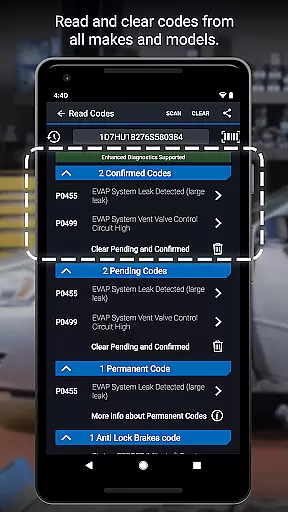
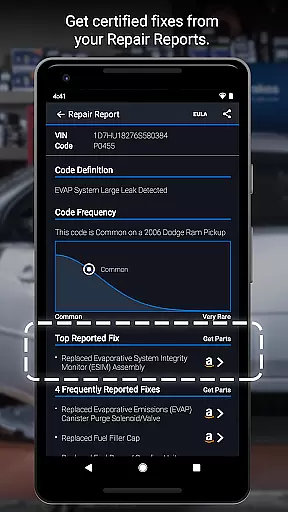
The application allows users to read and clear trouble codes across multiple systems including engine, ABS, airbag, and transmission. Its standout feature is the ability to generate detailed Repair Reports specific to your vehicle's make, model, and year. These reports help users understand issues through plain-language explanations and suggested fixes. The wireless Bluetooth connectivity ensures convenient operation without cumbersome cables.
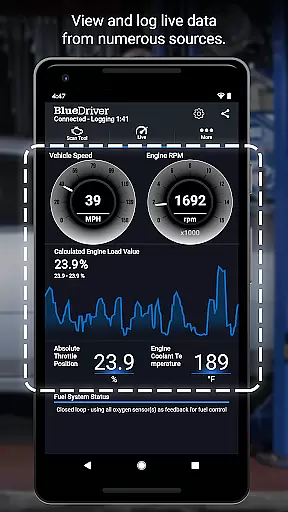
Whether you're addressing a check engine light, preparing for a smog test, or performing advanced diagnostics, BlueDriver provides clear data visualization through live graphing and freeze frame capture. The app supports enhanced diagnostics for most major car manufacturers and works globally without requiring subscriptions, making it an essential tool for modern vehicle maintenance.
BlueDriver distinguishes itself through several innovative features that enhance the vehicle diagnostic experience. The app's core functionality includes reading and clearing diagnostic trouble codes from various vehicle systems such as engine, ABS, airbag, and transmission modules. What sets it apart is its extensive database of real-world fixes, which provides practical solutions in plain language.
The application's professional-grade Repair Reports are particularly noteworthy. These reports are customized to your specific vehicle using VIN lookup and include detailed explanations of detected issues along with recommended repairs. The wireless Bluetooth connectivity eliminates the need for physical cables while maintaining stable communication with the vehicle's onboard systems.
Advanced features include Mode 6 on-board monitoring, multi-PID interactive graphing for live data analysis, and metric/imperial unit selection. The app also offers enhanced diagnostics coverage for major manufacturers including GM, Ford, Toyota, and European brands. Users can preview Repair Reports without a sensor by entering their VIN and trouble code, providing valuable insights even before purchase.
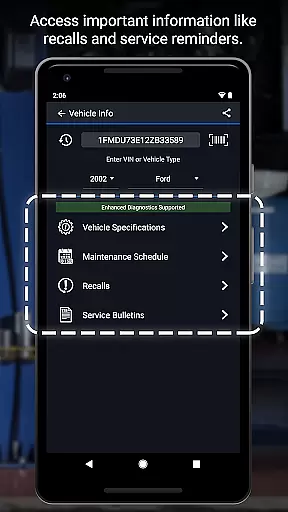
Accessing detailed vehicle information is crucial for effective diagnostics and repairs. BlueDriver OBD2 Scan Tool provides comprehensive data specific to your vehicle's make, model, and year.
The app reads and clears trouble codes from various systems including ABS, airbag, transmission, and more. It also generates professional-grade Repair Reports tailored to your exact vehicle specifications.
Users benefit from enhanced diagnostics coverage across multiple brands like GM, Ford, Toyota, and others. The app supports advanced features such as Mode 6 on-board monitoring and live data graphing.
This level of detail empowers both professional mechanics and DIY enthusiasts to make informed repair decisions with confidence.
Price transparency in automotive tools ensures users understand the costs involved before making a purchase. BlueDriver offers its app for free, with no subscription required, allowing users to access essential diagnostic features without hidden fees.
The BlueDriver Sensor, sold separately, enables full functionality when paired with the app via Bluetooth. This upfront pricing model allows users to budget accordingly for their diagnostic needs.
Customers can preview Repair Reports by entering their VIN and trouble code, even without purchasing the sensor. This feature demonstrates the company's commitment to transparent pricing practices.
The clear pricing structure, combined with global compatibility and real-world fix database access, makes BlueDriver a cost-effective solution for vehicle diagnostics.
User-friendly interface
Comprehensive diagnostic coverage
No subscription fees required
Wireless Bluetooth connectivity
Detailed Repair Reports
Sensor sold separately
Limited free features
Device compatibility issues
Occasional connection problems
Advanced features require premium sensor

Theme for Car Launcher
 4.4
4.4
* This app needs an adapter cable and a certain OBD2 adapter to work *
4.20
Discover new and used cars in Syria easily! Browse ads and connect with sellers.
3.70
myAudi offers users services and Audi connect services for Audi drivers
4.10
Digital Car Key/Launcher, Screen Mirror, Android Dashboard, Remote Wireless Link
4.40
The ExtraMile App allows you to pay for fuel from the comfort of your car!
4.70
Instant diesel savings. No credit checks or fees. Nationwide growing network.
4.40
DMV practice test 2025: Driver License permit test & written test for all states
4.70
Shop, finance, or sell today.
4.80
The Texaco App allows you to pay for fuel from the comfort of your car!
4.80
Oil change service & coupons for car maintenance at Valvoline Instant Oil Change
4.70
Your Path to Driving Licensing Success Begins Here! Develop your driving skills.
4.40
OBD diagnostics, Live Data, DPF regeneration for BMW
4.00
Blink Charging Mobile app makes finding an EV charger an intuitive experience.
3.80
PayByPhone: A quick and easy way to pay for parking.
3.80
Mobile Phone Parking - So easy to park
3.70
The Smarter Way Forward
3.30
Monitor specific TOYOTA parameters by adding this plugin to Torque Pro.
2.00
Theme for Car Launcher
4.3


User Reviews