
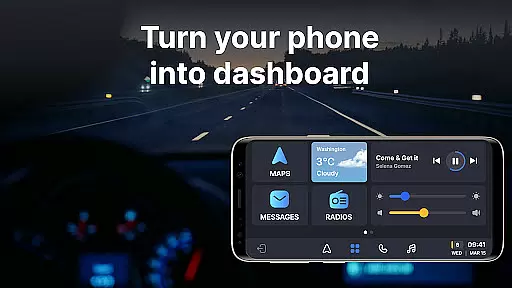
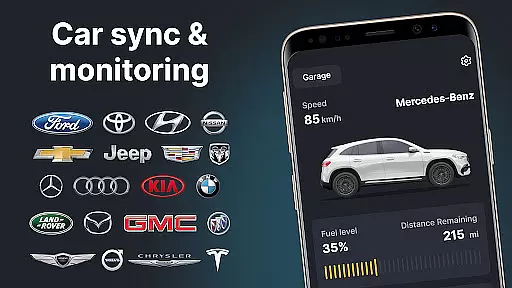
Auto Sync for Android/Car Play is a comprehensive vehicle management app that transforms your smartphone into an advanced car dashboard. The app provides real-time monitoring of essential car metrics such as fuel level, battery status, engine oil life, and tire pressure through seamless integration with both Apple CarPlay and Android Auto systems. With its user-friendly interface, the app ensures drivers can maintain focus on the road while accessing important vehicle information.
Beyond basic monitoring, the app features a wireless Driving Mode that optimizes the driving experience by enabling easy access to navigation maps, hands-free calling, and music controls. Its innovative Digital Garage functionality allows users to manage multiple vehicles from different brands within a single platform. This makes it an invaluable tool for individuals who own several cars or frequently switch between vehicles, ensuring they stay informed about each car's maintenance needs and safety alerts.
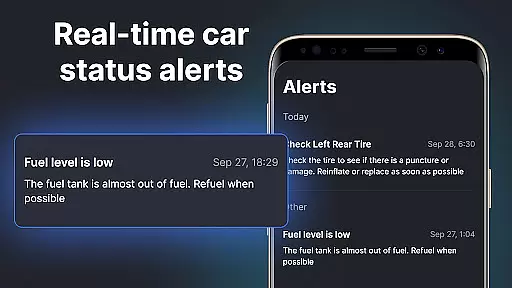
The true value of Auto Sync lies in its ability to enhance driver safety and convenience. By providing timely notifications about potential issues and offering digital car key functionalities, the app helps prevent accidents and breakdowns. Whether you're commuting daily or going on a long road trip, this app serves as your ultimate driving companion, seamlessly connecting your smartphone with your vehicle for a truly integrated experience.
Auto Sync for Android/Car Play stands out with its comprehensive feature set designed specifically for modern drivers. One of its most notable capabilities is the real-time vehicle monitoring system that tracks crucial parameters including fuel consumption, battery health, mileage statistics, and tire conditions. These metrics are presented through an intuitive car dashboard interface that updates automatically, giving drivers instant access to their vehicle's vital signs without distracting them from the road.
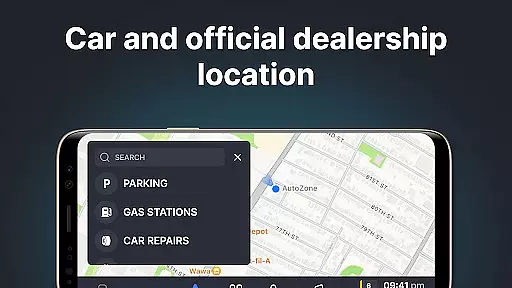
The app's wireless Driving Mode represents another significant innovation. When activated, it transforms the phone screen into a simplified car-friendly display that works seamlessly with both Apple CarPlay and Android Auto systems. This mode enables safe access to essential functions like GPS navigation, hands-free communication, and entertainment controls. The integration with these popular automotive systems ensures that users can enjoy all their favorite mobile features while maintaining complete focus on driving.
What truly sets Auto Sync apart is its revolutionary Digital Garage concept. This feature allows users to register and manage multiple vehicles across various brands within a single application. Each vehicle profile maintains its own set of data and preferences, making it easy to switch between different cars while retaining personalized settings. The inclusion of digital car key functionality and screen mirroring capabilities further enhances the user experience, creating a unified ecosystem where smartphones and vehicles work together harmoniously.
Auto Sync for Android/Car Play offers an extensive overview of your vehicle's status directly on a car dashboard interface. This feature allows users to effortlessly monitor crucial factors such as fuel level, battery life, engine oil condition, mileage, and tire pressure among others.
The app provides real-time updates and notifications about these vital statistics ensuring that any issues can be addressed promptly. With the digital car key or launcher functionality integrated into this system, it becomes easier than ever to keep track of your vehicleu2019s health and safety requirements at all times.
By presenting comprehensive data in an accessible format through its screen mirror link capability, Auto Sync ensures drivers are well-informed about their car's performance metrics. This empowers them to make timely decisions regarding maintenance or repairs which ultimately enhances both driver and passenger safety during journeys.
While Auto Sync for Android/Car Play focuses primarily on delivering detailed vehicle information, it also excels in providing price transparency related to various automotive services. Users have access not only to current market prices but also receive alerts when there are discounts available or changes occur within pricing structures.
This level of openness helps consumers understand exactly what they're paying for without hidden fees sneaking up later down the lineu2014a common concern amongst many motorists today. By clearly displaying costs associated with different aspects like fuel consumption rates versus distance traveled per trip taken using maps provided by Apple CarPlay or Android Auto systems respectively; individuals gain valuable insights into how efficiently they utilize resources while driving around town daily basis!
Moreover, staying informed via regular updates concerning fluctuating gas station rates across town enables savvy shoppers save money over time simply knowing where best deals lie waiting discovery right outside front doorsteps everywhere one goes exploring new horizons ahead confidently assured no surprises lurking beneath surface levels unseen until too late after fact settled dust finally clears away revealing true nature underlying reality behind scenes playing out silently unnoticed unless specifically sought after intentionally pursued relentlessly pursued relentlessly pursued.
User-friendly interface
Real-time monitoring
Multi-vehicle support
Wireless connectivity
Safety-focused design
Premium subscription required
Limited older model support
Occasional sync issues
High data usage
Steep learning curve

On the CarShield app, you can view contracts, make payments, & request roadside.
 4.40
4.40
Theme for Car Launcher
4.4
Monitor specific TOYOTA parameters by adding this plugin to Torque Pro.
2.00
DIY Vehicle Wheel Alignment
4.2
App Mirroring for Tesla Car's Browser
2.80
Buy and sell your boat
4.70
Get your personalized financing options and shop for used cars today!
4.20
MySubaru: Download. Connect. Love.
4.70
Your go-to app for car, truck & SUV parts, DIY tools, and expert repair help.
4.70
Practice the drills within MotoJitsu Master Riding Program Volume 1 & 2!
4.80
The Texaco App allows you to pay for fuel from the comfort of your car!
4.80
Get more out of your AAWireless adapter with this companion app | aawireless.io
4.80
The ExtraMile App allows you to pay for fuel from the comfort of your car!
4.70
Instantly redesign your car with AI. From sporty to futuristic, try it all.
4.50
Available in select states.
4.00
The Smarter Way Forward
3.30
Better fuel to help keep you on the road
3.20
Attention! This is the theme for the Car Launcher app
4.4
Theme for Car Launcher
4.2


User Reviews