
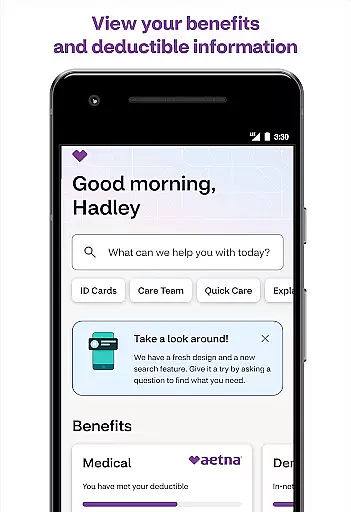
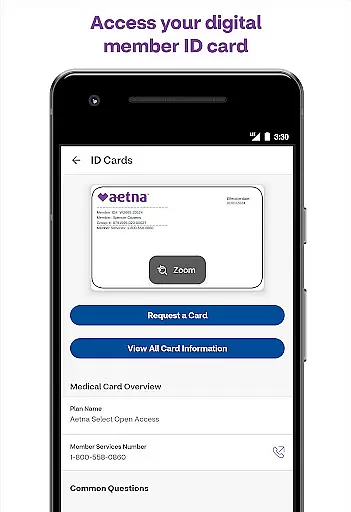
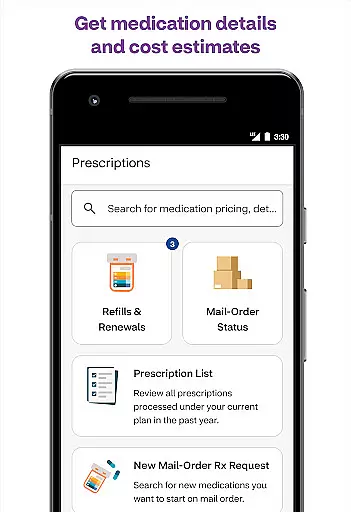
Aetna Health is a comprehensive medical application designed to help users manage their healthcare benefits effectively. With this app, you can access your ID card, track spending, and monitor progress towards meeting your deductible at any time. The app also allows you to check on various health accounts such as Health Savings Account (HSA), Health Reimbursement Account (HRA), and Flexible Spending Account (FSA).
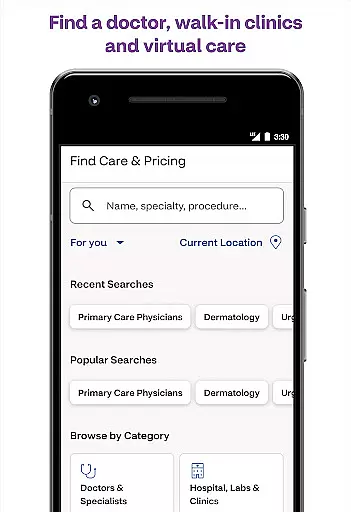
One of the key features of Aetna Health is its ability to connect users to care easily. You can find in-network doctors, facilities, and other providers with just a few taps. Additionally, the app provides access to MinuteClinic locations inside select CVS Pharmacy and Target stores, where you can schedule appointments and even consult with a doctor via phone or video anytime.
This app is particularly useful for individuals who want to take charge of their health and benefits conveniently from their mobile device. By offering 24/7 access to essential health management tools, Aetna Health ensures that users have the information they need to make informed decisions about their healthcare.
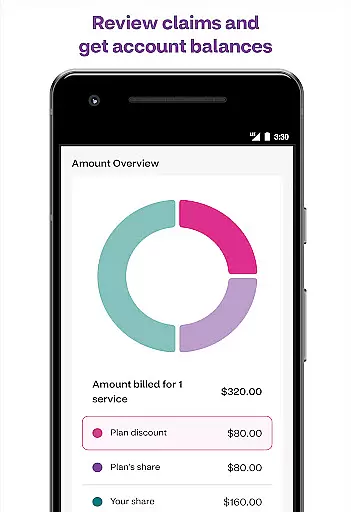
Aetna Health offers a wide array of features tailored to enhance user experience in managing healthcare benefits. One notable feature is the easy access to digital ID cards, which eliminates the need for physical cards and simplifies identity verification during medical visits. Users can also track their spending and view claims alongside an Explanation of Benefits, providing transparency into their healthcare expenses.
The app excels in connecting users to necessary care services efficiently. It includes functionalities like searching for in-network doctors and scheduling appointments at MinuteClinic locations within CVS Pharmacy and Target stores. Furthermore, telemedicine options allow users to consult with physicians through phone or video calls, ensuring timely medical advice without leaving home.
Customization and personalization are central to Aetna Health's design. Depending on the user’s specific plan, features may vary but generally include detailed summaries of coverage information and updates on different health accounts. This flexibility makes it easier for users to tailor the app according to their unique healthcare needs while maintaining ease of use across multiple devices.
In the realm of digital health solutions, the credibility of medical content is paramount. The Aetna Health app excels in this area by providing users with accurate and reliable health information curated by healthcare professionals. This ensures that members can make informed decisions about their health and benefits.
The app offers access to essential health plan documents such as the Explanation of Benefits and claims information. These documents are reviewed and updated regularly by experts to reflect the most current healthcare guidelines and individual plan provisions. This meticulous attention to detail guarantees that users receive precise coverage details tailored to their specific plans.
Additionally, Aetna Health provides resources for finding in-network doctors, facilities, and other providers. Each listed provider undergoes a rigorous vetting process to ensure they meet high standards of care. By facilitating connections with credible healthcare providers, the app empowers users to seek quality medical services aligned with their insurance coverage.
Teleconsultations have become an integral part of modern healthcare delivery, offering convenience without compromising on quality. The Aetna Health app embraces this trend by enabling users to consult with doctors via phone or video calls anytime, anywhere. This feature significantly enhances accessibility to professional medical advice, especially for those with busy schedules or limited mobility.
Beyond mere connectivity, the app ensures high-quality teleconsultations through partnerships with certified physicians who adhere to strict professional standards. Users can expect thorough evaluations and personalized recommendations during their virtual visits, mirroring the experience of an in-person consultation.
Moreover, the integration of MinuteClinic services within the app adds another layer of convenience. Members can easily locate nearby CVS Pharmacy or Target locations offering MinuteClinic services, schedule appointments, and receive timely care. This seamless blend of digital and physical healthcare options underscores Aetna's commitment to delivering comprehensive, user-centric telehealth experiences.
User-friendly interface
Comprehensive health tracking
24/7 access to telemedicine
Detailed expense reports
Wide network coverage
Limited to Aetna members
Feature variability by plan
Occasional connectivity issues
No offline functionality
Premium features require subscription

Identify pills, search different drugs, get drug information and much more!
 4.50
4.50
Molina Members: My Molina. Manage your health anytime, anywhere!
4.30
A rapid reference for prehospital providers caring for pediatric patients.
4.2
OKN Strips, OptoDrum, OKN
4.2
Medication reminder, Medicine list, Trackers for BP, glucose, weight, water, etc
4.70
Zepbound & Mounjaro support & resources for savings, tracking & more
3.90
PPP provides quick offline access to over 350 field treatment protocols.
4.60
MyChart for Android
4.50
Get Rx fast at the pharmacy, schedule health care, and shop ExtraCare savings.
3.30
CPR Timer for High Performance AHA BLS / ACLS
5.00
Elegant, easy-to-use period tracker for fertility, PMS symptoms, and more
4.90
The Better Pharmacy Experience
4.90
Want to make it easier to manage your health? We’re with you, wherever you are.
4.70
Boost reading, writing, speaking and listening with a scientifically proven app.
4.70
Sync your blood glucose device, log values automatically and tame your diabetes!
4.60
Master AEMT with 1,400+ study items, TEIs, practice tests, and scoring.
4.10
Hearing aid app for Android solves your hearing problems.
4.00
Care Simplified by MyChart
3.40
HealtheLife lets you easily manage your health online.
3.20


User Reviews