
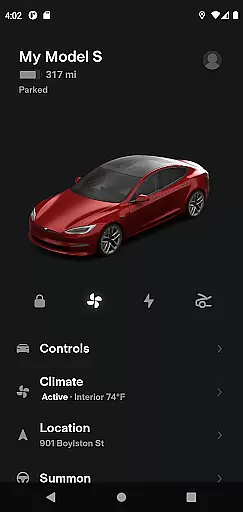
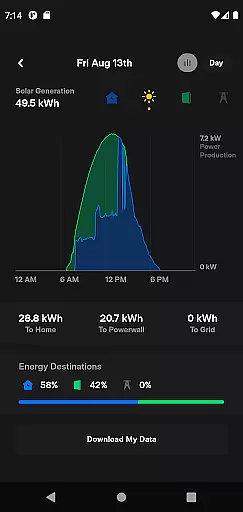
The Tesla app is a comprehensive lifestyle tool that allows vehicle owners to maintain constant contact with their Tesla cars and Powerwalls. This innovative application enables users to manage charging, climate control, security, and navigation remotely. Whether you're at home or on the go, the Tesla app provides unprecedented control over your vehicle's functions, making it an essential companion for Tesla owners.
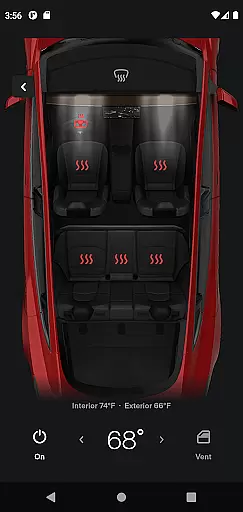
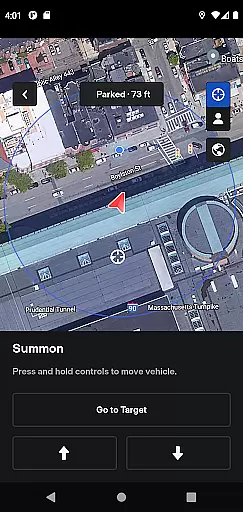
One of the standout features is the ability to precondition your car's temperature remotely, ensuring comfort in any weather. Additionally, the app offers advanced functionalities like Summon, which allows you to move your car in tight spaces using your phone. These capabilities not only enhance convenience but also improve the overall ownership experience by integrating seamlessly into daily life.
The Tesla app boasts a wide array of features designed to enhance user convenience and vehicle management. Users can monitor and manage charging sessions in real time, start or stop charging, and even schedule charging times to optimize energy usage. The remote climate control feature lets you heat or cool your car before driving, which is particularly useful in extreme weather conditions.
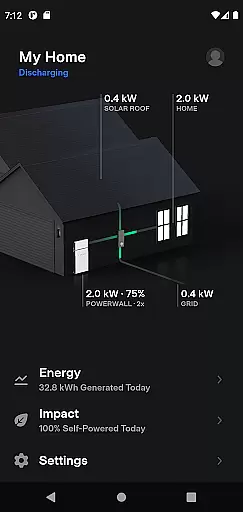
Security features include remote locking and unlocking, as well as the ability to locate your vehicle with GPS directions. For entertainment, passengers can control media playback directly from the app. Advanced functionalities such as Summon allow you to maneuver your vehicle out of tight spots, while over-the-air software updates ensure your car always has the latest features. Powerwall integration adds another layer of utility, allowing users to monitor solar energy storage and usage.
The Tesla app offers an extensive range of features that cater to various aspects of a user's lifestyle, ensuring comprehensive coverage of needs for both vehicle and home energy management.
With capabilities ranging from real-time charging updates and climate control to remote locking and solar energy monitoring, it seamlessly integrates essential functionalities into one platform.
This diverse feature set not only enhances convenience but also promotes sustainable living through energy usage tracking and optimization.
By covering such a broad spectrum of lifestyle categories, the app ensures users have all necessary tools at their fingertips for managing their Tesla products efficiently.
All information provided within the Tesla app is directly sourced from Tesla vehicles and Powerwall systems, guaranteeing unparalleled content authenticity and accuracy.
Each feature, from battery charging status to solar energy storage data, is meticulously verified through Teslau2019s advanced technological infrastructure, ensuring reliable insights.
Furthermore, Teslau2019s reputation as an industry leader in electric vehicles and renewable energy solutions adds an extra layer of expert credibility to the app's offerings.
Users can trust that they are receiving authoritative and precise information, empowering them to make informed decisions about their transportation and energy consumption habits.
User-friendly interface
Comprehensive vehicle control
Remote climate management
Advanced security features
Over-the-air updates
Limited to Tesla owners
Requires internet connection
Powerwall 2 needed for full features
Occasional connectivity issues
Premium pricing for some features

Cute Adorable Animals now on your wrist with our Wear OS watch face!
 4.40
4.40
Earn points with every purchase with Moe Rewards.
4.20
A watch face with transparency and fluid visuals inspired by liquid glass design
4.4
Unique Dual Colors with 6 Custom Complications for Wear OS watches!
3.40
Use your device sensors to detect energy and convert it into spoken words.
4.10
Spirit Communicator is a real paranormal ghost hunting app with many fun modes.
3.90
Customize your Wear OS watch with festive Christmas figures and colors!
4.2
Discover your Nationality, Family Origin, and Ancestry from one selfie
4.50
Falling Fruit is a massive collaborative map of food in our cities.
3.20
Play. Earn. Repeat. Get rewarded for playing mobile games. Welcome to Mobius!
4.80
Made To Order Faves
4.70
Have your Tehillim with you at all times
4.70
A smart Siddur with halachic times
4.60
Make money, get paid cash rewards & gift cards for every survey. Earn today!
4.60
Colorful selection floral watch face with gyro for Wear OS
4.60
The all-new Cync app. The simple, connected app for Cync and C by GE.
4.50
Play fun games, complete quick surveys, and earn money. It's fun and easy!
4.40
Do you want to communicate with spirits?
3.80
Unique informative Dial with Live Moon Phase at a glance!
3.60


User Reviews