
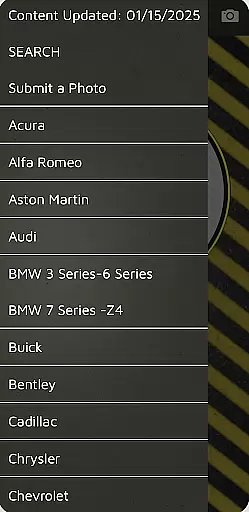
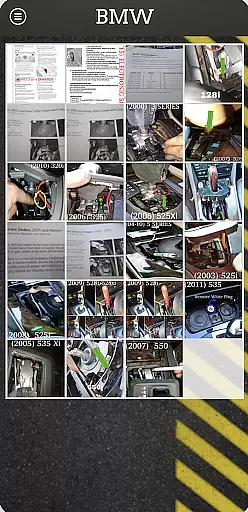
ShiftLock is an essential reference tool designed specifically for towing professionals. The app provides detailed information about the location of shift interlock releases in vehicles worldwide, including European and USA/Mexico/Caribbean models. This functionality allows tow operators to quickly place vehicles in neutral, streamlining the towing preparation process.
In addition to vehicle data, ShiftLock offers step-by-step instructions on how to operate various types of releases such as buttons, lanyards, or pull-tabs. Regular updates are delivered through free push notifications, ensuring users always have access to the latest vehicle information.
With its comprehensive database and user-friendly interface, ShiftLock proves invaluable for professionals in the towing industry who need reliable and quick access to crucial vehicle information.
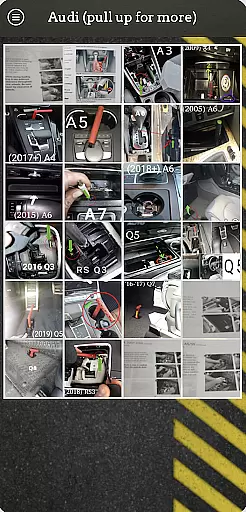
ShiftLock stands out with its extensive database covering vehicles from around the globe, making it a versatile tool for international towing operations. Its detailed descriptions and visual aids help users easily locate shift interlock mechanisms.
The app's intuitive design ensures that even first-time users can navigate effortlessly. Step-by-step instructions provide clear guidance on operating different release mechanisms, while regular updates via push notifications keep the database current without any additional cost to the user.
Furthermore, ShiftLock’s commitment to adding new vehicles regularly means that users will consistently have up-to-date information at their fingertips, enhancing efficiency and reliability in their work.
ShiftLock offers a comprehensive digital library tailored specifically for towing professionals. The application contains an extensive collection of vehicle data, including worldwide, European, and USA/Mexico/Caribbean vehicles.
Each entry in the app is meticulously researched to ensure copyright authenticity and compliance. This guarantees that users are accessing reliable and legally obtained information.
The database is regularly updated through FREE push notifications, ensuring that users always have access to the latest vehicle information. These updates expand the e-book library size, keeping it current with newly released vehicle models.
By providing accurate and timely information, ShiftLock ensures that its library remains a valuable resource for professionals in the towing industry.
One of the key strengths of ShiftLock is its format compatibility, which allows seamless integration across various devices. Whether you're using a smartphone or tablet, the app delivers a consistent and user-friendly experience.
The app supports multiple formats to display step-by-step instructions on operating shift interlock releases. This flexibility ensures that no matter the device specifications, users can easily access and read the content without any formatting issues.
Additionally, ShiftLock's compatibility extends to different operating systems, making it accessible to a broader audience. This cross-platform functionality enhances its utility for towing professionals who rely on diverse technology ecosystems.
With its robust format compatibility, ShiftLock ensures that all users can efficiently utilize the app's resources, regardless of their device preferences.
Comprehensive vehicle database
User-friendly interface
Regular free updates
Step-by-step instructions
Global vehicle coverage
Limited to towing professionals
No offline functionality
Requires internet connection
Occasional update delays
Premium features may require payment

Contains the 365 daily readings and everything other thing needed for catholics
 4.70
4.70
Powerful Bible study tools linked to every verse in an easy-to-use Bible reader!
4.60
University of North Carolina Herbarium presents the flora of TN, AL, & MS.
4.5
The favorite Christmas story comes to life!
4.80
A wonderful reader for good time spend.
4.20
F9 Cookbook Mobile App
4.60
The Original & Authentic Crystals, Gemstones, Rocks & Minerals Encyclopedia.
4.60
My Bible offers a comprehensive app by providing offline access, daily verses.
4.80
Build family tree & discover DNA, family history heritage, origins and ancestors
4.60
Read and study the Bible and other content in over 1,000 languages.
4.80
Daily Prayer, personalized Bible Study, AI-guided Insights, and Spiritual Growth
4.80
Read unlimited novels, audiobooks, stories & Unlock ebooks, fanfiction and more!
4.70
“It is fun to have fun, but you have to know how!”
4.40
Holy Bible with verses and audio for studying and prayer
4.30
Shop over 13 million new and used books at up to 80% off list price
4.20
KJV Bible works offline with Audio, Hebrew & Greek lexicon (concordance) & more!
4.20
WebNovel - Read Solo Leveling novel and comic
4.10
“There was one last piece of cake. My little sister said ‘Me too!’”
4.00
A story reading app: Read stories, novels and books, or write your own.
3.90


User Reviews