

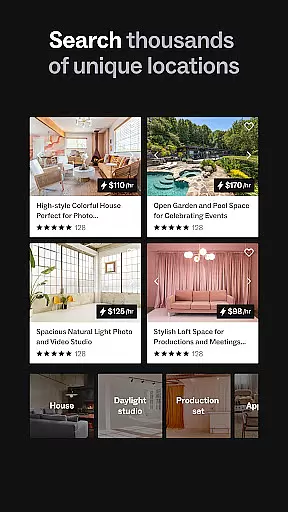
Peerspace is a leading platform for booking unique spaces by the hour, designed primarily for events, meetings, and creative projects. The app provides access to an extensive range of venues including photo studios, meeting rooms, lofts, galleries, and even backyards. With its intuitive interface, users can easily browse, connect with hosts, and book spaces directly from their mobile devices. Peerspace caters to both guests seeking extraordinary locations for personal or professional use and hosts looking to monetize their underutilized spaces. Whether you're planning a corporate event, a photoshoot, or a casual gathering, Peerspace offers flexibility and convenience in finding the perfect venue.
One of the standout features of Peerspace is its dual-sided marketplace. For guests, it opens up a world of possibilities by showcasing spaces that are not available on traditional booking platforms. For hosts, listing a space is free and straightforward, allowing them to set their own prices and determine which types of activities they want to host. This creates a win-win scenario where guests find unique venues while hosts generate extra income. Additionally, the app's mobile functionality ensures that users can manage bookings, communicate with hosts, and receive notifications on the go, making it an indispensable tool for modern event planning.
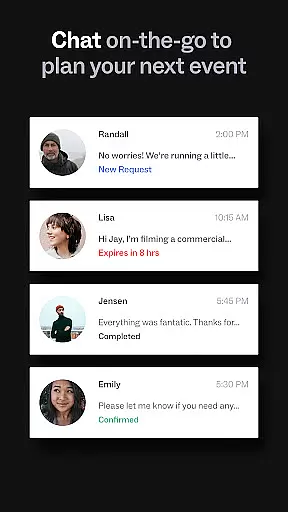
Peerspace stands out due to its comprehensive and user-friendly features tailored for both guests and hosts. For guests, the app offers advanced search filters that allow users to narrow down spaces based on location, size, amenities, and intended use. High-quality images and detailed descriptions provide a clear understanding of each space before booking. The app also includes a secure payment system, ensuring that transactions are smooth and reliable. Guests can communicate directly with hosts through an integrated messaging system, enabling them to ask questions and finalize details without leaving the app.
For hosts, Peerspace provides tools to manage listings efficiently. Hosts can set custom pricing, specify availability, and outline house rules. They have full control over which activities they wish to accommodate, whether it's a business meeting, a social event, or a creative project like photography. Payments are processed automatically and deposited directly into the host's bank account, simplifying financial management. Furthermore, the app sends real-time notifications about new booking requests and messages, ensuring hosts never miss an opportunity. These robust features make Peerspace a versatile and reliable choice for anyone involved in event planning or space rental.
Task creation and detail customization are essential features for event planning applications like Peerspace. This functionality allows users to define specific requirements and preferences when booking spaces for meetings, events, or productions.
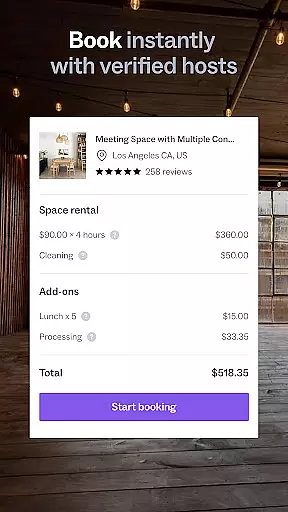
Peerspace offers a streamlined process where users can browse various unique venues, from photo studios to backyards, and customize booking details according to their needs. The app provides options to specify time, duration, and additional services needed, ensuring that every booking is tailored to the user's exact specifications.
The value of this feature lies in its ability to provide a personalized booking experience. Users can communicate directly with hosts to clarify details, request additional amenities, or negotiate terms, making the entire process more flexible and accommodating.
This level of customization ensures that whether it's a corporate meeting or a creative photoshoot, users can create tasks and manage bookings in a way that perfectly aligns with their objectives, enhancing both efficiency and satisfaction.
Reminder settings play a crucial role in event management apps by keeping users informed and prepared for upcoming bookings. For an application like Peerspace, which facilitates the rental of unique spaces, timely reminders ensure that users never miss an important event or booking.
Peerspace likely incorporates reminder notifications as part of its service, alerting users about upcoming reservations, messages from hosts, or pending requests. These reminders can be customized in terms of timing and frequency, allowing users to receive alerts that suit their schedules and preferences.
The benefit of such a feature is multifold; it not only helps users stay organized but also enhances communication between guests and hosts. By receiving timely updates, users can confirm details, make last-minute adjustments, or prepare accordingly for their booked events.
Ultimately, effective reminder settings contribute significantly to a seamless user experience, reducing the likelihood of missed bookings and ensuring that all events proceed as planned, thus maximizing the potential of the spaces rented through Peerspace.
User-friendly interface
Wide variety of spaces
Secure payment system
Free listing for hosts
Real-time notifications
Limited to hourly bookings
Availability varies by location
Service fees apply
No instant booking option
Dependent on host responsiveness

An App for Bhutanese
 4.2
4.2
Manages display and transfer of tickets from the Mundo Tickets platform
3.80
PheedLoop Go! is the mobile event app for events powered by PheedLoop.
4.40
Buy event tickets easily with our user-friendly App. Stay updated on hot events
4.3
Local events, contests, and giveaways for local dads
3.70
Soft Proxy for Your Online World
4.0
Microsoft Ignite is an event that showcases latest advancements in technology
4.00
Birthday Greetings provides Birthday Card, Frames, Gifs & Father's day Wishes
4.80
Introducing the official Magic: The Gathering app for mobile.
4.20
Find tickets to upcoming concerts, sports events, festivals, shows, attractions
4.70
Discover events & experiences in NYC, LA, Chicago, DC, Miami and more!
4.70
Everything you need for the Best Thursday Ever.
4.40
Octrober 2025: We've updated the MyGenMobile App with a new look and feel!
4.40
The official app for Sched events! View your event schedule here.
4.20
Instant photo sharing for every occasion
3.80
No invest, Easy way to earn USDT through crypto cloud mining
3.80
TV.Garden is a video player to play your own TV streams from around the world!
3.40
Some connections are better kept private
4.3
The Official Football Ticketing App for Fans in Qatar
4.4


User Reviews