

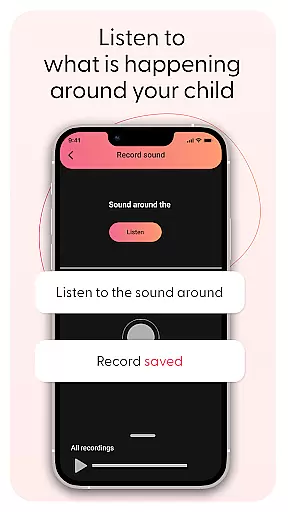
Kid Security is a comprehensive parental control app designed to ensure child safety both online and offline. The application provides parents with tools to monitor their child's surroundings by discreetly activating the phone's microphone, allowing them to listen to ambient sounds. This feature helps identify potentially unsafe situations while providing peace of mind.
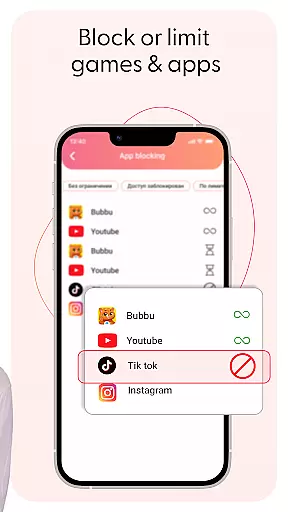
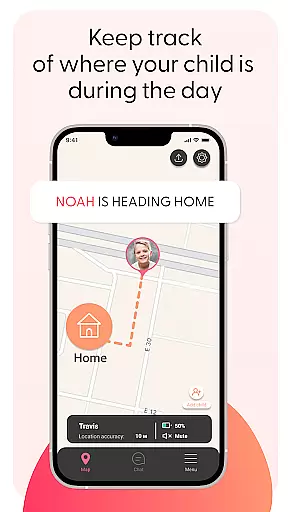
In addition to its innovative sound monitoring, Kid Security offers robust parental controls that allow management of the child’s digital experience. Parents can block inappropriate apps and websites, set up safe zones using GPS tracking, and receive instant alerts when their child enters or exits designated areas. With an intuitive interface, Kid Security makes it easy for parents to configure settings efficiently, ensuring a seamless blend of digital monitoring and real-world safety.
Kid Security stands out with its unique ability to let parents listen to surrounding sounds around their child's phone, offering insights into their physical environment. This feature bridges the gap between digital oversight and real-world safety, making it easier to confirm a child's location or detect potential dangers.
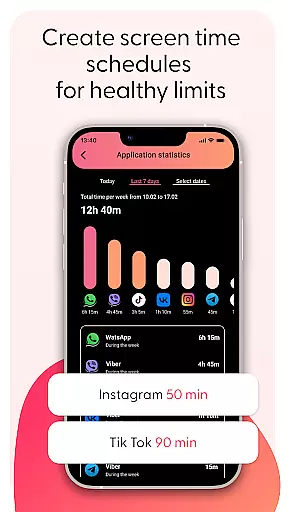
The app also includes powerful parental control functionalities. Parents can restrict access to inappropriate content by blocking specific apps or categories. They can monitor app usage statistics to understand their child's digital habits better. Additionally, Kid Security integrates GPS tracking and geolocation capabilities, enabling real-time location viewing and geofencing to create safe zones around important places. These features work together seamlessly, providing a holistic approach to child safety.
When it comes to parenting applications, the credibility of content and expert validation form the backbone of user trust. Kid Security stands out in this aspect by offering features that are not only innovative but also grounded in child safety expertise. The app provides a comprehensive suite of tools designed with the guidance of child safety professionals, ensuring that each feature serves a meaningful purpose in protecting your child.
The surrounding sound monitoring functionality exemplifies this commitment to credible parenting solutions. Developed with insights from child safety experts, this feature allows parents to listen to ambient sounds around their child's phone, providing valuable context about their environment. This capability is particularly useful when children are in new or potentially risky situations, giving parents peace of mind through verified technological solutions.
Kid Security maintains its authoritative stance by regularly updating its features based on the latest child safety research and digital protection standards. The application doesn't merely offer basic tracking; it integrates sophisticated parental controls that have been refined through continuous expert consultation. These include advanced geofencing capabilities and app restriction features that align with contemporary digital safety recommendations.
Parents can be confident in Kid Security's approach to child protection as it combines technological innovation with expert-endorsed safety practices. Every feature, from GPS tracking to content filtering, undergoes rigorous evaluation to ensure it meets the highest standards of child safety. This dedication to maintaining professional-grade solutions makes Kid Security a trusted partner in modern parenting.
Tracking a child's growth and development extends beyond physical measurements to encompass their digital maturity and responsible device usage. Kid Security excels in growth tracking accuracy by providing detailed analytics and precise monitoring tools that help parents understand their child's developmental progress in the digital age. The app goes beyond simple location tracking to offer comprehensive insights into children's behavioral patterns and digital habits.
The application's sophisticated algorithms generate accurate reports on children's location history, application usage, and website visits. These data points are crucial for parents seeking to understand their child's daily routines and digital footprint. Through precise geolocation tracking and detailed activity logs, Kid Security enables parents to identify patterns in their child's behavior, helping them make informed decisions about appropriate boundaries and freedoms.
What sets Kid Security apart is its scientific approach to growth tracking. The app employs advanced data processing techniques to ensure the accuracy of every recorded metric. From calculating average screen time to analyzing movement patterns, each data point is meticulously verified and presented in easy-to-understand visual formats. This level of precision helps parents track their child's gradual increase in responsibility and independence.
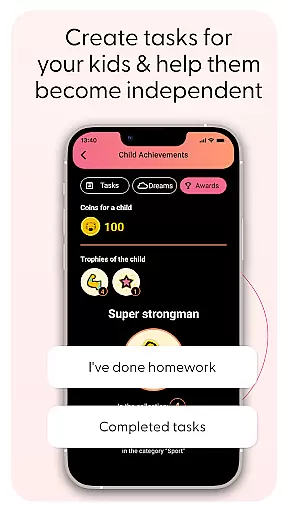
The growth tracking features extend to monitoring developmental milestones in digital literacy. Parents can observe how their child interacts with technology over time, adjusting permissions and access accordingly. With Kid Security's accurate tracking system, parents gain valuable insights into their child's evolving needs while maintaining appropriate safeguards. This systematic approach to growth monitoring ensures that children develop healthy digital habits while progressing toward greater autonomy.
Comprehensive safety features
User-friendly interface
Real-time GPS tracking
Ambient sound monitoring
Robust parental controls
Requires child's phone
Privacy concerns
Potential over-monitoring
Limited without Tigrow app
Dependent on internet connection

Happiest Baby App replaces the SNOO App (the mobile companion to SNOO & SNOObie)
 3.20
3.20
Track your pregnancy & your baby's growth in 3D. Get support from our community
4.60
Educational resource for parents to inspire creativity in their children.
4.00
With BabyCam you can monitor your baby using your mobile phone, tablet, PC or TV
4.40
Family parental control app: limit screen time, block apps, GPS tracker.
4.20
3D Baby size, Fruit comparisons, Smart Checklist, Trending Names & Training.
4.90
Fun Ideas for Parents
4.70
GPS tracker app: Simple GPS phone tracker for fast family location tracking
4.60
All-In-One Pregnancy Tracker, Your Baby's Milestones, Growth Stages & Parenting.
4.90
Track your pregnancy, kick & contraction counter, baby & mom's heartrate monitor
4.60
GPS phone tracker: find kids on map. Location tracking and parental control.
4.50
App/Game blocker & GPS tracker
4.50
All-in-one pregnancy app, contraction timer, kick counter & due date calculator
4.40
Keep track of your stored breastmilk
4.40
Fake call application designed for parents and adults to discipline their children through the children's police.
4.20
Pregnancy and baby formula tips for moms, plus Enfamil coupons & cash back
4.10
Keep Your Family Safe with Pollog Family Assistants
4.10
Save money on diapers. Get the Pampers Rewards app.
3.90
Screen Time, App and Web Block & Monitoring, Location Tracker
3.60


User Reviews