
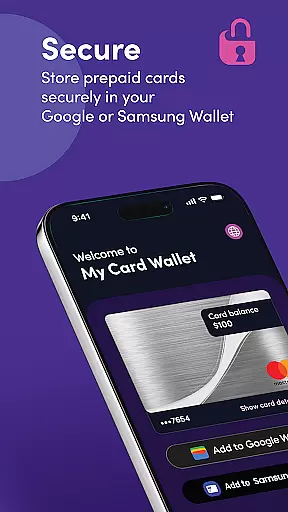
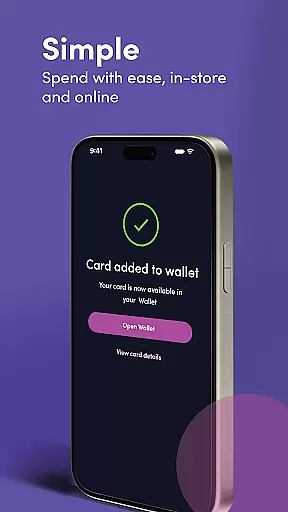
My Card Wallet is a comprehensive financial management application designed to simplify card usage and enhance payment convenience. The app allows users to securely store their prepaid cards, view balances in real-time, and add cards to digital wallets for seamless transactions. Whether shopping in-store or online, users can enjoy the benefits of contactless payments while maintaining full control over their spending.
The application's key strength lies in its ability to integrate with popular digital wallets like Google Pay and Samsung Pay, making it an essential tool for modern shoppers. By providing instant access to card details and transaction histories, My Card Wallet ensures that users are always informed about their financial status. This makes it particularly useful for individuals who rely on prepaid cards for budgeting and expense tracking.
My Card Wallet offers a robust set of features tailored to streamline payment processes. One standout capability is its support for contactless payments through Google and Samsung Wallet integration. Users can simply tap their devices at checkout points, eliminating the need to carry physical cards. Additionally, the app enables users to designate a primary payment method when managing multiple cards, ensuring a personalized and efficient payment experience.
Beyond payment functionalities, the app provides critical tools for balance monitoring and card management. Users can check their prepaid card balances directly within the app, helping them maintain better control over their finances. The platform also grants secure access to complete card details, which proves invaluable when dealing with retailers that don't support digital wallet payments. With dedicated help and support available via the website, My Card Wallet ensures users have assistance whenever needed.
In the realm of digital finance, security stands as a paramount concern for users managing their funds electronically. My Card Wallet addresses this by implementing stringent data encryption protocols to safeguard user information. Every transaction and personal detail is encoded, ensuring that your financial activities remain confidential and protected from unauthorized access.
Beyond encryption, the app incorporates multi-layered privacy protection measures. Users can securely store their cards within the app, reducing the risk of physical theft or loss. By enabling features such as biometric authentication and PIN protection, My Card Wallet ensures that only authorized individuals have access to sensitive card details, thus maintaining account integrity.
The application also emphasizes secure fund management through real-time monitoring and alerts. Any movement in your account, whether it's adding funds or making payments, triggers instant notifications. This empowers users with up-to-date insights into their financial status while providing an additional layer of security against fraudulent activities.
By prioritizing these comprehensive security strategies, My Card Wallet not only protects user assets but also fosters trust and peace of mind. Individuals can confidently manage their finances, knowing they are shielded by advanced security technologies designed to prevent breaches and unauthorized transactions.
A seamless transaction experience is crucial for any financial application, and My Card Wallet excels in providing users with intuitive tools for effortless payment processing. The app supports contactless payments via Google or Samsung Wallet, allowing users to make purchases simply by tapping their devices at compatible retail locations. This method significantly reduces checkout times and enhances convenience, especially in fast-paced environments.
To further streamline transactions, My Card Wallet enables users to set a preferred card as their default payment option when multiple cards are stored within the app. This feature eliminates the need to select a payment method manually each time, offering a frictionless purchasing process. Additionally, when shopping online, customers can choose their saved payment methods during checkout without re-entering lengthy card numbers, thanks to integrated wallet functionalities.
Real-time balance updates enhance the overall transaction experience by keeping users informed about their spending capacity after every purchase. As soon as a transaction occurs, the app refreshes the displayed balance, helping individuals maintain control over their expenditures and avoid overdrafts.
With its focus on simplifying payments both in-store and online, coupled with immediate transaction notifications, My Card Wallet delivers a superior user experience. These attributes ensure that users enjoy swift, reliable, and transparent financial operations, reinforcing the app's position as a leader in modern payment solutions.
User-friendly interface
Secure card storage
Real-time balance updates
Supports contactless payments
Easy access to card details
Limited to prepaid cards
No investment tools
Depends on external wallets
Occasional sync issues
Region-specific availability

Bank better with our new app
 3.80
3.80
Manage your Discover account conveniently from anywhere.
4.80
Get a cash advance instantly. File taxes & cover unexpected bills in minutes.
4.60
Early payday cash advance up to $150 a day with a max of $1,000 per pay period
4.70
Early payday & cash advances with no-fee mobile banking!
4.60
“Money Manager” is an optimized application for personal asset management.
4.70
Cash Advance, Credit Cards, Credit Lines, Score Monitoring, Saving, Budgeting
4.70
SuperQi, Your all-in-one Super App.
1.30
Pay, bank & build credit.
4.70
Currency Converter supports all currencies of the world.
5.00
Money transfer made easy. Send money to friends and family with great rates.
4.70
Your Big Financial Friend
4.70
Banking, Budgeting & Investing
4.60
Real-time tracking: Stocks, Indices, Futures, Commodities, ETF, & Funds prices.
4.60
Earn cash & save money daily. Access instant cash advances* - no credit check!
4.50
Save, spend & get paid faster²
4.50
Mine Bitcoin in the cloud! Earn BTC daily with high-speed mining power.
4.30
The PayPal app is the secure way to send and receive money, shop and pay in 4.
4.20
Make your paycheck work harder for you with Perpay.
4.10


User Reviews