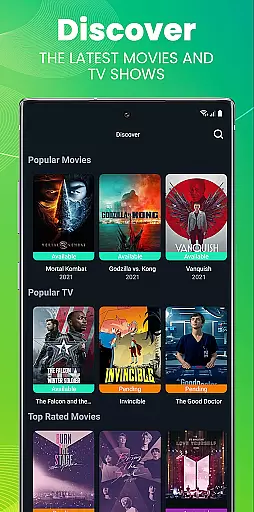
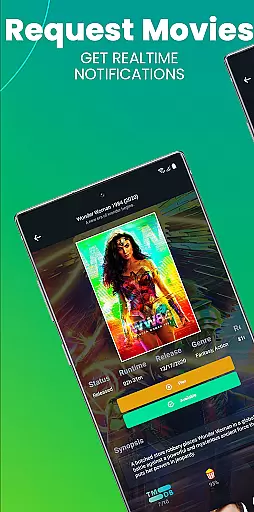
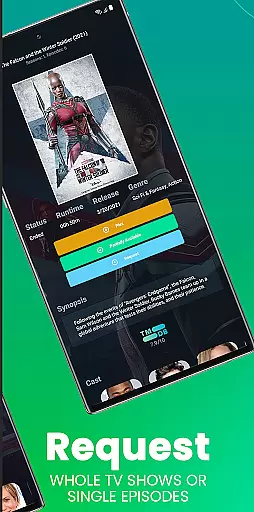
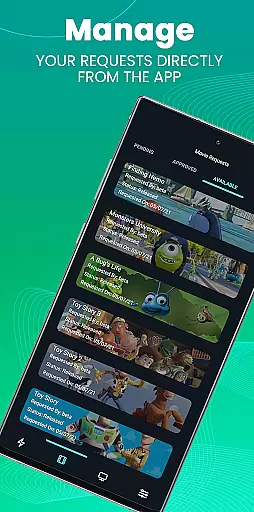
Ombi is a self-hosted entertainment management app that allows users to request content for Plex, Emby, or Jellyfin libraries. Designed for seamless integration, it connects with various DVR tools to automate the process of adding TV shows and movies. This app is ideal for managing shared media libraries in households or communities.
With its user-friendly interface, Ombi lets individuals submit requests directly through their devices. The app supports QR code login for enhanced security and convenience. As a versatile tool, it evolves over time, promising more features and improvements with each update.
Ombi stands out with its ability to integrate multiple media servers like Plex, Emby, and Jellyfin. Users can easily request new content, which is then automatically processed by connected DVR tools. This creates an end-to-end solution for managing entertainment libraries.
The app offers a secure QR code-based login system, ensuring only authorized users can access the platform. Its self-hosted nature provides complete control over data and privacy. As Ombi continues to evolve, users can expect regular updates with additional functionality and improved user experience.
Ombi offers a diverse range of content options by integrating with Plex, Emby, and Jellyfin, allowing users to request TV shows and movies directly through the app. This self-hosted web application bridges the gap between users and content providers, ensuring that your media library stays up-to-date with the latest releases.
The app's seamless connection with multiple DVR tools creates an end-to-end experience for users, making it easy to request and access desired content. With regular updates and improvements, Ombi ensures that its platform evolves over time, providing users with fresh features and an ever-improving interface.
By enabling shared users to independently request media, Ombi enhances user engagement and satisfaction. The ability to customize and expand the content library according to user preferences ensures that the platform remains dynamic and responsive to user needs.
Ombi is designed to keep users engaged by offering them the ability to request their favorite TV shows and movies effortlessly. By linking to various DVR tools, the app provides a streamlined process for content acquisition, encouraging users to remain active on the platform.
The requirement of having an existing Ombi account on a server running version v4.0.13XX or later ensures that users are part of a well-maintained ecosystem. This contributes to better user retention as they benefit from continuous updates and enhancements to the service.
Additionally, Ombi's mobile app feature, which involves scanning a QR code from the user's profile, adds a layer of personalization and security. This personalized approach not only boosts user engagement but also fosters long-term retention by creating a sense of ownership and involvement in the content management process.
User-friendly interface
Seamless media integration
Secure QR code login
Self-hosted privacy control
Regular feature updates
Requires existing Ombi account
Server version dependency
Limited initial functionality
No direct content streaming
Setup complexity for beginners

Ultimate VR movie player for android mobile videos
 4.2
4.2
Heroclix search units with multi filter , team builder, collection manager.
4.40
Stream over 80 hours of exclusive mashups and remixes by DJ Rehab.
4.0
Come and watch short dramas, reels with diverse genres!
4.40
NFL, NBA, NHL, MLB, local sports coverage, shows, movies & news!
3.20
Unleash Your AI Imagination
4.60
Binaural Brainwave Doses for Every Imaginable Mood
3.60
Create your Songs. Cover Maker with any Voice, Song Generator
3.30
Bold original series & hit movies that don't hold back.
4.40
Exclusive creator communities
4.70
Watch short films, dramas, reels, series and movies anytime on Micro Drama.
4.60
Direct access to the most complete Guitar Tab Archive in Spanish: LaCuerda.net
4.60
Premium version to enjoy your favorite anime
4.60
Triple A is a highly complex, kinetic, and interactive visualizer.
4.50
Fetch money rewards all just for playing games. Cash out for gift cards in app.
4.50
The Xbox app keeps you connected to your gaming community.
4.50
Himnario LLDM - Fast and Easy to read , updated Hymnal 2019 Edition Official
4.20
Browse popular images and videos from Reddit on Android TV!
3.90
Neon Christmas Tree Animated: Festive Wear OS watch face with fitness info
4.4


User Reviews