
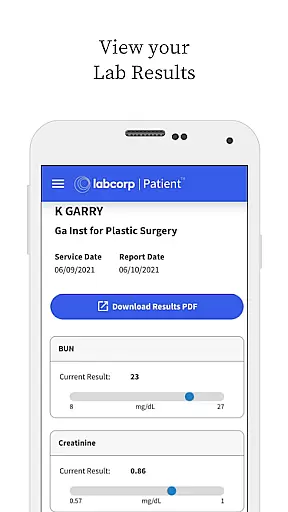
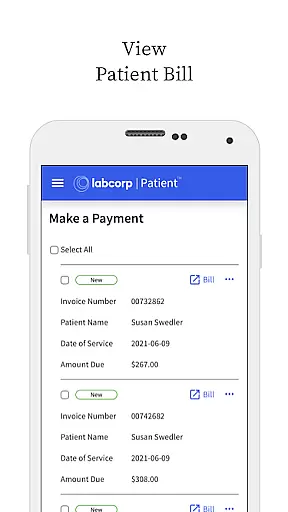
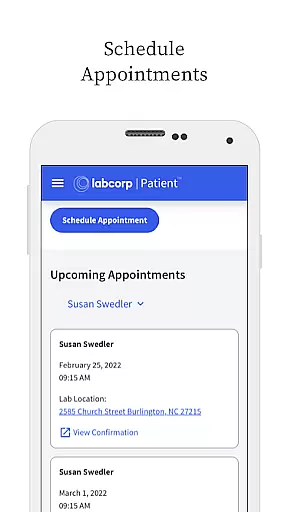
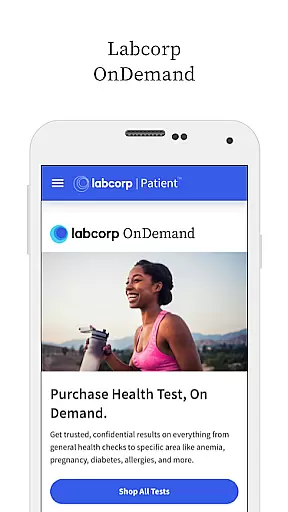
Labcorp is a comprehensive medical application designed to help patients manage their healthcare needs efficiently. The app provides essential features such as finding labs, scheduling appointments, and receiving notifications for lab results and bills. With Labcorp, users can conveniently check in at Patient Service Centers using QR codes or directly from their mobile devices.
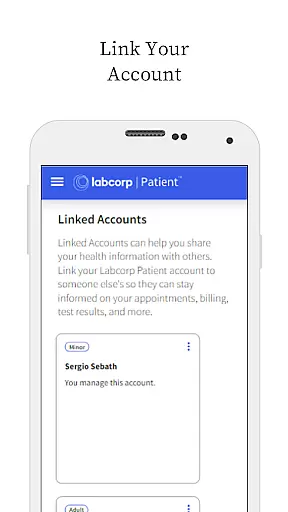
In addition to appointment management, the app allows users to view, download, and print official lab test result reports. It also supports managing historical data, sharing accounts with others, and adding minors to the account for managing their lab testing information. Available on both Android and iOS platforms, Labcorp ensures secure access through Face ID or Fingerprint login, making it an invaluable tool for anyone looking to take control of their health records.
Labcorp offers a wide array of features tailored to enhance patient experience and streamline healthcare management. One of its standout capabilities is the ability to find nearby labs and schedule appointments seamlessly. This feature saves time and reduces the hassle of traditional booking methods. Additionally, the app's check-in functionality via QR codes at Patient Service Centers ensures a smooth and contactless process.
Another significant feature is the notification system that alerts users when their lab test results are ready or when a bill is available. This keeps users informed and allows them to act promptly. The app also enables viewing, downloading, printing, and even paying bills directly. Moreover, advanced security measures like Face ID and Fingerprint login provide peace of mind regarding personal data protection. These robust features collectively make Labcorp a reliable choice for managing healthcare needs digitally.
In the realm of digital health management, the credibility of medical content is paramount. The Labcorp Patient mobile app excels in this area by providing users with access to official lab test result reports that are not only viewable but also downloadable and printable. This ensures that patients receive their health information in a format that maintains its integrity and authenticity.
Furthermore, the app goes beyond just delivering test results. It offers notifications when bills are available and provides the functionality to view, download, print, and even pay these bills directly through the app. By integrating financial management features with health data, Labcorp reinforces the reliability of its platform as a comprehensive tool for managing one's healthcare needs.
The inclusion of features such as scheduling appointments, checking in at Patient Service Centers via QR code scanning, and managing profile preferences adds layers of convenience and control for the user. These functionalities have been designed with the input of healthcare professionals, ensuring that they meet the standards required in a medical setting.
While the Labcorp Patient mobile app does not offer teleconsultation services in the traditional sense, it enhances the quality of remote interactions between patients and healthcare providers through various means. For instance, the ability to share your account with someone else or add minors to your account allows for a more collaborative approach to managing health information, which can be crucial during virtual consultations.
Additionally, the app supports modern authentication methods like Face ID and Fingerprint login, which streamline the process of accessing sensitive health information. This ease of access can significantly improve the efficiency of telehealth visits, allowing both patients and doctors to focus on the consultation rather than the logistics of information retrieval.
Lastly, the educational aspect of the app cannot be overlooked. By offering resources on how users can participate in clinical research offered by Labcorp, the app extends its utility beyond mere transactional interactions. This educational component enriches the teleconsultation experience by empowering patients with knowledge about potential opportunities to contribute to medical advancements.
User-friendly interface
Comprehensive lab services
Secure authentication methods
Convenient appointment scheduling
Real-time notifications
Limited to Labcorp services
Occasional bugs reported
Requires internet connection
No offline mode available
Some features need registration

Behavioral Health Portal
 4.70
4.70
Easy telehealth appointments + urgent care
4.70
Amplify surrounding sounds, conversations, TV or lectures for louder hearing.
4.70
The Omada app enhances your program experience and helps you stay engaged.
4.50
The Better Pharmacy Experience
4.90
MHealth is the mobile version of MEDITECH’s Patient and Consumer Health Portal.
3.10
Use the phone microphone or headset mic as sound amplifier for louder hearing.
4.30
Search by insurance, see real-time openings & verified reviews, get care fast.
4.80
A rapid reference for healthcare professionals caring for pediatric patients.
4.30
myVCA is your tailor-made guide to raising a healthy and happy pet.
4.90
Be more confident prescribing homeopathy at home for your family.
4.80
Leafly is a weed app for finding dispensaries, cannabis strains, & more.
4.70
Coaches you through labour using hypnobirthing techniques & tracks contractions
4.70
Beat alcohol and drug addiction with a revolutionary treatment program in an app
4.50
Secure video appointments
4.50
Get your lab results on your smartphone with MyQuest.
4.40
Download OctaApp for easy access to your plasma donation info
4.40
Your pocket guide to following The Monash University Low FODMAP diet.
4.20
Crush your paramedic exam with NREMT-style tests, ECGs, and top-tier prep!
3.90


User Reviews