
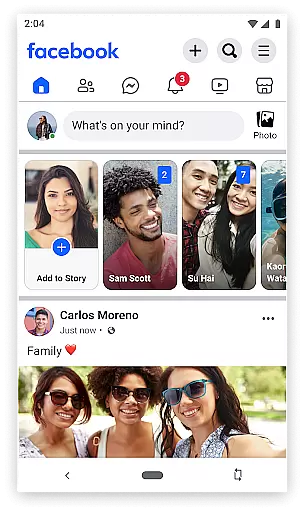

Facebook Lite is a streamlined version of the classic Facebook app, designed specifically for users with limited storage space or those operating in 2G network conditions. This lightweight social networking app allows you to stay connected with friends and family while consuming minimal data and occupying less than 10MB of space on your device.
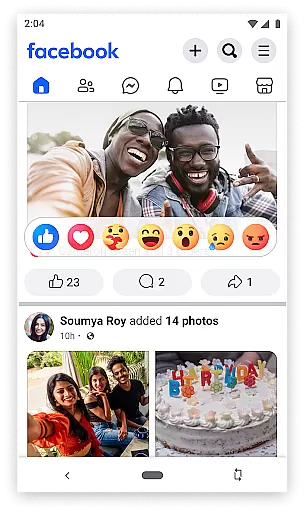
The app retains many essential Facebook features such as posting status updates, sharing photos, liking posts, and interacting with friends through comments and reactions. It also includes practical functionalities like event discovery, local business information, and access to Facebook Marketplace for buying and selling items locally. With its simplified interface and efficient performance, Facebook Lite delivers a seamless social media experience even on older devices or slower connections.
Whether you're catching up with friends, organizing photos, or following the latest news from your favorite brands, Facebook Lite provides a reliable platform for staying engaged with your social network without compromising on speed or functionality.
Facebook Lite offers an impressive range of features despite its reduced size. The app supports core social networking activities including posting status updates enhanced by Facebook's emoji library, sharing photos and memes, and engaging with others' content through likes, comments, and reactions. Notifications ensure you never miss important interactions when friends engage with your posts.
Beyond basic communication tools, Facebook Lite enables users to discover and RSVP to local events, follow public figures and brands for curated News Feeds, and explore nearby businesses complete with reviews, hours, and images. The inclusion of Facebook Marketplace facilitates local commerce directly within the app. These capabilities are delivered through an optimized architecture that prioritizes speed and efficiency.
Notably, Facebook Lite maintains essential privacy controls and photo management options. Users can organize their photos into albums, adjust privacy settings for individual images, and create restricted-access albums. The app's ability to function smoothly under low-bandwidth conditions while preserving these comprehensive features makes it an excellent choice for users seeking a more accessible social media experience.
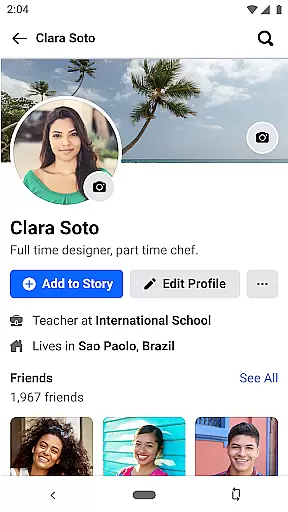
User profile customization is a fundamental aspect of any social networking app, allowing individuals to express their identity and preferences. Facebook Lite offers a streamlined yet comprehensive set of tools for users to personalize their profiles effectively.
The app enables users to update profile pictures, cover photos, and personal information such as work history, education, and interests. This ensures that each user's profile reflects their unique personality and current life status. Additionally, the ability to manage privacy settings gives users control over who can view their information.
Authenticity verification on Facebook Lite is equally important, ensuring the platform remains a trusted space for genuine interactions. The app employs various methods to verify user identities, including cross-referencing with phone numbers and email addresses. This helps prevent fake accounts and enhances overall community trust.
By combining robust customization options with stringent verification processes, Facebook Lite empowers users to create authentic and personalized profiles. This not only enriches the user experience but also fosters a safer and more reliable social environment.
Connection discovery is a vital feature in social apps, enabling users to find and connect with friends, family, and like-minded individuals. Facebook Lite excels in this area by providing efficient and intuitive tools for expanding one's social network.
The app utilizes sophisticated algorithms to suggest potential connections based on mutual friends, shared interests, and location data. Users can easily search for specific individuals or browse through recommended friend lists to discover new contacts. This functionality is particularly beneficial for those looking to reconnect with old acquaintances or meet new people within their community.
Moreover, Facebook Lite supports group and event-based connection discovery. Users can join groups related to their hobbies or professional interests, thereby meeting others with similar passions. Similarly, the app's event feature allows users to RSVP to local gatherings and interact with attendees, further broadening their social circles.
Overall, Facebook Lite's connection discovery mechanisms enhance user engagement and satisfaction. By facilitating meaningful interactions and expanding social networks, the app continues to be a valuable tool for staying connected in today's digital age.
Lightweight design
Low data usage
Fast performance
Wide feature set
2G network support
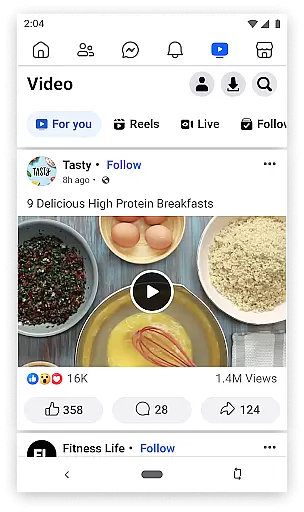
Limited video support
Fewer customization options
Reduced image quality
No Stories feature
Basic interface design

The hottest live chat app so far. Video chat and meet great people...
 4.60
4.60
Online group games like Mafia, Word War, Scattergories, Ludo, Uno, and many more
4.30
Dating & make friend to chat, meet, flirt, and make real connections!
4.60
The world's leading social networking app for gay, bi, trans, and queer people.
4.10
Chat and make new friends around the world!
3.90
Unlimited calls & texts | WiFi voice line plus group txt | Call & text now
4.50
Message and video call your family and friends!
2.60
Resonate & Date with New Match
3.70
Join your friends and discover videos you love, only on TikTok
4.10
Watch super live shows 24/7, chat & meet friends in Plamfy social networking app
4.70
Video call and chat, live stream and making friends around the world!
4.60
Get your NGL Link
4.60
Reddit is where you’ll find your people and feel at home in every conversation.
4.60
Calling and texting app. 2nd virtual line plus new phone number. Txt & talk now.
4.40
Second phone number for phone calls & texts. Text & SMS me now with a 2nd number
4.20
The official Skool app. Stay connected to your communities on the go.
4.20
Meet online & chat with people! Talk, have fun, make connections in real time!
4.00
Dive into diverse fandoms. Connect, create, reblog.
3.90
Video call, live video chat & talk to strangers. Meet people on Omega!
3.60


User Reviews