
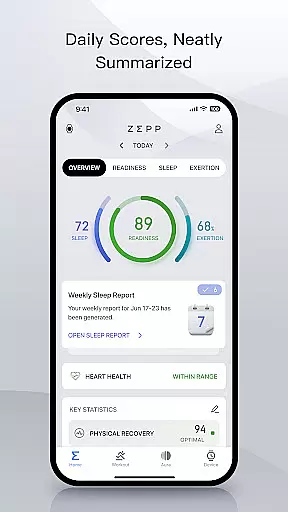
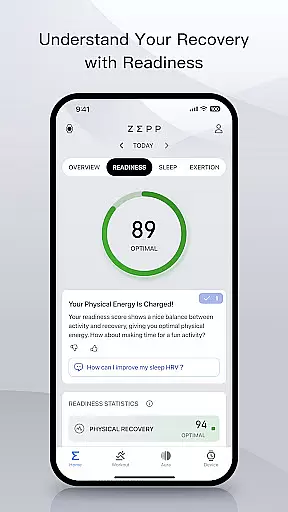
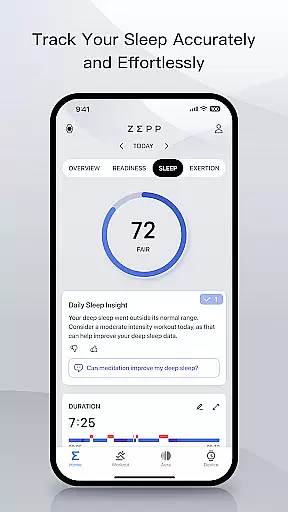
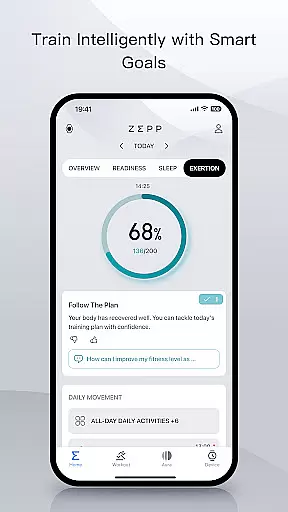
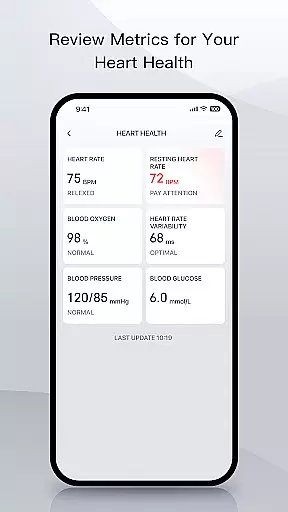
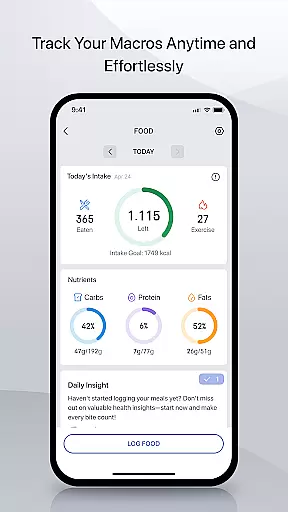
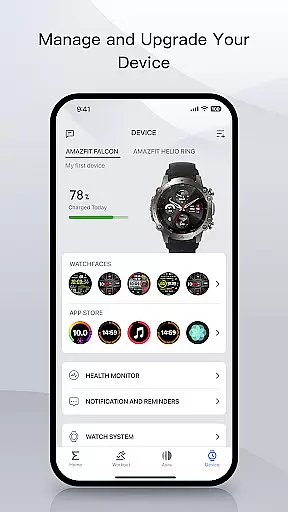
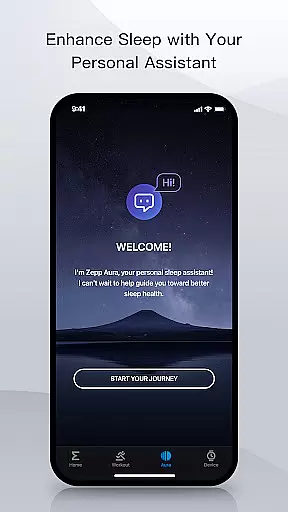
Zepp is a comprehensive sports and performance tracking app designed for athletes and fitness enthusiasts. The app serves as a central hub to monitor training, health metrics, and recovery data while offering AI-powered coaching for optimized performance. With features like macro tracking, sleep monitoring, heart health analytics, and watch customization options, Zepp provides users with detailed insights into their wellness journey. Its integration with Amazfit devices ensures accurate data collection, making it an essential tool for those striving to balance intense training regimens with proper recovery.
In addition to its robust tracking capabilities, Zepp emphasizes user privacy and data security. All health information is encrypted and stored securely through Amazon Web Services (AWS), ensuring GDPR compliance and protection against unauthorized access. Whether you're a professional athlete or someone focused on personal fitness goals, Zepp offers the tools needed to track progress effectively while safeguarding sensitive information. The app's free core experience makes it accessible to everyone, with optional premium features available for more personalized guidance.
Zepp stands out with its diverse range of advanced features tailored for both amateur and professional athletes. One of its key highlights is the AI-driven coaching system that provides actionable insights based on your tracked activities, nutrition, and recovery patterns. This feature helps users fine-tune their routines by delivering easy-to-understand scores and recommendations. Additionally, the app includes precise sleep monitoring technology, which tracks various sleep stages and recovery quality, enabling users to optimize rest periods crucial for athletic performance.
Another notable aspect of Zepp is its ability to sync seamlessly with Amazfit smartwatches, bands, and rings. Through the Zepp Store, users can customize their wearable devices with hundreds of downloadable apps and watch faces. Furthermore, the app supports manual entry of blood pressure and glucose levels from external devices, creating a holistic view of heart health. These innovative functionalities make Zepp a versatile companion for managing overall fitness and well-being.
Zepp app excels in delivering gameplay realism and physics accuracy through its advanced tracking capabilities. The app captures detailed health metrics such as heart rate, sleep patterns, stress levels, and blood oxygen saturation with precision sensors.
The sports and performance data includes daily activity tracking like steps and calories burned, along with advanced training insights such as pace, distance, speed, strength logs, and recovery analysis. This ensures that users receive accurate feedback on their physical activities, akin to real-world physics in gaming environments.
By providing comprehensive heart health monitoring, including heart rate variability (HRV) and resting heart rate (RHR), Zepp enhances the authenticity of its 'gameplay.' Users can manually input additional health parameters from external devices for a complete overview of their physiological status.
This level of detail and accuracy in tracking translates into an immersive experience where every movement and action is faithfully represented, offering users a realistic simulation of their athletic performance and overall well-being.
The control scheme intuitiveness of the Zepp app is evident in its user-friendly interface and seamless integration with Amazfit devices. With easy navigation and clear visual cues, users can effortlessly track their training, health, and recovery data.
One standout feature is the ability to log nutrition by simply snapping a photo of a meal, which instantly provides calories, weight, and macronutrients. This intuitive process eliminates the need for manual entry, streamlining the user experience significantly.
Additionally, the Zepp Store offers hundreds of downloadable mini-apps and watch faces, allowing users to customize their smartwatch experience according to personal preferences. These customizations enhance the intuitiveness of interactions between the user and their device.
Overall, the Zepp app's design prioritizes simplicity and ease of use, ensuring that even those new to fitness tracking can quickly adapt and make the most out of their Amazfit products without a steep learning curve.
User-friendly interface
Advanced AI coaching
Comprehensive health tracking
Secure data encryption
Free core features
Premium subscription required
Limited device compatibility
Occasional syncing issues
High battery usage
Region-specific limitations

NBA-licensed Streetball Game
 4.70
4.70
Very fun billiards game.
4.60
Join over 10,000,000 people in the only official PBA bowling game!
4.40
Build a football club from scratch and see if you can conquer the leagues!
4.70
Trampoline backflips, frontflips & trick stunts! Ultimate adrenaline rush!
4.60
Old-School Football
4.40
The classic Backyard Football 1999 is now enhanced to run on modern systems!
4.40
Play online multiplayer or PvP Pool games and compete with your friends!
4.80
Space City Home Network subscribers can now stream their favorite local teams.
3.60
Soccer mini games! Play career mode: Score & be the next soccer superstar!
4.70
Basketball Team Management Sim Coach a custom team and dunk your way to glory!
4.70
Coach a franchise of NFL PA licensed pro football players to gridiron glory
4.60
Vertical billiards game with single player
4.60
Trick cliff dive backflips, stunts & doubles! Unparalleled real physics!
4.50
Build a soccer club from scratch and see if you can conquer the World!
4.50
Ice Fishing Derby - It's the fun of ice fishing without the frostbite
4.40
Feel the thrill of American football: guide a team to triumph through touchdowns
4.40
Challenging 1vs1 online matches! Strike, score, and be a soccer champion!
4.40
Be a wrestling Superstar
4.40


User Reviews