
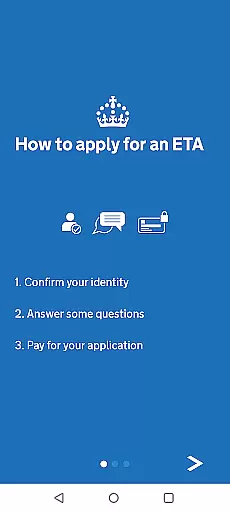
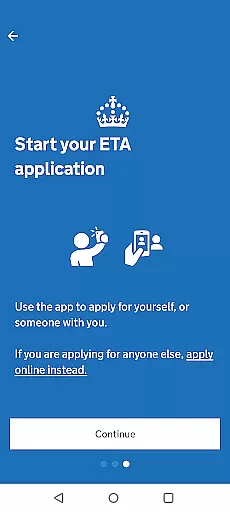
The UK ETA app provides a streamlined digital solution for travelers needing an Electronic Travel Authorisation to enter the United Kingdom. This innovative application simplifies the process by allowing users to complete their ETA application directly from their mobile device.
Key features include passport scanning, facial recognition, and secure payment processing. The entire application process can be completed in approximately 10 minutes, making it an efficient option for last-minute travelers who meet the necessary requirements.
This app is particularly beneficial for tourists and business travelers who need quick approval before their trip. By linking the approved ETA directly to the applicant's passport, it ensures a seamless travel experience while maintaining top-level security standards.
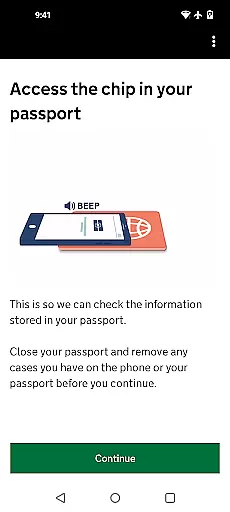
The UK ETA app incorporates several advanced features that enhance the user experience while maintaining strict security protocols. One notable feature is the integrated NFC technology that enables direct scanning of passport chips, ensuring accurate data capture.
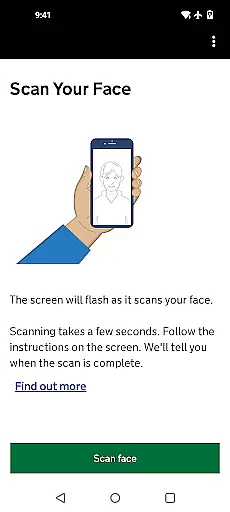
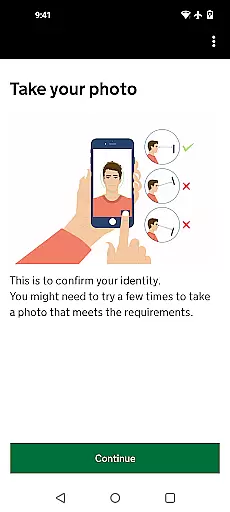
Another significant capability is the facial recognition system that verifies applicant identity through biometric authentication. This feature works in tandem with the document scanning functionality to create a comprehensive digital profile for each applicant.
The app also includes robust security measures - all personal information is automatically deleted upon closing the application. This temporary data storage approach, combined with government-grade encryption, provides users with peace of mind when submitting sensitive information.
Booking authenticity is a crucial aspect of any travel application, ensuring that the process from application to confirmation is both legitimate and secure. The UK ETA app excels in this area by providing a streamlined and verified method for applying for an Electronic Travel Authorisation (ETA) to the UK.
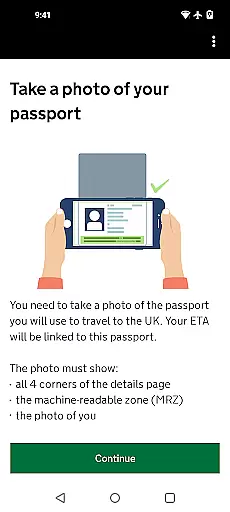
The app facilitates a straightforward application process where users can take a photo of their passport, scan the chip within it, and even scan their face for identity verification. This multi-step verification ensures that all bookings are authentic and tied directly to the applicant's official documentation, thus reducing fraud and enhancing security.
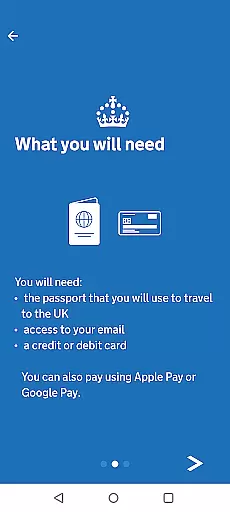
Users benefit from clear instructions and secure handling of their personal information. With features like Near-Field Communication (NFC) to scan your passport and options to pay via credit card, debit card, or Apple Pay, the app provides a reliable booking experience. Moreover, the assurance that no information is stored on the app post-closure adds another layer of trust.
Ultimately, the UK ETA app not only simplifies the process of obtaining travel authorization but also guarantees peace of mind through its robust booking authenticity protocols, making sure travelers can focus on planning their journey with confidence.
Price transparency in travel applications is essential for building trust with users, as it ensures they understand all costs involved before proceeding with a transaction. The UK ETA app offers complete clarity regarding the fees associated with applying for an Electronic Travel Authorisation (ETA), reinforcing user confidence throughout the application process.
From the outset, users are informed about the necessity of having a payment method readyu2014be it a credit card, debit card, or Apple Pay. This upfront communication eliminates hidden surprises and aligns with best practices for transparent pricing strategies in digital services.
Moreover, the app clearly outlines that there is no need to enter travel details during the application, which simplifies the financial transaction to just the ETA processing fee. By focusing solely on this charge, applicants can easily comprehend what they are paying for without worrying about additional or undisclosed costs.
In conclusion, the UK ETA app sets a standard for price transparency in the travel sector. Users can apply knowing exactly what they will be charged, fostering trust and satisfaction. This approach not only enhances the overall user experience but also encourages future engagement with the platform due to its honesty and straightforwardness.
Fast application process
Secure data handling
Convenient mobile access
Biometric verification
Direct passport linking
Android 12+ required
Limited device compatibility
No web alternative
Occasional delays
Technical requirements

INDOT Trafficwise is a traffic and traveler information mobile app.
 4.00
4.00
Iowa 511 is the Iowa Department of Transportation's traveler information app.
3.80
Plan where to stand and shave minutes off your trip!
4.80
Tide Table Chart provides quick and easy access to high and low tide forecasts.
3.20
A tool for outdoor activities.
4.30
Easily rent a car at over 9,500 locations with the Enterprise car rental app.
4.60
Book now to save with exclusive travel deals on hotels, flights, cars & packages
4.70
The United app puts valuable travel information in the palm of your hand.
4.70
Examine the planet
3.80
Maximize your cruise vacation with the Royal Caribbean app
4.70
Stay at Motel 6 for less - book fast, save more with MY6 app!
4.70
Book rooms at any of 4.2M properties worldwide. Find flight deals every day!
4.60
Tickets, hotels, wait times, maps, mobile ordering, Disney PhotoPass & more
4.50
Flight booking, hotel booking & more - all in one place with the Southwest App!
4.50
CLEAR provides a safer, easier way through airports, stadiums, and beyond.
4.20
Mix of explore game, travel mapping & tracking to memorize everywhere you go
3.60
Find the best prices, pay for the cheapest gas, and save on every fill up
3.30
A packing list app that helps you remember what to pack for a trip.
3.10
OFFLINE detailed information about the Florida National and State Parks
4.0


User Reviews