


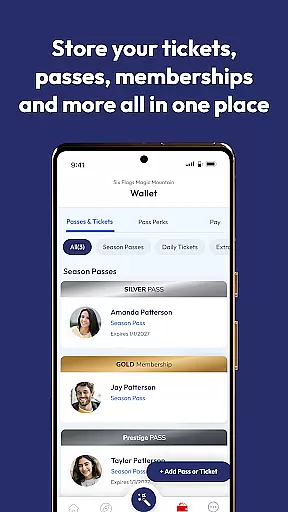


Six Flags is a comprehensive travel app that provides access to all 41 Six Flags amusement and water parks. The app allows users to manage tickets, passes, memberships, and enjoy exclusive benefits through a unified account system. With features like real-time ride wait times, interactive park maps, and personalized offers, it enhances the overall park experience.
Key functionalities include mobile food ordering, parking spot marking, photo pass management, and even augmented reality games at select locations. Whether you're a frequent visitor or planning your first trip, this app ensures convenience and maximizes enjoyment during your visit to any Six Flags park.
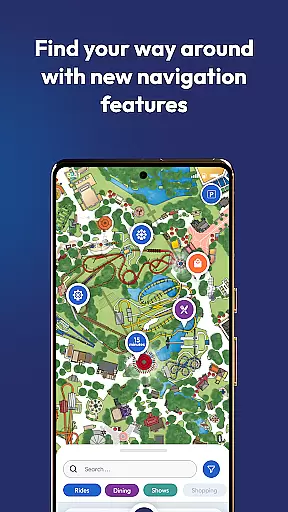
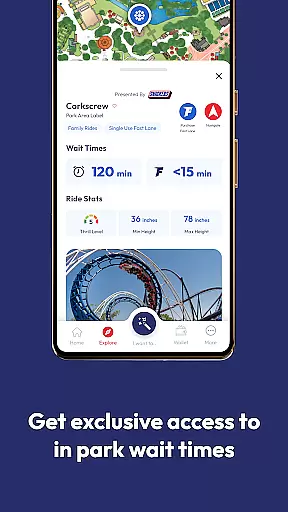
The Six Flags app stands out with its robust set of features designed for seamless park navigation and enhanced guest experiences. The interactive map not only shows locations but also provides step-by-step directions to rides, shows, and amenities. Users can view real-time wait times for attractions and receive customized offers based on their preferences and visit history.
Additional notable features include the ability to purchase tickets and special passes directly within the app, order food from park restaurants, and locate dining options that meet specific dietary needs. The app's augmented reality games add an extra layer of entertainment, while the parking spot marker solves the common issue of forgetting where you parked. These thoughtful additions demonstrate Six Flags' commitment to leveraging technology for better guest service.
When it comes to planning your visit to one of the 41 Six Flags parks, the authenticity of your bookings is paramount. The Six Flags mobile app ensures that every ticket, pass, or membership you purchase is legitimate and directly linked to your account.
The app's booking system is seamlessly integrated with the park's database, providing real-time confirmation for all transactions. This means when you buy tickets or memberships through the app, you receive immediate verification, ensuring a hassle-free entry experience on your visit day.
Users benefit from the peace of mind that comes with knowing their reservations are secure and recognized across all Six Flags locations. Whether you're purchasing single-day tickets or signing up for an annual membership, the app guarantees that your bookings are authentic and ready for use.
Understanding the cost associated with your amusement park visit is crucial for budgeting purposes. The Six Flags app excels in offering price transparency, allowing users to see the full cost of tickets, passes, and additional services without hidden fees.
All pricing information is clearly displayed within the app, enabling guests to make informed decisions about their purchases. From standard admission tickets to premium fast lane options, the app provides detailed breakdowns of costs, ensuring visitors know exactly what they're paying for.
This transparency extends to in-app purchases such as food ordering and photo packages, empowering users to manage their expenses effectively while enjoying their time at the park. With no surprises at checkout, guests can focus on creating unforgettable memories.
User-friendly interface
Comprehensive park coverage
Real-time updates
Personalized offers
Augmented reality games
Limited AR availability
Occasional bugs
Membership required
Heavy data usage
Not all parks have same features

INDOT Trafficwise is a traffic and traveler information mobile app.
 4.00
4.00
Meet Allyz®, your ultimate travel companion
4.70
It drives. You ride.
4.90
Real-time flight tracking with live maps and flight status updates.
3.70
Tickets, hotels, wait times, maps, mobile ordering, Disney PhotoPass & more
4.50
Maps, Wait Times, Park Hours
4.40
Booking your bus tickets has never been easier
4.70
Book now to save with exclusive travel deals on hotels, flights, cars & packages
4.70
Examine the planet
3.80
Guest how you guest when you book one of our 6,800+ hotels and earn rewards.
4.90
Travel and Book 8,000+ Hotels Worldwide with the Marriott Bonvoy™ app.
4.90
Get faster fuel rewards, exclusive offers, and helpful tools!
4.70
Now you can book homes, experiences, and services—all in our redesigned app.
4.40
A Camino de Santiago Guidebook from St. Jean Pied de Port to Santiago
3.60
Get Moving Made Easier® with the official U-Haul® Moving & Storage app.
3.40
Tide Table Chart provides quick and easy access to high and low tide forecasts.
3.20
Learn about one of the most famous Victorian cemeteries in the world
2.80
Locate and navigate to local holiday displays
4.1
The #1 Parent App in Brevard County
4.0


User Reviews