


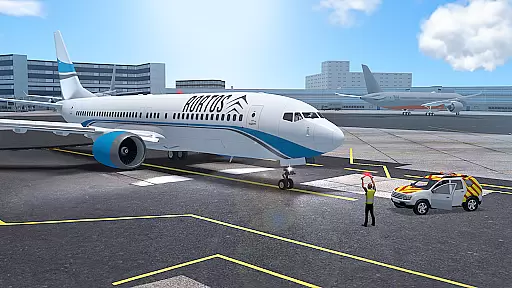

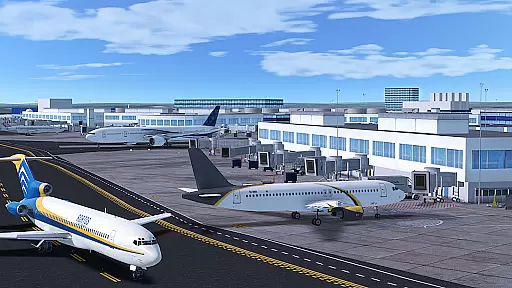



















RFS - Real Flight Simulator offers an unparalleled flight simulation experience on mobile, featuring advanced aviation systems and real-time global flights. Pilots can explore ultra-realistic airports with live weather patterns while flying iconic aircraft models.
With over 50 aircraft options and 1200+ HD airports, users can enjoy authentic flight procedures including pilot checklists, autopilot functions, and assisted landings. The app also supports multiplayer modes, allowing pilots worldwide to connect, compete, and collaborate in a shared sky.
The app stands out with its highly detailed satellite terrain maps and realistic height data, providing an immersive experience across varied landscapes. Unique features like ground services bring airports to life with passenger vehicles, refueling trucks, and emergency teams.
Advanced functionalities include customizable flight planning, live ATC (Air Traffic Control) mode, and community-shared liveries. These tools not only enhance realism but also allow users to design custom content such as aircraft designs and HD airports, fostering creativity within the aviation community.
In RFS - Real Flight Simulator, the economic system is intricately designed to reflect real-world aviation economics. The game simulates various aspects such as fuel costs, airport fees, and maintenance expenses that pilots must consider when planning their flights.
Players can experience dynamic feedback from their financial decisions in real time. For instance, choosing more fuel-efficient aircraft or optimizing flight routes can lead to significant savings. This creates a realistic environment where strategic financial planning directly impacts success.
The simulator also incorporates fluctuating market conditions, affecting ticket prices and cargo rates. These changes require players to adapt their strategies continuously, just like in actual airline operations. Such features help users understand the complexities of aviation economics while enjoying immersive gameplay.
This level of economic detail not only enhances realism but also provides valuable learning opportunities for aspiring pilots and aviation enthusiasts. By mastering these elements, players can develop better decision-making skills applicable to real-world scenarios.
Resource management in RFS - Real Flight Simulator involves careful allocation and optimization of various assets including aircraft, crew, and ground services. Players must strategically manage these resources to ensure smooth operations across multiple flights.
The game offers an impressive array of 50+ aircraft models, each with unique characteristics and capabilities. Choosing the right aircraft for specific routes is crucial for efficient resource utilization. Additionally, managing ground services like refueling trucks, passenger vehicles, and emergency teams adds another layer of complexity.
Advanced flight planning tools allow players to customize weather conditions, navigation routes, and even simulate system failures. This flexibility ensures balanced resource management by enabling users to prepare for unexpected challenges while maintaining operational efficiency.
By mastering resource management, players can improve their overall performance in the simulator. This skill set translates into better understanding and appreciation of real-world aviation logistics, making RFS not just a game but also an educational tool for aviation enthusiasts.
Realistic flight physics
Extensive aircraft variety
Vibrant multiplayer community
Customizable flight plans
Live ATC communication
Subscription required
Internet connection mandatory
Complex for beginners
High system requirements
Limited offline features

Pro Wrestling Team Management Sim, Face off with fearsome foes!
 4.50
4.50
A fun and challenging bridge builder puzzle game.
4.20
Drive trucks along challenging routes inspired by Bolivia
4.20
Manage your own supermarket. Order products and expand your store simulator game
3.90
Help your child, in a story-driven nurture game based on true events
4.80
It’s not a bug, it’s a feature
4.20
Explore Mimo Land – where you can shop, decorate your home, relax at the spa!
3.70
Merge food, cook & serve! Design unique theme restaurants. Unlock recipes.
4.70
One to rule them all
3.90
Make a Wizard's journey to find the Philosopher's Stone in an Incremental RPG!
4.80
Lead a Magical School and Cast Spells in an Incremental Game!
4.70
The ultimate off-roading game!
4.60
Dodge lasers and explore! Planetary Development Simulation
4.60
Control the traffic flow. Decide when the cars can pass and avoid crashes
4.60
Laugh, play, take care, learn and relax with the cutest virtual friend
4.50
Draw the image and color in the spaces to create the complete picture
4.50
Build your base, fight zombies, and survive the post-apocalyptic war!
4.20
Prank and cause chaos in the house. But don’t get caught!
4.10
Live a mom’s life—take care of family & home
4.00


User Reviews