


Family Dollar is a premier shopping app designed to help users maximize savings while shopping for everyday essentials and favorite brands. The app's core functionality revolves around its Smart Coupons feature, which allows shoppers to save up to $500 weekly through easy coupon clipping and in-store redemption.
Beyond coupons, the app offers personalized content and exclusive deals tailored to individual shopping habits. With an intuitive barcode scanner, users can check for available discounts directly in-store by scanning product barcodes. This creates a seamless shopping experience where savings are easily accessible at every step of the purchasing journey.
The app particularly benefits budget-conscious families who want to optimize their weekly shopping expenses. By combining digital convenience with substantial savings, Family Dollar transforms routine shopping trips into opportunities for significant financial optimization.
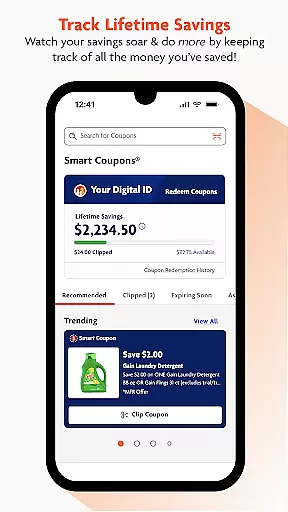
The Family Dollar app stands out with its comprehensive suite of shopping features. Its most prominent capability is the Smart Coupons system, which enables one-click coupon clipping from digital ads and catalogs. This feature streamlines the traditional couponing process while offering better tracking of accumulated savings.
A key innovation is the integrated barcode scanner that lets shoppers instantly verify available discounts on store items. The app also delivers personalized offers based on user preferences and shopping history, creating a customized shopping experience. Regular updates bring seasonal savings and special coupon events, keeping the shopping experience fresh and rewarding.
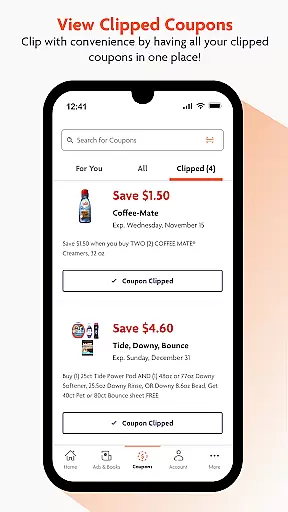
Additional practical features include detailed savings tracking, automatic coupon organization, and a unique in-app barcode for seamless checkout redemption. These elements work together to create a sophisticated shopping tool that combines convenience with substantial financial benefits for regular shoppers.
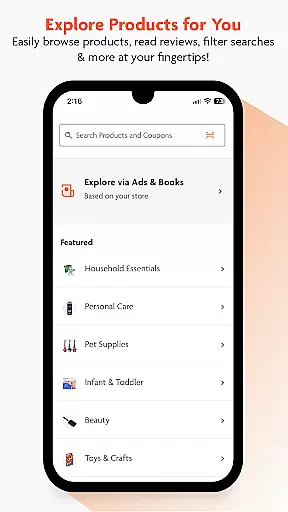
When it comes to shopping apps, product variety and categorization play a crucial role in enhancing user experience. The Family Dollar app excels in offering an extensive range of products neatly organized into various categories. This makes it simple for users to navigate through different sections and find exactly what they need without any hassle.
The app provides personalized content and offers, ensuring that users are presented with the most relevant products. Whether you're looking for everyday essentials or specific brand items, the Family Dollar app has you covered. Its intuitive interface allows for seamless browsing, letting you explore numerous deals and savings opportunities effortlessly.
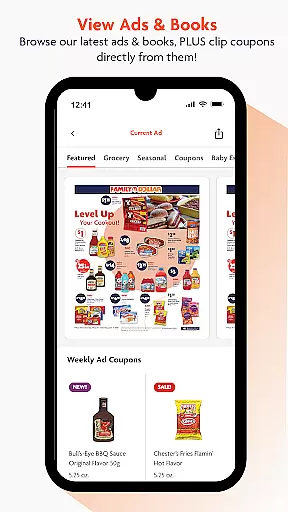
Moreover, the Family Dollar app goes beyond just listing products; it enhances your shopping journey by offering easy coupon clipping directly from ads and books. This feature not only saves time but also maximizes your savings potential. With new deals and hot offers available weekly, users can continuously discover ways to save on their favorite brands.
In summary, the Family Dollar app's robust product variety and smart categorization ensure a smooth and efficient shopping experience. By integrating personalized offers and easy access to coupons, it empowers users to make the most out of their shopping trips while enjoying significant savings.
Pricing transparency is a key factor that influences purchasing decisions, and the Family Dollar app takes this seriously. It ensures that users have clear visibility into the prices of products, allowing them to make informed choices. This transparency builds trust and encourages users to engage more with the app, knowing they are getting fair deals.
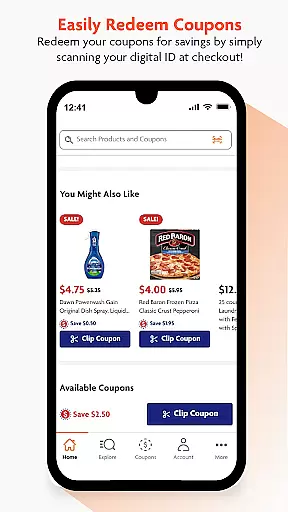
The app further enhances its pricing strategy by offering competitive prices and significant savings through Smart Coupons. Users can save up to $500 every week by simply clipping coupons and redeeming them in-store. These coupons are easily accessible and can be clipped directly from ads, making the process straightforward and user-friendly.
Additionally, the Family Dollar app keeps users updated with seasonal savings and special coupon events throughout the year. By regularly checking the app, users can take advantage of hot offers and personalized coupons tailored to their shopping habits. This approach not only boosts user engagement but also ensures continuous value addition.
In conclusion, the Family Dollar app's commitment to pricing transparency and competitiveness sets it apart in the shopping category. By providing clear price information and substantial savings opportunities, it enables users to shop smarter and save more effectively.
User-friendly interface
Significant weekly savings
Personalized offers
Easy coupon management
Barcode scanning functionality
Limited to Family Dollar stores
Requires regular updates
Occasional bugs reported
Internet connection needed
Learning curve for new users

Healthy living for less just got easier with our updated Sprouts App.
 4.50
4.50
TikTok Shop is an integrated e-commerce platform within the TikTok app, allowing users to discover and purchase products directly through short videos and live streams.
4.10
VEVOR Shopping Store for Home Improvement DIYers and Professionals.
4.70
Shop stores, delivery & pickup
4.80
Harbor Freight Coupons - Generators, Air Compressors, Tool Storage, and More.
4.70
The Costco Mobile App is the easiest way to save time and money on the go.
4.70
Shop home goods, vintage treasures, art prints & more with Etsy. Download today!
4.80
Fast delivery and epic savings await in your AliExpress app!
4.40
shop on Temu for amazing offers
4.60
Measure your PD and try on frames virtually | Gift yourself the perfect pair!
4.80
Create wishlists and share with family. Claim gifts for any occasion!
4.80
Shop, plan, order, and save
4.70
Shop the latest items & unique used goods. Sell pre-loved items and earn money.
4.70
Access free, exclusive savings on the go thanks to Capital One Shopping!
4.70
Affordable prescription eyeglasses, sunglasses, and more eyewear starting at 7!
4.60
Live Auctions, Savings, and Always Free Shipping! Trusted Since 2008.
4.60
NCPMobile is the easy and intuitive way to scan and transmit your purchases!
4.50
Earn and spend Shop Cash, boost balance & find top products from loved brands!
4.50
Join a community of millions of members buying and selling second-hand items.
3.90


User Reviews